
C programming remains one of the most important and widely used programming languages in software development. It forms the foundation of operating systems, embedded systems, firmware, device drivers, compilers, and high-performance applications.
Because of its low-level memory access, efficiency, and close interaction with hardware, C is still heavily used in industries such as embedded systems, automotive, networking, IoT, and system software development.
As a result, C interview questions are commonly asked in technical interviews for both freshers and experienced developers.
In most interviews, companies focus on core C programming concepts such as:
- Pointers and pointer arithmetic.
- Memory management.
- Storage classes.
- Macros and preprocessor directives.
- const and volatile keywords.
- Undefined behavior.
- Bitwise operators.
- Arrays and strings.
- Structures and unions.
- Embedded C concepts
In this article, I have compiled 200+ important C interview questions with detailed answers to help you prepare for technical interviews and strengthen your understanding of the C language.
These interview questions for C are especially useful for:
- Embedded firmware engineers.
- Software developers.
- Microcontroller programmers.
- Linux/C developers.
- College placement preparation.
- Product-based company interviews
Whether you are a beginner learning C programming or an experienced developer preparing for technical interviews, these top C interview questions will help you revise important concepts and improve your problem-solving skills.
Let’s start with the most important C interview questions.
📘 Table of Contents
Basic C Interview Questions:
Q: What is the difference between declaration and definition of a variable/function?
Ans: Below table describe the difference between declaration and definition.
| Declaration | Definition |
|---|---|
| Introduces the name and type of an identifier to the compiler. | Fully defines the identifier. |
| May or may not allocate storage. | Usually allocates storage for objects. |
| Function declaration does not contain the function body. | Function definition contains the function body. |
| Can appear multiple times if all declarations are compatible. | Usually appears once for an identifier with external linkage. |
| Helps the compiler know that an identifier exists. | Creates the actual object or function implementation. |
extern int x; |
int x; |
int fun(int); |
int fun(int a) { return a; } |
Q: Why is C called a middle-level language?
Ans: Yes, C is called a middle-level language because it bridges the gap between low-level and high-level languages:
Low-level features:
- Direct memory access via pointers.
- Bitwise operations for hardware-level manipulation.
- Manual memory management (malloc, free).
- Close mapping to machine/assembly instructions
High-level features:
- Functions for modularity and reuse.
- Abstraction through structured programming.
- Readable syntax compared to assembly.
- Support for data types, loops, conditionals
Q: What is the difference between const and #define?
OR
Q: What is the difference between const and macro?
Ans:
const and #define are fundamentally different. A const variable is handled by the compiler and has a specific data type, scope, and storage duration. The compiler enforces that its value cannot be modified through that identifier.
In contrast, #define is a preprocessor directive that performs simple text substitution before compilation. It has no type information, no scope rules, and does not occupy storage by itself.
Because they operate at different stages of the build process, they behave differently. const provides type safety, better debugging support, and scope control, whereas #define simply replaces tokens in the source code.
The following table highlights the key differences between const and #define:
| Feature | const | #define (Macro) |
|---|---|---|
| Processing Stage | Handled by the compiler. | Handled by the preprocessor before compilation begins. |
| Type Information | Has a specific data type such as int, float, or char. |
Has no type. It is simply a text substitution. |
| Type Checking | Compiler performs full type checking. | No type checking is performed. |
| Memory Allocation | Typically occupies storage and may have a memory location. | Does not allocate memory because it is replaced before compilation. |
| Scope | Follows normal C/C++ scope rules (block, function, file, or namespace scope). | Remains active from its definition until #undef or the end of the translation unit. |
| Pointer / Address | Its address can usually be obtained using the & operator. |
Cannot have an address because it is not an actual object. |
| Debugging | Visible in debuggers with its name, type, and value. | Usually disappears after preprocessing and is not directly visible during debugging. |
| Safety | Safer because the compiler enforces type rules and scope restrictions. | More error-prone because textual substitution can lead to unexpected behavior. |
| Can Be a Function Parameter? | Yes. Commonly used as a parameter qualifier (e.g., const char *). |
No. A macro is not an object or type and cannot be passed as a parameter. |
Q: What are scope and lifetime of a variable?
Ans:
Scope and lifetime are two distinct properties of a variable in C. Scope defines where a variable is visible in the program, while lifetime defines how long the variable exists during program execution.
Example,
#include <stdio.h>

void func(void)
{
   int x = 10; // Local variable
   printf("%d\n", x);
}

int main(void)
{
   func();
   // printf("%d\n", x); // ERROR: 'x' is out of scope here
   return 0;
}
In the above example,
- Scope of x: Limited to the block ({ … }) of func() where it is declared.
- Lifetime of x: Starts when execution enters func() and is destroyed the moment func() returns.
Q: What is the scope and lifetime of x?
void func()
{
   static int x = 0;
   x++;
   printf("%d\n", x);
}
Ans:
The variable “x” has block scope because it is declared inside the function, so it is only accessible within func(). However, because it is declared as static, it has static storage duration, meaning it is created once and exists for the entire program execution, retaining its value across multiple calls to the function.
Q: What is the difference between local and global variables?
Ans:
A local variable is declared inside a function or block and can be accessed only within that function or block. A global variable is declared outside all functions and can be accessed by all functions in the file (and by other files using extern).
| Factor | Local Variable | Global Variable |
|---|---|---|
| Declaration | Declared inside a function or block. | Declared outside all functions. |
| Scope | Accessible only within the declaring block/function. | Accessible throughout the file after its declaration. |
| Lifetime | Exists while the block/function is executing. | Exists for the entire program execution. |
| Storage Duration | Automatic by default. | Static storage duration. |
| Default Initialization | Indeterminate value if not initialized. | Initialized to zero if not explicitly initialized. |
Example,
#include <stdio.h>

int globalVar = 100;  // Global variable

void display(void)
{
    int localVar = 10;  // Local variable

    printf("Global Variable = %d\n", globalVar);
    printf("Local Variable = %d\n", localVar);
}

int main()
{
    display();

    printf("Global Variable = %d\n", globalVar);

    // printf("%d\n", localVar); // Error: localVar is not visible here

    return 0;
}
Q: What are the basic data types in C and their sizes?
Ans:
A data type specifies the type of data a variable can store, the amount of memory required, and the range of values that can be represented. The exact size of a data type is implementation-dependent and can vary between compilers and architectures (e.g., 32-bit vs. 64-bit systems).
Categories of Data Types in C:
1. Fundamental (Basic) Data Types:
| Data Type | Typical Size |
|---|---|
| char | 1 byte |
| short int | Typically 2 bytes |
| int | Typically 4 bytes |
| long int | Typically 4 or 8 bytes (platform-dependent) |
| long long int | Typically 8 bytes |
| float | Typically 4 bytes |
| double | Typically 8 bytes |
| long double | Typically 8, 12, or 16 bytes (implementation-dependent) |
Note: void is also considered a fundamental type, though specifically an “incomplete” type meaning no data.
2. Derived Data Types:
- Arrays
- Pointers
- Functions
3. User-Defined Data Types:
- struct
- union
- enum
- typedef
Code Examples for Determining Size Using the sizeof Operator.
#include <stdio.h>

int main(void) {
    printf("char = %zu bytes\n", sizeof(char));
    printf("int = %zu bytes\n", sizeof(int));
    printf("float = %zu bytes\n", sizeof(float));
    printf("double = %zu bytes\n", sizeof(double));

    return 0;
}
The C standard does not mandate exact byte sizes for most types (like forcing int to be 4 bytes). Instead, it guarantees two strict rules:
Rule 1: Relative Sizes:
sizeof(char) <= sizeof(short) <= sizeof(int) <= sizeof(long) <= sizeof(long long)
Rule 2: The Size of Char
sizeof(char) == 1
Q: What is the sizeof operator?
Ans:
The sizeof operator is a compile-time operator that returns the size, in bytes, of an object or a type.
Its operand can be:
- An expression
- A variable
- The parenthesized name of a type
The result of sizeof has type size_t, which is an unsigned integer type defined in <stddef.h> (and several other standard headers).
Syntax:
sizeof(expression)

sizeof(type)
Example:
int x;

printf("%zu\n", sizeof(x));
printf("%zu\n", sizeof(int));
The value returned by sizeof depends on the implementation and target architecture. For example, the size of int may be 2, 4, or more bytes depending on the system.
The sizeof operator is commonly used to:
- Determine the amount of memory required for an object.
- Allocate memory dynamically.
- Calculate the number of elements in an array.
- Write portable programs without hard-coding data sizes.
Note: Except when its operand is a Variable Length Array (VLA), the operand of sizeof is not actually evaluated at runtime. The compiler determines the size at compile-time and simply replaces the sizeof call with the resulting number.
Because of this, any expressions inside sizeof will not execute consider the below example code.
#include <stdio.h>

int main()
{
    int i = 10;

    printf("%zu\n", sizeof(i++));  // Evaluates type size, does NOT execute i++
    printf("%d\n", i);             // Output is still 10, not 11

    return 0;
}
Q: What are the different types of operators in C?
Ans:
Operators in C are special symbols that perform operations on one or more operands (variables, constants, or expressions) and produce a result.
Classification by Number of Operands:
| Operator Type | Description | Examples |
|---|---|---|
| Unary Operator | Operates on a single operand and produces a result. | ++a, --a, sizeof(a), !a |
| Binary Operator | Operates on two operands and produces a result. | a + b, a && b, a = b |
| Ternary Operator | Operates on three operands and selects one of two expressions based on a condition. | (a > b) ? a : b |
Q: What is implicit type conversion and type promotion?
Ans:
1. Implicit Type Conversion:
Implicit type conversion (also called automatic type conversion or coercion) is the process where the C compiler automatically converts a value from one data type to another when required by an expression, assignment, or function call.
Example,
When operands of different data types are used in an expression, the compiler automatically converts them to a common type to perform the operation.
int i = 10;
float f = 2.5f;

// The compiler converts 'i' from int to float before addition.
float result = i + f;
- Under the hood: It is evaluated as (float)i + f.
- Result: 12.5
2. Type promotion:
Type promotion is a special kind of implicit conversion where smaller integer types are automatically converted to int (or unsigned int) before most arithmetic operations.
#include <stdio.h>

int main()
{
    char a = 100;
    char b = 27;

    // Although 'a' and 'b' are char, both are promoted to int before addition.
    int result = a + b;

    printf("%d\n", result); // Output: 127
    return 0;
}
- Under the hood: It is evaluated as (int)a + (int)b.
The following types are automatically promoted to int (or unsigned int if an int cannot hold all of the original type’s possible values):
| Original Type | Promotes To |
|---|---|
char |
int |
signed char |
int |
unsigned char |
int (or unsigned int if required) |
short |
int |
unsigned short |
int (or unsigned int if required) |
_Bool (C99) |
int |
enum (Enumeration) |
int (or a compatible integer type) |
Q: What is explicit type casting?
Ans:
Explicit type casting is the process of manually converting a value from one data type to another using the cast operator. It allows the programmer to control type conversion instead of relying on the compiler’s automatic (implicit) conversions.
The syntax of a type cast is:
(type_name) expression
Example,
int a = 10;
int b = 4;

float result = (float)a / b;
In the above example, “a” is explicitly converted to float before the division operation.
Common Uses of Explicit Type Casting:
- Converting between integer and floating-point types.
- Avoiding unwanted integer division.
- Interfacing with APIs that require specific data types.
- Improving code readability by making conversions explicit.
Q: What is the purpose of the typedef keyword?
Ans:
The typedef keyword is used to create a new name (an alias) for an existing data type. It does not create a new type; it simply provides an alternative name that can make code easier to read, write, and maintain.
Syntax:
typedef existing_type new_type_name;
Example:
typedef unsigned long ulong;

ulong count = 100;
Here, ulong becomes an alias for unsigned long.
Common Uses of typedef:
- Creating shorter names for complex data types.
- Improving code readability and maintainability.
- Simplifying structure, union, and enumeration declarations.
- Simplifying function pointer declarations.
- Providing platform-independent type names.
Q: What is an enumeration (enum)?
Ans:
An enumeration (enum) is a user-defined data type in C that consists of a set of named integer constants called enumerators. It is used to represent a fixed set of related values, making programs more readable and maintainable.
Syntax:
enum enum_name
{
    enumerator1,
    enumerator2,
    enumerator3
};
Example,
enum Day
{
    SUNDAY,
    MONDAY,
    TUESDAY,
    WEDNESDAY,
    THURSDAY,
    FRIDAY,
    SATURDAY
};
By default, the enumerators are assigned integer values starting from 0:
Advantages of Enumeration:
- Improves code readability.
- Replaces “magic numbers” with meaningful names.
- Makes code easier to maintain.
- Groups related constants together.
- Helps reduce programming errors.
Q: What is the difference between structure and union?
Ans:
Both structure (struct) and union (union) are user-defined data types in C that allow grouping different data types under a single name. However, they differ in how memory is allocated and used.
Key Differences Between Structure and Union:
| Factor | Structure (`struct`) | Union (`union`) |
|---|---|---|
| Memory Allocation | Separate memory is allocated for each member. | All members share the same memory location. |
| Size | Size is at least the sum of the sizes of all members (plus any padding). | Size is equal to the size of its largest member (plus any alignment requirements). |
| Member Access | All members can contain valid values simultaneously. | Only one member’s value can be reliably stored at a time. |
| Data Modification | Changing one member does not affect other members. | Writing to one member may overwrite the value of other members. |
| Memory Efficiency | Consumes more memory. | Consumes less memory. |
| Typical Use Case | When all members are needed at the same time. | When only one of several data representations is needed at a time. |
Example of Structure:
struct Employee
{
    int id;
    float salary;
    char grade;
};
All members (id, salary, and grade) have their own storage and can hold values simultaneously.
Example of Union:
union Data
{
    int i;
    float f;
    char c;
};
All members share the same memory location. Writing to f overwrites the value previously stored in i.
Q: What is the const keyword and where can it be applied?
Ans:
The const keyword is a type qualifier in C that specifies that an object cannot be modified through the identifier used to access it. It helps prevent accidental modification of data and improves code readability and safety.
According to the C Standard, “The const keyword is used to qualify an object as read-only through a given identifier. It can be applied to, Variables, Pointers, Function parameters, Arrays and Combinations of pointers and pointed-to data
By applying const to these elements, the compiler prevents accidental modification, making the code more robust and improving program reliability.
Common Uses of const:
| Application | Example | Meaning |
|---|---|---|
| Const Variable | const int x = 10; |
The value of x cannot be modified after initialization. |
| Pointer to Const Data | const int *ptr; |
The data pointed to by ptr cannot be modified through ptr. |
| Const Pointer | int * const ptr = &x; |
The pointer itself cannot point to another location. |
| Const Pointer to Const Data | const int * const ptr = &x; |
Neither the pointer nor the data can be modified through ptr. |
| Function Parameter | void print(const char *str); |
The function promises not to modify the string through str. |
| Array Parameter | void func(const int arr[], size_t n); |
The function will not modify the array elements through arr. |
Examples of const,
Example 1: //Const Variable
const int max_retry = 5;

/* Error: modification is not allowed */
max_retry = 10;


Example 2://Pointer to Const
int x = 10;
int y = 20;

const int *ptr = &x;

/* Error: cannot modify data through ptr */
// *ptr = 15;

ptr = &y;   /* Valid */


Example 3: //Const Pointer
int x = 10;
int y = 20;

int * const ptr = &x;

*ptr = 15;  /* Valid */

/* Error: pointer cannot be changed */
// ptr = &y;


Example 4://Const Pointer to Const Data
int x = 10;

const int * const ptr = &x;

/* Error */
// *ptr = 20;

/* Error */
// ptr = &y;
Q: When should we use const in a C Program?
Ans:
The const keyword is used to indicate that an object should not be modified through a particular identifier. It helps improve code safety, readability, and maintainability by allowing the compiler to detect unintended modifications.
The following are common situations where const should be used in a C program:
1. In Function Parameters (Call by Reference):
When passing a pointer to a function and you don’t want the function to modify the original value:
void PrintData(const char *pcMessage)
{
    // pcMessage cannot be modified here
    printf("%s", pcMessage);
}
The const qualifier prevents accidental modification of the passed data. It is a good practice to use const for all read-only pointer parameters.
2. Instead of #define for Constants:
const is safer than macros because it has type checking and scope. Also, compiler can catch type mismatches with const but not with #define.
// Prefer this:
const int MAX_SIZE = 100;

// Over this:
#define MAX_SIZE 100  // no type, no scope, no safety
3. With volatile for Hardware / Memory-Mapped Registers:
When accessing hardware registers that can change unexpectedly but should not be written to by the program:
const volatile uint32_t *DEVICE_STATUS = (uint32_t *)0x80102040;
Here,
- volatile → tells compiler the value may change unexpectedly (hardware).
- const → tells compiler the program must not modify it.
In the above example, together, const volatile indicates that the value can change externally, but the program is only allowed to read it.
4. To Protect an Initialized Variable from Modification:
When a variable is set once and should never change:
const int DAYS_IN_WEEK = 7;

// DAYS_IN_WEEK = 8;  Compiler error!
Here, const makes the programmer’s intent clear and allows the compiler to enforce the restriction, preventing accidental modification of the variable.
Q: What is the volatile keyword and when should it be used?
Ans:
The volatile keyword is a type qualifier in C that tells the compiler that the value of an object may change unexpectedly at any time, outside the control of the program. According to the C standard, an object that has a volatile-qualified type may be modified in ways unknown to the implementation.
Therefore, the compiler must always read the object’s value directly from memory and must not optimize away accesses to it. Without volatile, the compiler may assume that the value does not change unexpectedly and may cache it in a CPU register or remove repeated memory accesses entirely during optimization.
Common Use Cases of volatile:
- Memory-mapped peripheral registers (where hardware changes the value).
- Global variables modified by an Interrupt Service Routine (ISR) and read by the main program loop.
- Variables shared between multiple asynchronous tasks or signal handlers.
Note:
volatiledoes not guarantee atomic operations.volatiledoes not provide thread synchronization.volatiledoes not prevent race conditions.- It only tells the compiler that every read and write must be performed as written in the source code.
Q: What is the Proper place to use the volatile keyword?
Ans:
The volatile keyword tells the compiler that a variable’s value may change unexpectedly at any time, outside the normal program flow. Therefore, the compiler must generate code for every read from and write to a volatile object and must not optimize away, combine, or eliminate those accesses.
1. Memory-Mapped Hardware Registers:
Hardware registers can change independently of program execution. Therefore, every access must be performed exactly as written.
#define COM_STATUS_BIT  0x00000006U

volatile const uint32_t * const pStatusReg =
    (volatile const uint32_t *)0x00020000U;

uint32_t GetRecvData(void)
{
    while (((*pStatusReg) & COM_STATUS_BIT) == 0U)
    {
        /* Wait until the status bit is set */
    }

    return RecvData;
}
In this example:
- volatile tells the compiler that the register value may change at any time.
- const indicates that the program must not modify the register through this pointer.
2. Variables Shared Between ISR and Normal Code:
When a variable is modified by an ISR and read by normal code (or vice versa), it must be volatile otherwise the compiler may cache it in a register and never see the ISR update.
volatile int giFlag = 0;

void ISR(void)
{
    giFlag = 1;         // modified inside interrupt
}

int main(void)
{
    while (!giFlag)     // must re-read from memory every iteration
    {
        /* Do some work */
    }

    return 0;
}
In the above example, without volatile, the compiler may optimize while (!giFlag) into an infinite loop since it assumes giFlag never changes inside main().
3. Variables Modified Directly by Hardware (DMA):
Some variables may be updated directly by hardware mechanisms such as DMA controllers or peripheral hardware. Such objects should be declared volatile.
volatile uint8_t RxBuffer[128]; // DMA writes directly to this buffer
Without volatile, the compiler may use a cached copy and never see the DMA-written data.
4. Delay Loops / Busy-Wait Loops:
When writing a software delay loop, the compiler may completely remove it during optimization:
// Without volatile — compiler removes this as "useless" code!
void SoftwareDelay(void)
{
    uint32_t i;
    for (i = 0; i < 10000U; i++)
    {
        /* Do nothing — just waste time */
    }
}
// With volatile — compiler cannot remove or optimize the loop
void SoftwareDelay(void)
{
    volatile uint32_t i;
    for (i = 0; i < 10000U; i++)
    {
        /* Loop is preserved exactly as written */
    }
}
5. Variables Shared Between Threads:
In multi-threaded environments, a variable modified by one thread and read by another should be volatile to prevent caching:
volatile int thread_done = 0;

// Thread 1
void WorkerThread(void)
{
    /* Do work */
    thread_done = 1;     // signal completion
}

// Thread 2
void MonitorThread(void)
{
    while (!thread_done) // must re-read from memory
    {
        /* Wait */
    }
}
Q: What are storage classes in C?
Ans:
Storage classes in C specify the storage duration (lifetime), scope (visibility), and linkage of variables and functions. They help the compiler determine how long an identifier exists in memory and from where it can be accessed.
The four storage classes available in C are:
- auto: Default storage class for local variables.
- static: Preserves a variable’s value throughout the program execution and can restrict visibility to a single source file.
- extern: Declares a variable or function that is defined in another source file or elsewhere in the program.
- register: Suggests that a variable be stored in a CPU register for faster access (the compiler may ignore this request).
Q: What is the difference between static inside a function vs at file scope?
Ans:
1. static Inside a Function:
When static is used inside a function, the variable has local scope but static storage duration. It is initialized once and retains its value between function calls.
Example,
In the following code, the variable count is declared as static inside the function. This changes its storage duration from automatic (typically allocated on the stack and recreated on each function call) to static (allocated once in the data or BSS segment and existing for the entire program lifetime).
As a result, the following properties of `count` change:
Storage Duration:
- The variable is created only once and remains in memory for the entire execution of the program.
- Unlike an automatic local variable, it is not destroyed when the function returns.
Value Retention:
- The variable retains its value between successive function calls.
- It is initialized only once. In this example, count is initialized to 0 before program execution begins, and each call to counter() continues using the previously stored value.
Scope (Unchanged):
- The variable still has block scope and remains accessible only within the counter() function.
- No other function can access or modify count directly by name.
Therefore, a static local variable combines the scope of a local variable with the lifetime of a global variable.
#include <stdio.h>

void counter()
{
    static int count = 0; // Initialized once at startup
    count++;
    printf("%d\n", count);
}

int main()
{
    counter(); // 1
    counter(); // 2
    counter(); // 3
}
2. static at File Scope:
When static is used at file scope, the variable or function has internal linkage, meaning it can only be accessed within the current source file, while still existing for the entire program execution.
Example,
file1.c
static int g_counter = 0;

void increment(void)
{
    g_counter++;
}
file2.c
// Error: g_counter has internal linkage

extern int g_counter;
In the above code, the variable g_counter is declared as static at file scope (outside of any function). This does not change its storage duration because file-scope variables already have static storage duration. Instead, it changes its linkage from external to internal.
As a result, the following properties of g_counter are affected:
Linkage:
- The variable has internal linkage, meaning it can only be accessed within the current translation unit (source file).
- Other source files cannot access `g_counter`, even if they declare it using the `extern` keyword.
Storage Duration:
- The variable has static storage duration and exists for the entire lifetime of the program.
- It is created before program execution begins and destroyed when the program terminates.
Visibility:
- Any function within the same source file can access and modify g_counter.
- Code in other source files cannot access `g_counter` directly.
Therefore, a file-scope static variable provides global storage duration while restricting visibility to the current source file, making it useful for encapsulating module-private data.
Q: What is the C preprocessor and what does it do?
Ans:
The C Preprocessor is a program that runs before the actual compilation process. It processes special instructions called preprocessor directives, which begin with the # symbol.
The preprocessor modifies the source code and generates an expanded source file that is then passed to the compiler.
Main Tasks of the C Preprocessor
| Task | Description | Example |
|---|---|---|
| Macro Expansion | Replaces macros with their corresponding values or code before compilation. | #define PI 3.14159 |
| File Inclusion | Inserts the contents of another file into the source file before compilation. | #include <stdio.h> |
| Conditional Compilation | Compiles selected portions of code only when specified conditions are satisfied. | #ifdef DEBUG |
| Compiler Control | Provides compiler-specific instructions or settings. | #pragma pack(1) |
Example:
#include <stdio.h>

#define PI 3.14159

int main()
{
    printf("%f\n", PI);
    return 0;
}
After preprocessing, the macro PI is replaced with its value:
//After macro expension

printf("%f\n", 3.14159);
Q: What are common preprocessor directives?
Ans:
Preprocessor directives are commands that begin with the # symbol and are processed by the C preprocessor before compilation. They are used for tasks such as file inclusion, macro definition, conditional compilation, and compiler-specific instructions
Common Preprocessor Directives with Examples:
| Directive | Purpose | Example |
|---|---|---|
#include |
Includes the contents of a header file. | #include <stdio.h> |
#define |
Defines a macro or symbolic constant. | #define MAX_SIZE 100 |
#undef |
Undefines a previously defined macro. | #undef MAX_SIZE |
#if |
Compiles code if a specified condition evaluates to true. | #if VERSION >= 2 |
#ifdef |
Compiles code if a macro is defined. | #ifdef DEBUG |
#ifndef |
Compiles code if a macro is not defined. | #ifndef HEADER_H |
#elif |
Specifies an additional condition in a conditional compilation block. | #elif VERSION == 1 |
#else |
Provides an alternative block when previous conditions are false. | #else |
#endif |
Ends a conditional compilation block. | #endif |
#pragma |
Provides compiler-specific instructions. | #pragma pack(1) |
#error |
Generates a compilation error with a custom message. | #error Unsupported platform |
#line |
Changes the line number and filename reported by the compiler. | #line 100 "myfile.c" |
Q: What is a header guard and why is it important?
Ans:
A header guard is a preprocessor technique used to prevent a header file from being included multiple times in the same source file. It helps avoid compilation errors such as redefinition of variables, functions, structures, enums, and macros.
When a header file is included for the first time, the header guard defines a unique macro. If the same header is included again, the preprocessor detects that the macro is already defined and skips the contents of the header file.
Example,
A standard header guard uses conditional compilation directives (#ifndef, #define, and #endif). Here is the traditional structure for a header file named my_header.h:
#ifndef MY_HEADER_H
#define MY_HEADER_H

// Your function declarations, structures, and macros go here
void myFunction();

typedef struct
{
    int id;
    char name[20];
} User;

#endif // MY_HEADER_H
How it works:
- The preprocessor encounters #ifndef MYHEADER_H.
- If MYHEADER_H is not defined, the code inside the header is processed.
- #define MYHEADER_H defines the macro.
- If the header is included again, MYHEADER_H is already defined.
- The preprocessor skips the entire header contents until #endif.
Modern Alternative: #pragma once
Many modern C and C++ compilers support a simpler alternative to traditional header guards:
#pragma once

// Your code goes here
When a header file contains #pragma once, the compiler ensures that the file is included only once during a single compilation, preventing multiple inclusion problems. Although #pragma once is simple and widely supported, traditional include guards using #ifndef, #define, and #endif are still widely used because they are part of the C/C++ standard and are guaranteed to be supported by all compliant compilers.
Q: What is the difference between compile-time and run-time errors?
Ans:
Errors in a program can occur either during compilation or while the program is running. These are known as compile-time errors and run-time errors.
| Feature | Compile-Time Error | Run-Time Error |
|---|---|---|
| When it occurs | During the compilation process | While the program is executing |
| Detected by | Compiler | Operating system, runtime environment, or hardware exception handlers |
| Program execution | Program does not compile successfully; no executable file is created | Program compiles successfully but crashes or fails during execution |
| Cause | Syntax errors, type mismatches, undeclared variables, missing semicolons, etc. | Division by zero (via variables), null pointer dereference, invalid memory access (segmentation fault), file not found, etc. |
| Easy to detect? | Usually easier because the compiler reports the exact line and error type | Often harder because they may occur only under specific conditions or inputs |
| Example | printf("Hello") (missing semicolon) |
int a = 10, b = 0; (division by zero via variables) |
Example of a Compile-Time Error:
#include <stdio.h>

int main()
{
    printf("Hello World")
    return 0;
}
Error: Missing semicolon (;) after the printf statement.
Example of a Run-Time Error:
#include <stdio.h>

int main(void)
{
    int a = 10;
    int b = 0;

    printf("%d\n", a / b);

    return 0;
}
Error: Division by zero occurs while the program is running.
Note:
Compile-timeerrors prevent the program from being built successfully.Run-time errorsoccur after successful compilation and may cause the program to crash, behave unexpectedly, or produce incorrect results.
Q: What are lvalues and rvalues?
Ans:
In C, every expression has a type and belongs to a value category. The two most important value categories are lvalues and rvalues.
lvalue:
An lvalue is an expression that designates an object. In simple terms, a lvalue refers to a specific object in memory.
Examples:
int x = 10;
int arr[5];
int *ptr = &x;

x          // lvalue
arr[0]     // lvalue
*ptr       // lvalue
Structure members are also lvalues:
struct Employee
{
    int id;
};

struct Employee emp;
emp.id     // lvalue
Because an lvalue designates an object, you can take its address:
int x = 10;

int *p = &x;   // Valid
rvalue:
An rvalue is an expression that does not designate an object. Instead, it represents a temporary value produced by an expression or a literal constant.
Examples:
5          // rvalue (integer literal)
'A'        // rvalue (character literal)
x + 5      // rvalue (the result of an arithmetic expression)
a > b      // rvalue (the result of a logical expression)
Function calls that return ordinary values also produce rvalues:
int getValue()
{
    return 10;
}

getValue()     // rvalue
Summary Table:
| Feature | lvalue | rvalue |
|---|---|---|
| Meaning | Designates an object | Represents a value that does not designate an object |
| Refers to a specific object | Yes | No |
| Can take its address (&) | Usually yes (except for objects declared with register) |
No |
| Can appear on the left side of assignment | Yes, if it is a modifiable lvalue | No |
| Examples | x, arr[0], *ptr, emp.id |
5, x + 1, getValue() |
Q: What is undefined behavior?
Ans:
Undefined Behavior (UB) means the C standard does not specify what should happen when the code is executed. Once undefined behavior occurs, the program can do anything it may appear to work correctly, produce unexpected results, crash, or behave differently each time it runs. Therefore, you cannot rely on any particular outcome.
Example,
int x = 10;

int y = x / 0;   // Undefined behavior
In this case, the program might:
- Crash.
- Produce a garbage value.
- Generate an exception.
- Or behave differently on another compiler or system.
Since the behavior is undefined, the C standard makes no guarantees about the result.
Q: What is implementation-defined behavior?
Ans:
Implementation-defined behavior is behavior for which the C standard allows different compilers or platforms to choose a specific behavior. However, the compiler or platform vendor must clearly document how that behavior is implemented.
In other words, the C standard leaves certain details up to the compiler or platform, but the compiler vendor must clearly document how those details are handled.
Unlike undefined behavior, implementation-defined behavior is not arbitrary. The behavior is predictable and documented, but it may vary between different compilers, operating systems, or hardware architectures.
Examples of Implementation-Defined Behavior:
1. Size of Integer Types:
//print size of int

printf("%zu\n", sizeof(int));
The C standard specifies only minimum size requirements for integer types. The actual size of int is implementation-defined and may differ across platforms.
For example:
- 2 bytes on some embedded systems.
- 4 bytes on most modern desktop systems.
2. Right Shift of a Signed Negative Integer:
int x = -8;

int y = x >> 1;
The result of right-shifting a negative signed integer is implementation-defined. Different implementations may perform the shift differently.
Q: What is undefined behavior vs Implementation defined?
Ans:
The following table explains the differences between implementation-defined behavior and undefined behavior.
| Feature | Implementation-Defined Behavior | Undefined Behavior |
|---|---|---|
| Defined by the C Standard | Partially defined; the implementation chooses from permitted options. | Not defined by the C standard. |
| Documentation Required | Yes, the compiler or platform vendor must document the behavior. | No documentation is required. |
| Predictability | Predictable and consistent on a given implementation. | Unpredictable; any result is possible. |
| May Vary Between Compilers | Yes. | Yes. |
| Safe to Rely On | Generally yes, after verifying the compiler documentation. | No, it should never be relied upon. |
Q: What is unspecified behavior?
Ans:
Unspecified behavior occurs when the C standard permits two or more possible behaviors, and the implementation is not required to document which one is chosen for a particular execution.
The program is still valid C code, and all possible outcomes are well-defined by the standard. However, you cannot rely on which of the permitted behaviors will occur. Different compilers, compiler versions, optimization levels, or even different executions of the same program may produce different valid results.
Examples of Unspecified Behavior:
1. Order of Evaluation for Function Arguments:
When you pass multiple arguments or expressions to a function, the C standard does not specify the order in which they are evaluated (e.g., left-to-right or right-to-left).
int getFirst()
{
   printf("First\n");
   return 1;
}
int getSecond()
{
   printf("Second\n");
   return 2;
}

// Unspecified Behavior: Which function prints first?
int result = add(getFirst(), getSecond());
The compiler can evaluate getSecond() before getFirst(). Both ways are perfectly valid, and the compiler does not have to document its choice.
2. Order of Subexpression Evaluation:
Similar to function arguments, the order in which parts of a math equation are evaluated is unspecified.
// Unspecified whether f() or g() is called first

int x = f() + g();
Q: What is difference between undefined behavior, implementation dependent behavior and unspecified behavior?
Ans:
The following table compares undefined behavior, implementation-defined behavior, and unspecified behavior, highlighting how each is treated by the C standard and compiler implementations.
| Feature | Implementation-Defined Behavior | Unspecified Behavior | Undefined Behavior |
|---|---|---|---|
| Defined by the C Standard | Partially; the implementation chooses from permitted options. | Yes; the standard permits multiple valid outcomes. | No; the standard imposes no requirements. |
| Documentation Required | Yes; the compiler or platform vendor must document the behavior. | No. | No. |
| Program Validity | Yes. | Yes. | Yes, but the resulting behavior is not defined. |
| Predictability | Predictable on a given implementation. | Not necessarily; different valid outcomes are possible. | Unpredictable. |
| Safe to Depend on a Specific Outcome | Generally yes, after checking the documentation. | No. | No. |
| Examples | Size of int, signedness of char. |
Order of function argument evaluation. | Out-of-bounds array access, signed integer overflow. |
Q: What is stack overflow and when does it happen?
Ans:
A stack overflow occurs when a program uses more stack memory than has been allocated for it. The stack is a region of memory used to store function call frames, local variables, function parameters, and return addresses. When the stack grows beyond its allocated limit, the program starts accessing memory outside the stack’s valid region, leading to undefined behavior such as crashes, memory corruption, system faults, or unexpected program termination.
Common Causes of Stack Overflow:
| Cause | Description |
|---|---|
| Infinite Recursion | A function repeatedly calls itself without a proper termination condition, continuously consuming stack space. |
| Deep Recursion | A recursive function has a valid base case, but the recursion depth becomes so large that the available stack space is exhausted. |
| Large Local Variables | Declaring large arrays or structures as local variables can consume a significant amount of stack memory. |
| Excessive Function Nesting | A deep chain of function calls can accumulate enough stack frames to exceed the available stack space. |
| RTOS Task Stack Too Small | In embedded systems, a task may be allocated insufficient stack memory for its worst-case execution requirements. |
Q: What is the difference between stack and heap memory?
Ans:
Stack and heap are two different memory regions used by a program during execution.
Stack memory is used for storing local variables, function arguments (parameters), and return addresses. Memory allocation and deallocation are managed automatically when functions are called and return.
Heap memory is used for dynamic memory allocation. Memory is allocated and released explicitly by the programmer (e.g., using malloc() and free() in C).
Difference Between Stack and Heap Memory:
| Feature | Stack Memory | Heap Memory |
|---|---|---|
| Allocation | Automatic | Manual (dynamic) |
| Managed By | Compiler/Runtime | Programmer |
| Lifetime | Until the function returns | Until explicitly freed |
| Access Speed | Generally faster | Generally slower |
| Size | Usually limited | Typically much larger |
| Risk | Stack overflow | Memory leaks and fragmentation |
| Typical Usage | Local variables and function calls | Dynamic data structures and large memory blocks |
Example,
#include <stdlib.h>

void example()
{
    int var = 10;          // Stored on the stack

    int *ptr = malloc(sizeof(int)); // Memory allocated on the heap

    if(ptr != NULL)
    {
        *ptr = 20;
        free(ptr);              // Release heap memory
    }
}
In the above example:
- var is allocated on the stack and is automatically destroyed when example() returns.
- The memory pointed to by ptr is allocated on the heap and remains allocated until free() is called.
Q: Which memory is faster, stack or heap?
Ans:
Stack memory is generally faster because allocation and deallocation involve simply adjusting the stack pointer, whereas heap allocation requires memory management algorithms that are more complex and time-consuming.
Q: What is structure padding and alignment?
Ans:
Structure alignment is the process of arranging structure members in memory so that each member is placed at an address that satisfies the alignment requirements of its data type. Proper alignment enables the processor to access data more efficiently and, on some architectures, may be required for correct operation.
Structure padding refers to the extra unused bytes that the compiler automatically inserts between structure members and sometimes at the end of a structure to satisfy alignment requirements. Padding helps ensure that each member is correctly aligned and can improve memory access performance.
Example,
struct Example
{
    char  a;   // 1 byte
               // 3 bytes padding (to align 'b' to a 4-byte boundary)
    int   b;   // 4 bytes
    char  c;   // 1 byte
               // 3 bytes padding (tail padding, so sizeof == 12, a multiple of 4)
};
// sizeof(struct Example) == 12, not 6


//Visual Representation

Offset:  0   1   2   3   4   5   6   7   8   9  10  11
         +---+---+---+---+---+---+---+---+---+---+---+---+
         | a | P | P | P |       b       | c | P | P | P |
         +---+---+---+---+---+---+---+---+---+---+---+---+
Q: What is the difference between strcpy, strncpy, memcpy, and memmove?
Ans:
These functions are used to copy data in C, but they differ in what they copy, how they handle strings, and whether overlapping memory is allowed.
| Function | Purpose | Null-Terminator Handling | Overlapping Memory | Typical Use |
|---|---|---|---|---|
strcpy() |
Copies a null-terminated C string from source to destination. | Always copies characters until '\0', including the terminating null character. |
Undefined behavior if source and destination overlap. | Copy an entire C string. |
strncpy() |
Copies up to n characters from a C string. |
May not append '\0' if the source length is greater than or equal to n. |
Undefined behavior if source and destination overlap. | Copy a string while limiting the number of characters copied. |
memcpy() |
Copies a specified number of bytes between memory regions. | Does not treat data as a string and ignores '\0'. |
Undefined behavior if source and destination overlap. | Fast copying of arrays, structures, and binary data. |
memmove() |
Copies a specified number of bytes between memory regions. | Does not treat data as a string and ignores '\0'. |
Safe for overlapping source and destination regions. | Copy memory when overlap between regions is possible. |
Q: What are inline functions and how do they differ from macros?
Ans:
An inline function is a function that suggests to the compiler that the function body should be expanded at the point of the call instead of generating a normal function call. This can reduce function call overhead for small, frequently used functions.
A macro is a preprocessor construct that performs simple text substitution before compilation. Macros do not have type checking and can lead to unexpected behavior if not written carefully.
| Factor | Inline Function | Macro |
|---|---|---|
| Processing Stage | Handled by the compiler. | Expanded by the preprocessor before compilation. |
| Type Checking | Supported. | Not supported. |
| Argument Evaluation | Function arguments are evaluated once before the function executes. | Macro arguments are substituted as text and may be evaluated multiple times in the expanded code. |
| Debugging | Easier to debug. | More difficult to debug because only expanded code is compiled. |
| Scope Rules | Follows normal C scope and visibility rules. | No scope awareness; simple text substitution. |
| Address Can Be Taken | Yes. | No. |
| Safety | Safer and type aware. | Prone to side effects and precedence issues. |
Q: What is the restrict keyword and when should it be used?
Ans:
The restrict keyword, introduced in C99, is a type qualifier that tells the compiler that, for the lifetime of a pointer, the object it points to will be accessed only through that pointer (or a value directly derived from it).
This information allows the compiler to perform more aggressive optimizations because it can assume that different restrict pointers do not refer to overlapping memory regions.
Example,
void add_arrays(int* restrict a, int* restrict b, int* restrict result, int n)
{
   for (int i = 0; i < n; i++)
   {
      // Fast! Compiler optimizes aggressively
      result[i] = a[i] + b[i];
   }
}
When you add restrict, you tell the compiler, “I promise these three memory locations are completely separate.” The compiler can now load multiple array elements into CPU registers all at once (vectorization), making the loop drastically faster.
Q: What are variadic functions and how does stdarg.h work?
Ans:
A variadic function is a function that accepts a variable number of arguments. In C, variadic functions are implemented using the macros provided by <stdarg.h>.
There are a few important rules to remember when working with variadic functions:
- A variadic function must have at least one fixed parameter. This parameter allows the function to determine where the variable argument list begins.
- The ellipsis (…) must always appear at the end of the function’s parameter list.
- The compiler cannot perform type checking on the variable arguments. Therefore, you must ensure that the type specified in va_arg() matches the actual type of the argument passed by the caller. If va_arg() expects an int but a string pointer was passed, the function will interpret the memory incorrectly, resulting in undefined behavior, crashes, or unexpected results.
Example:
In the below example, I will create a function that calculates the average of a variable list of numbers:
#include <stdarg.h>
#include <stdio.h>

// Here, 'count' is our mandatory fixed parameter.
// Ellipsis ('...') signifies the variable argument list.
double calculate_average(int count, ...)
{
   va_list args;
   double sum = 0.0;

   // 1. Initialize 'args' to point to the first argument after 'count'
   va_start(args, count);

   for (int i = 0; i < count; i++)
   {
      // 2. Extract the next argument, explicitly telling it to expect a 'double'
      sum += va_arg(args, double);
   }

   // 3. Clean up the memory/stack pointer
   va_end(args);

   return (count == 0) ? 0.0 : (sum / count);
}

int main()
{
   // Calling the function with 3 arguments, then 5 arguments
   printf("Average 1: %.2f\n", calculate_average(3, 10.5, 20.0, 30.5));

   printf("Average 2: %.2f\n", calculate_average(5, 1.0, 2.0, 3.0, 4.0, 5.0));
   return 0;
}
Q: What is a union used for in low-level programming?
Ans:
Unlike a structure, where each member occupies its own storage location, a union stores all of its members in the same memory location. Therefore, all members share the same storage, and only one member’s value can be meaningfully stored at a time. The size of a union is typically equal to the size of its largest member, subject to alignment requirements.
In low-level and embedded programming, unions are commonly used for:
1. Hardware Register Access:
Microcontrollers interact with peripherals such as GPIOs, timers, UARTs, and ADCs through memory-mapped hardware registers. In some cases, software needs to read or write the entire register at once, while in others it only needs to modify specific bits or fields.
A common Embedded C pattern is to combine a union with a bit-field struct, allowing both full-register access and fine-grained bit manipulation through a single data type.
Example: Timer Control Register
typedef union
{
    uint8_t value;    // Complete register access

    struct
    {
        uint8_t enable    : 1;
        uint8_t mode      : 2;
        uint8_t interrupt : 1;
        uint8_t reserved  : 4;
    } bits;

} TimerRegister;


int main()
{

 TimerRegister reg;

 reg.value = 0x00;      // Access entire register

 reg.bits.enable = 1;   // Access individual field

 return 0;
}
2. Memory-Efficient Data Storage:
A union allows multiple data types to share the same memory location. Because all members occupy the same storage, the union’s size is determined by its largest member. This makes unions useful when a variable needs to hold one of several data representations, but never more than one at the same time.
Example,
union Data
{
    uint32_t number;
    float temperature;
};


int main()
{
 union Data data;

 data.number = 100;    // Store an integer value

 data.temperature = 36.5f; // Reuse the same memory for a float value

 return 0;
}
3. Protocol and Packet Processing:
A union allows the same data to be viewed in different ways. For example, a communication packet can be accessed either as a raw byte array or as individual fields without requiring extra memory.
union Packet
{
    uint8_t raw[8];

    struct
    {
        uint16_t device_id;
        uint16_t command;
        uint32_t payload;
    } data;
};
Note: However, the memory layout of structures may vary between compilers and processors, so this technique should be used carefully when portability is important.
Q: What is the difference between little-endian and big-endian?
Ans:
Little-endian and big-endian are two different ways of storing multi-byte data types (such as short, int, or long) in memory.
- Little-endian: The least significant byte (LSB) is stored at the lowest memory address.
- Big-endian: The most significant byte (MSB) is stored at the lowest memory address.
Q: What is a segmentation fault and what causes it?
Ans:
A segmentation fault (also called a Segmentation Violation or SIGSEGV) is a runtime error that occurs when a program attempts to access memory that it is not permitted to access. The operating system detects the invalid memory operation and terminates the program to protect system stability and prevent memory corruption.
Segmentation faults are one of the most common causes of program crashes in C and C++ applications.
There are following possible cause of segmentation faults:
1. Dereferencing a NULL pointer:
int *ptr = NULL;

*ptr = 10;   // Segmentation fault
2. Accessing freed memory (Dangling Pointer):
Accessing memory after it has been freed results in a dangling pointer. This can lead to undefined behavior, including segmentation faults, data corruption, or unexpected program crashes.
int *ptr = malloc(sizeof(int));

free(ptr);

*ptr = 10;   // Undefined behavior, may cause segmentation fault
3. Accessing memory outside array bounds:
Accessing an array outside its valid bounds results in undefined behavior. This may cause a segmentation fault, data corruption, incorrect program behavior, or it may appear to work depending on the memory layout and runtime environment.
int arr[5];

arr[10] = 100;  // Out-of-bounds access >> undefined behavior
4. Writing to Read-Only Memory:
String literals are typically stored in read-only memory. Attempting to modify them results in undefined behavior and may cause a segmentation fault on many systems.
char *str = "Hello";

str[0] = 'h'; // Attempt to modify a string literal
Note: A segmentation fault is not caused by all invalid memory accesses, but only when the operating system detects an access violation to a protected memory region. Since it results from undefined behavior, some invalid accesses may appear to work, while others may cause a segmentation fault.
Q: What is the difference between static and dynamic linking?
Ans:
Linking is the process of combining object files and libraries to create an executable program. There are two main types of linking: static linking and dynamic linking.
The below table explains the difference between static and dynamic linking.
| Feature | Static Linking | Dynamic Linking |
|---|---|---|
| Library Inclusion | Required library code is copied into the executable during the link stage. | Library code remains in separate shared libraries (.so, .dll) and is loaded at runtime. |
| Linking Time | Linking is completed during the build process. | Final linking occurs when the program starts or when a library is loaded. |
| Executable Size | Typically larger because library code is embedded in the executable. | Typically smaller because library code is stored separately. |
| Memory Usage | Library code becomes part of each executable image. | Multiple processes can share the same read-only library code in memory. |
| Runtime Dependency | Usually self-contained and does not require external application libraries. | Requires compatible shared libraries to be available at runtime. |
| Updates | Library changes require rebuilding and relinking the executable. | Library updates can benefit applications without recompilation if ABI compatibility is maintained. |
| Deployment | Simpler deployment because all required code is bundled. | Requires distribution of the necessary shared libraries. |
| Startup Time | Avoids runtime library loading and symbol resolution overhead. | May incur a small overhead for loading libraries and resolving symbols. |
| Typical Use Cases | Embedded systems, standalone tools, recovery utilities, and environments with limited dependencies. | Desktop applications, operating systems, plugin architectures, and applications requiring frequent updates. |
Q: How does the C compilation process work step by step?
Ans:
The C Compilation Process is the sequence of steps that transforms C source code into an executable program. In this process, the source code goes through preprocessing, compilation, assembly, and linking before it can be executed by the computer.
The following table summarizes the key inputs, outputs, and tools involved in each stage of the C compilation process:
| Stage | Input File | Tool Used | Output File | Description |
|---|---|---|---|---|
| Preprocessing | main.c | Preprocessor (cpp) | main.i | Processes preprocessor directives (#include, #define, etc.), expands macros, and produces pure C source code. |
| Compilation | main.i | Compiler (cc1) | main.s | Translates the preprocessed C code into assembly language instructions. |
| Assembly | main.s | Assembler (as) | main.o | Converts assembly code into machine code and generates an object file. |
| Linking | main.o (+ libraries) | Linker (ld) | main.exe / a.out | Combines object files and libraries, resolves external references, and creates the final executable program. |
Q: What is re-entrant code and why does it matter in embedded systems?
Ans:
Re-entrant code is code that can be safely interrupted and then called again (“re-entered”) before the previous execution has finished, without causing incorrect behavior.
In other words, multiple executions of the same function can occur simultaneously, and each execution remains independent.
Example of Non-Re-entrant Code,
int counter = 0;

void increment(void)
{
    counter++;
}
This function is not re-entrant because it modifies a shared global variable. If an interrupt occurs during counter++ and also calls increment(), the updates can interfere with each other, causing lost counts.
Example of Re-entrant Code,
int add(int a, int b)
{
    int result = a + b;
    return result;
}
This function is re-entrant because it uses only local variables stored on the stack and does not access shared mutable data.
Q: What is difference between Re-entrancy vs Thread Safety
Ans:
While re-entrancy and thread safety both deal with how code behaves when executed concurrently or interrupted, they address different problems and operate through different mechanisms.
Thread safety is concerned with handling concurrent execution by multiple threads, whereas re-entrancy is concerned with safely re-entering the same function before a previous invocation has finished executing.
Re-entrancy means that a function can be safely interrupted and invoked again before its previous execution has completed. Re-entrant functions typically avoid shared mutable state and use only local variables or caller-provided data.
Thread safety means that multiple threads can execute the same code concurrently without causing data corruption or inconsistent results. Thread-safe code often uses synchronization mechanisms such as mutexes, locks, or atomic operations.
Q: You are designing an RTOS-based application. A low-priority task is calling a third-party math library function when a high-priority hardware interrupt occurs. The ISR needs to call that exact same math function. What property must this library function have, and why?
Ans:
The function must be re-entrant. Because an ISR can pre-empt an active RTOS task at any given instruction cycle, the function cannot rely on any shared state or synchronization primitives like mutexes. It must execute purely on the stack so that when the ISR finishes, the low-priority task can resume precisely where it was interrupted without its data being corrupted.
Q: If a function does not use any global or static variables, but it writes to a hardware configuration register to clear an interrupt flag. Is it re-entrant? Is it thread-safe?
Ans:
It is thread-safe if properly synchronized, but it is not re-entrant. Even though it avoids C-level global variables, a hardware register is a shared physical resource. If the function is interrupted mid-write, and the ISR modifies that same hardware register, the original function will resume with the hardware in an unexpected state, causing a race condition.
Q: We have a high-frequency sensor reading every 50 microseconds. We need to process this data. Should we make the processing function re-entrant or thread-safe using a lock? Explain from a latency perspective?
Ans:
It must be re-entrant. At a 50-microsecond interval, the overhead of acquiring and releasing a lock (which involves OS system calls, atomic operations, and potential context switching or priority inversion) will destroy our real-time deadlines. A re-entrant function operates entirely on local stack data with zero blocking, providing predictable, deterministic execution speed
Pointers Interview Questions:
Pointers are a fundamental programming concept and a common topic in technical interviews. This section covers frequently asked pointer interview questions to help you strengthen your understanding of memory management, addresses, and efficient coding techniques.
Q: What is a pointer?
Ans:
A pointer is a variable that stores the memory address of another variable, function, or memory location instead of storing the actual data itself.
int x = 10;

int *ptr = &x;
In the above example,
- x stores the value 10.
- &x gives the memory address of x.
- ptr stores the address of x.
- *ptr accesses the value at that address (10).
Q: What is a NULL pointer?
Ans:
A NULL pointer is a pointer that does not point to any valid object, function, or memory location. According to the C standard, a null pointer is obtained by converting a null pointer constant (such as 0 or (void *)0) to a pointer type. It is commonly used to indicate that a pointer is not currently pointing to anything.
int *ptr = NULL;
Here, ptr is a NULL pointer, meaning it does not hold the address of any valid memory location.
Q: What is pointer arithmetic?
Ans:
Pointer arithmetic refers to performing arithmetic operations on pointers, such as incrementing (++), decrementing (–), adding an integer (+), or subtracting an integer (-). When a pointer is modified, it moves by a number of bytes equal to the size of the data type it points to.
Example:
int arr[3] = {10, 20, 30};

int *ptr = arr;

ptr++;   // Moves to the next integer element
Note: Pointer arithmetic is scaled by the size of the pointed-to type. For example, incrementing an int * advances it by sizeof(int) bytes, while incrementing a char * advances it by sizeof(char) byte.
Q: What is the difference between a pointer and a reference (in C++)?
Ans:
The following table describes the difference between pointer and reference.
| Feature | Pointer | Reference |
|---|---|---|
| Definition | A variable that stores the memory address of another object. | An alias (another name) for an existing object. |
| Nullability | Can be nullptr and may not point to any object. |
Must refer to a valid object and cannot be null in standard C++. |
| Reassignment | Can be reassigned to point to another object. | Cannot be reseated after initialization. |
| Access Syntax | Requires dereferencing (*) to access the pointed-to value. |
Used like the original variable; no dereferencing syntax is required. |
| Declaration | Declared using *. |
Declared using &. |
| Pointer Arithmetic | Supports pointer arithmetic. | Does not support pointer arithmetic. |
| Memory Manipulation | The stored address can be explicitly manipulated. | Primarily provides an alternative name for an object. |
Q: How do you pass a pointer to a function and modify the original variable?
Ans:
To modify the original variable through a function, pass its address (pointer) to the function. The function can then dereference the pointer and update the value stored at that memory location.
#include <stdio.h>

void increment(int *ptr)
{
    *ptr = 20;
}

int main()
{
    int value = 10;

    increment(&value);

    printf("Value = %d\n", value);

    return 0;
}
Output: 20
Explanation:
- &value passes the address of value to the function.
- ptr receives that address.
- *ptr accesses the original variable stored at that address.
- Modifying *ptr changes the actual value variable in main().
Q: What is the size of a pointer on a 32-bit vs 64-bit system?
Ans:
The size of a pointer depends on the system architecture because a pointer stores a memory address.
| System Architecture | Pointer Size |
|---|---|
| 32-bit System | 4 bytes (32 bits) |
| 64-bit System | 8 bytes (64 bits) |
Example,
#include <stdio.h>

int main()
{
    //program to print the size of the pointer
    printf("Pointer size = %zu bytes\n", sizeof(void *));

    return 0;
}
Q: Difference between array and pointer?
Ans:
Although arrays and pointers are closely related in C, they are not the same.
An array is a collection of elements of the same data type stored in contiguous memory locations. The name of an array represents the address of its first element, but this address is fixed and cannot be changed.
A pointer is a variable that stores the memory address of another variable, function, or memory location. Since it is a variable, its value (the address it holds) can be modified to point to different memory locations. The key difference is that an array name is not a modifiable lvalue, whereas a pointer variable can be reassigned.
Consider the following example,
#include <stdio.h>

int main()
{
    int arr[5] = {1, 2, 3, 4, 5};
    int *ptr = arr;

    ptr++;     // Valid

    arr++;     // Error

    return 0;
}
In the above example:
- ptr is a pointer variable, so it can be incremented to point to the next element.
- arr is an array name. It represents the address of the first element of the array, but it is not a modifiable lvalue. Therefore, attempting to increment it results in a compiler error.
| Array | Pointer |
|---|---|
| An array is a collection of elements stored in contiguous memory locations. | A pointer is a variable that stores the address of another object. |
| The array name represents the address of the first element. | A pointer stores an address that can be changed. |
| The array name cannot be reassigned or incremented. | A pointer can be reassigned and incremented. |
sizeof(array) returns the total size of the array in bytes. |
sizeof(pointer) returns the size of the pointer itself. |
| Memory for all array elements is allocated when the array is declared. | A pointer only stores an address; it does not allocate storage for the object it points to. |
Here is a clean, practical code example that perfectly demonstrates the sizeof difference:
#include <stdio.h>

int main()
{
    int arr[5] = {10, 20, 30, 40, 50};
    int *ptr = arr;

    // Assuming a 64-bit system where int is 4 bytes and pointers are 8 bytes:
    printf("Size of array: %zu bytes\n", sizeof(arr)); // Prints 20 (5 ints * 4 bytes)

    printf("Size of pointer: %zu bytes\n", sizeof(ptr)); // Prints 8 (Size of an address)

    return 0;
}
Note: In most expressions, an array name decays to a pointer to its first element, which is why arrays and pointers often appear similar. However, they are fundamentally different types in C.
Q: Can you perform pointer subtraction? What does it return?
Ans:
Yes, you can subtract two pointers in C, but both pointers must point to elements of the same array (or one past the last element of the same array).
Pointer subtraction returns the number of elements between the two pointers, not the number of bytes. The result type is ptrdiff_t, which is defined in <stddef.h>.
Example,
#include <stdio.h>
#include <stddef.h> // Required for ptrdiff_t

int main()
{
    int arr[5] = {10, 20, 30, 40, 50};

    int *ptr1 = &arr[1]; // Points to 20
    int *ptr2 = &arr[4]; // Points to 50

    // Perform pointer subtraction
    ptrdiff_t difference = ptr2 - ptr1;

    printf("Difference in elements: %td\n", difference);

    return 0;
}
Output: Difference = 5
Explanation:
- ptr1 points to arr[2].
- ptr2 points to arr[7].
- ptr2 – ptr1 returns 5 because there are 5 elements between the two positions.
- The result is automatically adjusted based on the size of the pointed-to type.
Q: What is a void pointer?
Ans:
A void pointer (void *) is a generic pointer that can store the address of any data type. Since it has no associated data type, the compiler does not know the type or size of the object it points to.
A void * can be assigned the address of any object type and can be converted (type-cast) to another pointer type when needed.
According to the C standard, a pointer to void has the same representation and alignment requirements as a pointer to a character type.
Syntax,
//ptr is a void pointer

void *ptr;
Example,
Here is an example that shows how to safely use a void pointer to point to different data types and how to properly type-cast it to read the data.
#include <stdio.h>
int main()
{
int num = 42;
char letter = 'A';
void *gPtr; // Generic pointer
// 1. Point to an Integer
gPtr = #
printf("Integer value: %d\n", *(int*)gPtr); // Correct: Cast to int* then dereference
// 2. Point to a Character (Reassignment)
gPtr= &letter;
printf("Char value: %c\n", *(char*)gPtr); // Correct: Cast to char* then dereference
return 0;
}
Two Golden Rules of Void Pointers:
Since the compiler does not know the type or size of the object it points to, it enforces two important restrictions:
1. A void pointer cannot be dereferenced directly
- The compiler does not know how many bytes should be read from memory. Therefore, you must first cast the void * to the correct pointer type before dereferencing it.
2. Pointer arithmetic cannot be performed directly on a void pointer
- Pointer arithmetic depends on the size of the pointed-to type. Since void has no size, the compiler cannot determine how many bytes to move when incrementing or decrementing the pointer.
Rule of Thumb: Before using a void *, first convert it to the appropriate data type. Without type information, you can neither dereference the pointer nor perform pointer arithmetic in standard C.
Q: What is a pointer to pointer (double pointer)?
Ans:
A pointer to pointer (also called a double pointer) is a pointer variable that stores the address of another pointer variable. In other words, it points to a pointer, which in turn points to a data object.
A double pointer is declared using two asterisks (**).
Code Example,
Here is how you initialize, assign, and access values using a double pointer:
#include <stdio.h>

int main()
{
    int value = 100;
    int *ptr1 = &value;    // Single pointer: Stores address of 'value'
    int **ptr2 = &ptr1;   // Double pointer: Stores address of 'ptr1'

    // Printing the values
    printf("Value directly: %d\n", value);
    printf("Value via single pointer (*ptr1): %d\n", *ptr1);
    printf("Value via double pointer (**ptr2): %d\n", **ptr2);

    // Printing the addresses to see the chain
    printf("\nAddress of value: %p\n", (void*)&value);
    printf("Address stored in ptr1: %p\n", (void*)ptr1);
    printf("Address of ptr1: %p\n", (void*)&ptr1);
    printf("Address stored in ptr2: %p\n", (void*)ptr2);

    return 0;
}
Memory Relationship:
value = 100

+-------+
|  100  |
+-------+
    ^
    |  ptr1 stores the address of value
    |
+-------+
| ptr1  |
+-------+
    ^
    |  ptr2 stores the address of ptr1
    |
+-------+
| ptr2  |
+-------+
Note: Double pointers are commonly used to modify pointers in functions, perform dynamic memory allocation, handle arrays of strings, and implement dynamic data structures such as linked lists and trees.
Q: What is a function pointer?
Ans:
A function pointer is a pointer that stores the address of a function. Like other pointers, which store the address of variables or objects, a function pointer stores the address of executable code.
Using a function pointer, a program can call a function indirectly through its address. This is useful for implementing callbacks, state machines, interrupt handlers, and table-driven designs.
Q: How to declare a pointer to a function in c?
Ans:
A function pointer is declared just like a normal function declaration, except that the function name is replaced with a pointer name enclosed in parentheses.
Syntax:
return_type (*pointer_name)(parameter_list);
Example,
void (*pfDisplayMessage)(const char *);
This declaration means:
- pfDisplayMessage is a pointer to a function.
- The function takes a const char * argument.
- The function returns void.
Why are the parentheses important?
The parentheses around *pfDisplayMessage tell the compiler that pfDisplayMessage is a pointer.
If you remove the parentheses:
void *pfDisplayMessage(const char *);
the meaning changes completely. Now pfDisplayMessage is a function, not a function pointer. It takes a const char * argument and returns a void * pointer.
Q: Where can the function pointers be used?
Ans:
There are a lot of places, where the function pointers can be used. Generally, function pointers are commonly used for callback functions, finite state machines, interrupt handlers, table-driven designs, menu systems, and implementing polymorphic behavior in C. They provide flexibility by allowing functions to be selected and called at runtime.
Q: What is a const pointer vs pointer to const vs const pointer to const?
Ans:
The position of const determines what cannot be changed: the data, the pointer, or both.
1. Pointer to Const:
const int *ptr;
- The data cannot be modified through the pointer.
- The pointer can point to another variable.
2. Const Pointer:
int * const ptr = &x;
- The pointer cannot point to another variable.
- The data can be modified through the pointer.
3. Const Pointer to Const:
const int * const ptr = &x;
- Neither the pointer nor the data can be modified.
| Declaration | Can Change Data? | Can Change Pointer? |
|---|---|---|
const int *ptr |
No | Yes |
int * const ptr |
Yes | No |
const int * const ptr |
No | No |
Q: Difference between: int *p, int (*p)[10], and int *p[10]?
Ans:
Although these declarations look similar, they have different meanings.
| Declaration | Meaning |
|---|---|
int *p |
p is a pointer to an integer. |
int (*p)[10] |
p is a pointer to an array of 10 integers. |
int *p[10] |
p is an array of 10 pointers to integers. |
Example,
#include <stdio.h>
int main()
{
int target = 5; //integer variable
int grid[10] = {0}; //array
// 1. int *p
int *pA = ⌖
// 2. int (*p)[10] -> Must point to the ADDRESS of an entire array block
int (*pB)[10] = &grid;
// 3. int *p[10] -> An array initialized with pointers
int *pC[10];
pC[0] = ⌖ // The first slot of the array holds an address
printf("Size of single pointer (int *p): %zu bytes\n", sizeof(pA));
printf("Size of pointer to array (int (*p)[10]): %zu bytes\n", sizeof(pB));
printf("Size of array of pointers (int *p[10]): %zu bytes\n", sizeof(pC));
return 0;
}
Output: ??
Q: What is a near, far, and huge pointer?
Ans:
Near, far, and huge pointers were used in older 16-bit x86 systems that used a segmented memory model. They are not part of the C standard and are generally obsolete on modern 32-bit and 64-bit systems.
The following table explain the difference between near, far and huge pointers.
| Pointer Type | Stores | Can Access Multiple Segments? | Pointer Arithmetic |
|---|---|---|---|
| Near | Offset only | No | Within current segment |
| Far | Segment + Offset | Yes | Offset changes only |
| Huge | Segment + Offset | Yes | Segment and offset both change |
Q: What is the size of a void pointer in C?
Ans:
According to the C standard, a pointer to void (void *) must have the same representation and alignment requirements as a pointer to a character type (char *). Therefore, the size of a void * is the same as the size of a char * on a given platform.
However, the actual pointer size is implementation-dependent and varies by architecture. For example:
- On many 32-bit systems, pointers are typically 4 bytes.
- On many 64-bit systems, pointers are typically 8 bytes.
#include <stdio.h>

int main()
{
    printf("Size of void*: %zu\n", sizeof(void *));

    printf("Size of char*: %zu\n", sizeof(char *));

    return 0;
}
Note: A void * and a char * always have the same representation and alignment requirements. However, the C standard does not require all pointer types to have the same size across different platforms and implementations.
Q: What is a dangling pointer?
Ans:
A dangling pointer is a pointer that points to a memory location that is no longer valid. This typically occurs when the object being pointed to has been deleted, deallocated, or has gone out of scope, but the pointer itself has not been updated.
Dangling pointers are dangerous because they still contain the address of memory that is no longer available for use. Dereferencing a dangling pointer results in undefined behavior, which may lead to program crashes, data corruption, or segmentation faults.

Example,
int *ptr = malloc(sizeof(int));

free(ptr);      // Memory is deallocated

*ptr = 10;      // Undefined behavior: ptr is now a dangling pointer
Note: A common practice to help avoid accidental use of a dangling pointer is to set it to NULL immediately after freeing the memory.
free(ptr);

ptr = NULL;
Q: What are the common causes of dangling pointers?
Ans:
A pointer can become dangling in the following situations:
- Memory is freed using free(), but the pointer is not updated.
- A pointer refers to a local variable that has gone out of scope.
- A function returns the address of a local variable.
int* foo(void)
{
    int x = 10;
    return &x;  // Dangling pointer
}
Q: How can dangling pointers be avoided?
Ans:
- Set pointers to NULL after calling free().
- Avoid returning addresses of local variables.
- Ensure that pointers do not outlive the objects they point to.
- Use ownership rules and clear memory-management practices.
Q: What is a wild pointer?
Ans:
A wild pointer is a pointer that has not been initialized before it is used. Since it contains an indeterminate (garbage) value, it may point to an arbitrary memory location. Dereferencing a wild pointer results in undefined behavior, which can lead to program crashes, data corruption, or unexpected results.
In other words, any pointer that is declared but not explicitly initialized becomes a wild pointer until it is assigned a valid address or initialized to NULL (or nullptr in C++).
Example:
int *piData; // piData is a wild pointer
*piData = 10; // Undefined behavior


//Good Practice:
int *piData = NULL; // Safe initialization
Note: Most modern compilers generate warnings when an uninitialized pointer is used.
Q: Can a NULL pointer be dereferenced? What happens?
Ans:
No, a NULL pointer must not be dereferenced. A NULL pointer is guaranteed not to point to any valid object or function.
Attempting to access or modify data through a NULL pointer results in undefined behavior. In many systems, dereferencing a NULL pointer causes a program crash (such as a segmentation fault or access violation), but the C standard does not require any specific outcome.
int *ptr = NULL;

*ptr = 10; // Undefined behavior
Note: Always ensure that a pointer refers to a valid object before dereferencing it. If a pointer may be NULL, check it first:
if (ptr != NULL)
{
   *ptr = 10;
}
Q: What happens when pointer arithmetic goes out of bounds?
Ans:
Pointer arithmetic is only valid within the bounds of the same array object (or one element past the last element). If a pointer is incremented or decremented beyond these limits, the behavior is undefined.
A pointer may legally point:
- To any element of an array.
- To one past the last element of the array (but it must not be dereferenced).
Any pointer arithmetic that produces a pointer before the first element or more than one past the last element results in undefined behavior, even if the pointer is not dereferenced.
Example,
int arr[5] = {1, 2, 3, 4, 5};

int *p = arr + 5;   // Valid: one past the last element
// *p;              // Invalid: dereferencing is undefined

p = arr + 6;        // Undefined behavior
Note: Pointer arithmetic in C is only allowed inside an array and just one step after its last element. If a pointer goes before the first element or more than one step past the last element, it becomes undefined behavior even if you don’t use or access that pointer.
Example,
int arr[5] = {10, 20, 30, 40, 50};

int *valid_end = arr + 5;
// OK: points just after the last element (not usable for reading value)

int *invalid = arr + 6;
// Wrong: goes too far past the array (not allowed)

int *invalid_before = arr - 1;
// Wrong: goes before the array start (not allowed)
Q: How do you dynamically allocate memory using malloc, calloc, and realloc?
Ans:
In C, dynamic memory allocation allows memory to be allocated at runtime. The functions malloc(), calloc(), and realloc() are provided by the <stdlib.h> header file for this purpose.
malloc():
malloc() allocates a specified number of bytes and returns a pointer to the allocated memory. The allocated memory is not initialized.
//Malloc example

int *ptr = (int *)malloc(5 * sizeof(int));
calloc():
calloc() allocates memory for multiple elements and initializes all bytes to zero.
//Example calloc

int *ptr = (int *)calloc(5, sizeof(int));
realloc():
realloc() changes the size of a previously allocated memory block. It may move the memory to a new location if required.
//realloc example

ptr = (int *)realloc(ptr, 10 * sizeof(int));
Note: Always check the returned pointer for NULL and release dynamically allocated memory using free() when it is no longer needed.
Q: What is the difference between stack and heap memory?
Ans:
Stack memory is automatically managed, fast, and scope-based, whereas heap memory is dynamically allocated, manually managed, and remains valid until explicitly released.
The following table describe between stack and heap memory:
| Aspect | Stack | Heap |
|---|---|---|
| Allocation | Automatic | Manual using malloc()/new |
| Deallocation | Automatic on scope exit | Manual using free()/delete |
| Lifetime | Limited to scope | Until explicitly freed |
| Speed | Very fast | Relatively slower |
| Size | Limited | Larger and flexible |
| Pointer Validity | Invalid after scope ends | Valid until freed |
| Common Pointer Bug | Dangling pointer | Memory leak or use-after-free |
| Fragmentation | No | Possible |
| Access Pattern | LIFO | No fixed pattern |
| Embedded Systems | Preferred | Used cautiously |
Q: What is the difference between shallow copy and deep copy in pointer context?
Ans:
A shallow copy copies the pointer value only, so both pointers refer to the same memory location. As a result, changes made through one pointer are visible through the other, and improper memory management can lead to dangling pointers or double-free errors.
Example,
char *p1 = malloc(10);

char *p2 = p1; // Shallow copy
A deep copy allocates new memory and copies the actual data, creating an independent copy. Changes to one copy do not affect the other.
Example,
char *p3 = malloc(10);

memcpy(p3, p1, 10); // Deep copy
Note: A shallow copy duplicates the address, whereas a deep copy duplicates the data.
Q: How are function pointers used for callbacks?
Ans:
A callback is a function that is passed to another function using a function pointer. The receiving function can invoke the callback whenever it needs to perform a specific action.
Callbacks make code flexible and reusable because the calling function does not need to know the implementation details of the callback. This helps decouple modules and allows behavior to be customized at runtime.
Callbacks are commonly used in embedded systems, device drivers, RTOS frameworks, and event-driven applications.
Example,
#include <stdio.h>

void callback(void)

{
   printf("Hi Aticleworld.com\n");
}

void process(void (*func)(void))

{
   func(); /* Call the callback */
}

int main(void)
{

   process(callback);

   return 0;
}
Q: What is pointer aliasing?
Ans:
Pointer aliasing occurs when two or more pointers refer to the same memory location. Any modification made through one pointer is visible through the other pointers because they access the same data.
Example,
int value = 10;

int *ptr1 = &value;
int *ptr2 = &value; // Pointer aliasing


*ptr1 = 20;

printf("%d\n", *ptr2); // Output: 20
In this example, ptr1 and ptr2 both point to value. Therefore, changing the value through ptr1 is reflected when accessing it through ptr2.
Note: Pointer aliasing occurs when multiple pointers reference the same memory location. It can make code harder to understand and may limit compiler optimizations because the compiler must assume that modifying data through one pointer can affect data accessed through another pointer.
Q: What is a self-referential structure (linked list node) using pointers?
Ans:
A self-referential structure is a structure that contains a pointer to an object of the same structure type. It allows structures to be linked together dynamically and is commonly used to implement linked lists, trees, and graph data structures.
Example,
struct Node
{
    int data;
    struct Node *next;
};
In this example, the next pointer points to another Node structure, creating a chain of nodes.
Note: A self-referential structure contains a pointer to the same structure type, enabling the creation of dynamic data structures such as linked lists, trees, and graphs.
Q: Explain how pointer-based implementation of a stack or queue works?
Ans:
A pointer-based stack or queue uses dynamically allocated nodes connected through pointers. Each node contains data and a pointer to the next node. This approach allows the data structure to grow or shrink at runtime without requiring a fixed-size array.
Stack (LIFO):
A stack follows the Last In, First Out (LIFO) principle. New nodes are inserted and removed from the top of the stack.
struct Node
{
 int data;
 struct Node *next;
};
struct Node *top = NULL;
- Push: Create a new node and make it the new top.
- Pop: Remove the top node and update the top pointer.
Queue (FIFO):
A queue follows the First In, First Out (FIFO) principle. Nodes are inserted at the rear and removed from the front.
struct Node
{
 int data;
 struct Node *next;
};
struct Node *front = NULL;
struct Node *rear = NULL;
- Enqueue: Add a new node at the rear.
- Dequeue: Remove a node from the front.
Note: Pointer-based stacks and queues use linked nodes and dynamic memory allocation, allowing efficient insertion and deletion without requiring contiguous memory.
Memory Management Questions:
Q: What is memory management in C?
Ans:
Q: What is the difference between malloc() and calloc()?
Ans:
Q: What does realloc() do? What happens if realloc() fails?
Ans:
Q: What is the return value of malloc (0)??
Ans:
The return value of malloc(0) is implementation-defined. It may return either NULL or a non-NULL pointer. If a non-NULL pointer is returned, it can be passed to free(), but it must not be dereferenced.
Q: How does free() / delete know how many bytes to deallocate?
Ans:
free () and delete do not obtain the allocation size from the pointer itself. Instead, the memory allocator maintains bookkeeping information (metadata) for each allocated memory block.
In many implementations, this metadata is stored adjacent to the allocated memory block (often immediately before it) and contains information such as the block size and allocation status. When free() or delete is called, the allocator uses the supplied pointer to locate the corresponding metadata and determine how much memory should be released.
For delete[], implementations often store additional information, such as the number of array elements, so that the destructor for each element can be invoked before the memory is deallocated.
The exact mechanism is implementation-dependent and is not specified by the C or C++ standards. Therefore, the internal layout and metadata structure may vary across compilers, runtimes, and memory allocators.
Q: What is the return type of malloc()? Why do we cast it in C?
Ans:
Q: What happens if malloc() fails? How do you handle it?
Ans:
Q: What is a memory leak? How do you detect and prevent it?
Ans:
A memory leak is a type of resource leak that occurs when dynamically allocated memory is not released after it is no longer needed. In C, a memory leak typically happens when memory is allocated using functions such as malloc(), calloc(), or realloc(), but the program fails to free that memory using free().
As a result, the allocated memory remains reserved and cannot be reused until the process terminates, leading to increased memory consumption and potentially causing the system or application to run out of memory.
Note: Once memory is allocated, it remains reserved for the process until it is explicitly freed using free() or until the process terminates. Repeated memory leaks can eventually exhaust available memory and degrade system performance.
Q: What is a double free error? Why is it dangerous?
Ans:
A double free error occurs when a program attempts to release the same dynamically allocated memory block more than once using the free() function.
Once memory has been freed, it is returned to the heap manager and should no longer be accessed or freed again. Calling free() a second time on the same pointer results in undefined behavior.
Example,
int *ptr = (int *)malloc(sizeof(int));

free(ptr);  // First free - Valid
free(ptr);  // Second free - Double free error
Why is it dangerous?
A double free error can cause:
- Program crashes or segmentation faults.
- Heap corruption, damaging the memory allocator’s internal structures.
- Unpredictable program behavior and data corruption.
- Security vulnerabilities, which attackers may exploit to execute arbitrary code.
How to avoid it?
- Free each allocated memory block exactly once.
- Set pointers to NULL immediately after freeing them.
- Clearly define memory ownership in the program.
Safe Practice:
int *ptr = (int *)malloc(sizeof(int));

free(ptr);
ptr = NULL;  // Prevent accidental reuse

free(ptr);   // Safe: free(NULL) has no effect
Q: What is a buffer overflow? How does it occur in C?
Ans:
A buffer overflow occurs when a program writes more data into a buffer than it can hold. The extra data overwrites adjacent memory locations, leading to undefined behavior, program crashes, data corruption, or security vulnerabilities.
In C, buffer overflows commonly occur because the language does not perform automatic bounds checking on arrays and pointers.
Example,
#include <stdio.h>

int main()
{
    char buffer[5];

    strcpy(buffer, "Aticleworld.com");  // Buffer overflow

    return 0;
}
In the above example, buffer can store only 5 characters, but “Aticleworld.com” requires 16 bytes (including the null terminator). As a result, data is written beyond the buffer’s boundaries, corrupting adjacent memory.
Common Causes of Buffer Overflow:
- Copying data without checking the destination buffer size.
- Using unsafe functions such as strcpy(), strcat(), gets(), and sprintf().
- Incorrect array indexing.
- Writing beyond allocated dynamic memory.
Consequences:
- Program crashes or unexpected behavior.
- Memory corruption.
- Data loss or corruption.
- Security vulnerabilities that attackers can exploit to execute malicious code.
Prevention Techniques:
- Always validate input sizes.
- Use safer functions such as strncpy(), strncat(), and snprintf().
- Perform proper bounds checking before accessing arrays.
- Use compiler security features such as stack protection and address sanitizers.
Example of Safer Code:
char buffer[5];

strncpy(buffer, "Aticleworld.com", sizeof(buffer) - 1);

buffer[sizeof(buffer) - 1] = '\0';
Note: Buffer overflows are among the most common and dangerous programming errors in C. Careful memory management and proper bounds checking are essential to writing secure and reliable software.
Q: What is a stack overflow in C? What causes it?
Ans:
A stack overflow occurs when a program exceeds the available stack memory. Since the stack is used to store function call frames, local variables, and return addresses, exhausting its capacity results in undefined behavior, typically causing the program to crash.
Common causes:
- Infinite or excessively deep recursion (even with a valid base case, if the recursion depth is too large).
- Large local variables or arrays allocated on the stack.
- Deeply nested function calls.
Prevention:
- Ensure recursive functions have proper termination conditions, and consider converting deep recursion to an iterative approach.
- Avoid large stack allocations; use dynamic memory allocation (malloc()/calloc()) when appropriate.
- In embedded and real-time systems, monitor stack usage and configure stack size appropriately.
Note: The available stack size is usually limited and platform-dependent. Exceeding this limit can lead to crashes, data corruption, or other unpredictable behavior.
Q: What is heap fragmentation? How does it affect C programs?
Ans:
Heap fragmentation is a condition in which free memory on the heap becomes divided into many small, non-contiguous blocks over time due to repeated memory allocations and deallocations.
As a result, a program may have enough total free memory available but may still be unable to satisfy a large allocation request because no single contiguous block is large enough.
There are two types of heap fragmentation:
1. External Fragmentation:
External fragmentation occurs when free memory is scattered across the heap in small, non-contiguous blocks.
Example:
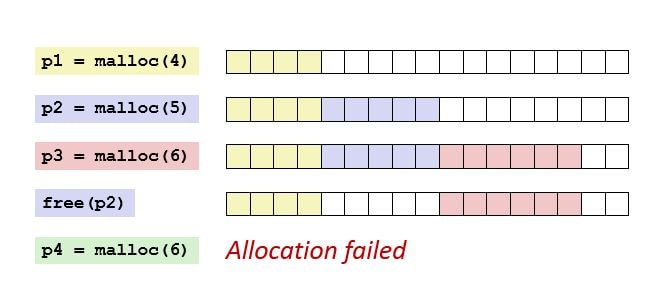
Although the total free memory may be sufficient, a large allocation request may fail because the free blocks are not contiguous.
2. Internal Fragmentation:
Internal fragmentation occurs when more memory is allocated than the application actually requests. This can happen due to memory alignment requirements, allocator metadata (bookkeeping), or allocation granularity.
For example, if a program requests 10 bytes and the allocator round the allocation up to 16 bytes, the unused 6 bytes represent internal fragmentation.
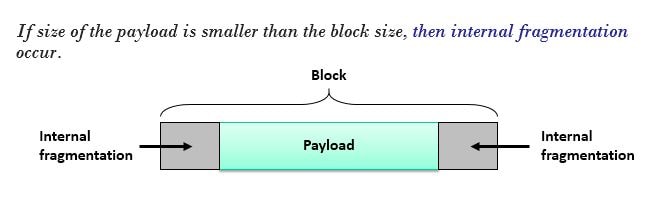
Effects on C Programs:
- Reduced memory utilization.
- Increased heap memory consumption.
- Allocation failures despite sufficient total free memory.
- Performance degradation due to allocator overhead.
- Reduced system reliability, especially in long-running embedded systems.
Mitigation Techniques:
- Minimize frequent allocation and deallocation of different-sized blocks.
- Reuse memory buffers when possible.
- Use memory pools or fixed-size block allocators.
- Allocate large objects statically when appropriate.
- Periodically analyze heap usage in embedded and real-time systems.
Note: Heap fragmentation is a common issue in long-running C applications and embedded systems that rely heavily on dynamic memory allocation.
Q: What is the difference between static memory allocation and dynamic memory allocation in C?
Ans:
C defines four storage durations: static, thread (since C11), automatic, and allocated. Storage duration determines the lifetime of an object.
Static Memory Allocation:
Static memory allocation refers to memory that is allocated before program execution and has static storage duration. Objects such as global variables and variables declared with the static keyword are allocated once and remain valid for the entire execution of the program.
These objects are initialized before program startup and are automatically managed by the implementation.
Examples:
int gCounter; // Global variable


static int sCounter; // Static storage duration
Characteristics:
- Allocated before program execution.
- Lifetime spans the entire program execution.
- Automatically managed by the implementation.
- Suitable for data that must persist throughout the program.
Dynamic Memory Allocation:
Dynamic memory allocation refers to memory that is allocated at runtime from the heap using functions such as malloc(), calloc(), and realloc().
Unlike static allocation, the amount of memory can be determined during program execution, providing flexibility for variable-sized data and dynamic data structures.
These functions return a pointer to the allocated memory block, or NULL if the allocation request cannot be satisfied.
Example:
int *ptr = malloc(10 * sizeof(*ptr));

if (ptr != NULL)
{
  /* Use memory */
  free(ptr);
}
Dynamically allocated memory remains allocated until it is explicitly released using free(). Failure to release allocated memory results in a memory leak.
Characteristics:
- Allocated at runtime.
- Size can be determined dynamically.
- Lifetime is controlled by the programmer.
- Requires explicit deallocation using `free()`.
Key Differences:
| Static Allocation | Dynamic Allocation |
|---|---|
| Allocated before program execution | Allocated during program execution |
| Lifetime is the entire program execution | Lifetime is controlled by the programmer |
| Managed automatically by the implementation | Must be explicitly deallocated using free() |
| Suitable for fixed-size, long-lived data | Suitable for variable-size and runtime-determined data |
| No risk of memory leaks | Improper management can cause memory leaks and fragmentation |
Note: Static allocation provides simplicity and predictable memory usage, while dynamic allocation provides flexibility at the cost of additional complexity and risks such as memory leaks, dangling pointers, double-free errors, and heap fragmentation.
Q: What are the different memory segments of a C program (text, data, BSS, heap, stack)?
Ans:
A C program is typically divided into several memory segments. Each segment serves a specific purpose and stores different types of data during program execution.
| Memory Segment | Description |
|---|---|
| Text (Code) Segment | Stores the executable instructions of the program. It is typically read-only to prevent accidental modification of code. |
| Data Segment | Stores global and static variables that are explicitly initialized by the programmer. |
| BSS Segment | Stores global and static variables that are uninitialized or initialized to zero. This memory is automatically initialized to zero before program execution. |
| Heap Segment | Used for dynamic memory allocation at runtime using functions such as malloc(), calloc(), realloc(), and free(). Memory management is controlled by the programmer. |
| Stack Segment | Stores local variables, function parameters, and return addresses. Memory is automatically allocated and deallocated as functions are called and return. |
Example code,
#include <stdio.h>
#include <stdlib.h>

int global_init = 10; // Data Segment
int global_uninit;    // BSS Segment

int main()
{
   int local_var = 20; // Stack Segment

   int* ptr = malloc(sizeof(int)); // Heap Segment
   *ptr = 30;

   printf("%d %d %d %d\n", global_init, global_uninit, local_var, *ptr);

   free(ptr);
   return 0;
}
Q: What is the BSS segment? How is it different from the data segment?
Ans:
The BSS (Block Started by Symbol) segment is a memory section that stores global and static variables that are not explicitly initialized by the programmer or are initialized to zero. Before the program starts executing, the operating system automatically initializes all variables in the BSS segment to zero.
The Data segment stores global and static variables that are explicitly initialized with non-zero values. These variables already have their assigned values when the program starts running.
Example,
int g_uninitialized;      // BSS Segment
int g_zero = 0;           // BSS Segment (typically)
int g_initialized = 10;   // Data Segment


static int s_uninitialized;    // BSS Segment
static int s_initialized = 20; // Data Segment
BSS vs Data segment:
| Factor | BSS Segment | Data Segment |
|---|---|---|
| Purpose | Stores uninitialized or zero-initialized global and static variables. | Stores initialized global and static variables. |
| Initialization | Automatically initialized to zero before program execution. | Contains programmer-specified initial values. |
| Executable File Size | Does not occupy space for variable values in the executable file. | Occupies space in the executable because initial values must be stored. |
| Example | int count; |
int count = 10; |
Q: What is memory alignment in C? Why does it matter?
Ans:
Memory alignment is the practice of placing data in memory at addresses that satisfy the alignment requirements of the underlying hardware. Typically, a data object is stored at an address that is a multiple of its size (or its required alignment).
For example:
- A 4-byte int is usually stored at an address divisible by 4.
- An 8-byte double is usually stored at an address divisible by 8.
Compilers automatically enforce alignment requirements by inserting padding bytes within structures so that each member is properly aligned.
Example,
#include <stdio.h>

struct Example
{
    char a;   // 1 byte
    int b;    // 4 bytes
};


int main()
{
    printf("Size = %zu\n", sizeof(struct Example));
    return 0;
}
Typical Memory Layout:
Offset  Member
------  ------
0       a (1 byte)
1-3     Padding (3 bytes)
4-7     b (4 bytes)
Why Does Alignment Matter?
- Improves Performance: Aligned memory accesses are usually faster because the CPU can fetch data in fewer memory operations.
- Avoids Hardware Faults: Some processors, especially embedded MCUs and ARM Cortex-M devices, may generate exceptions or faults when accessing misaligned data.
- Reduces Memory Access Cycles: Properly aligned data can often be read or written in a single bus transaction.
- Affects Structure Size: Padding inserted for alignment increases memory usage, which is important in memory-constrained embedded systems.
Q: How can you minimize structure padding in C?
Ans:
Structure padding occurs when the compiler inserts extra bytes between structure members to satisfy memory alignment requirements. To minimize padding and reduce memory usage, arrange structure members from the largest data type to the smallest data type.
Example,
struct SBadLayout
{
    char a;    // 1 byte
    int b;     // 4 bytes
    char c;    // 1 byte
};


struct SGoodLayout
{
    int b;     // 4 bytes
    char a;    // 1 byte
    char c;    // 1 byte
};

//The SGoodLayout structure typically requires less padding and therefore uses memory more efficiently.
Q: What is the use of the volatile keyword in C memory management?
Ans:
The volatile keyword tells the compiler that a variable’s value may change unexpectedly due to external factors and therefore should not be optimized. Every read and write to a volatile variable must be performed as written in the program.
Volatile is commonly used for:
- Memory-mapped hardware registers (I/O devices).
- Variables modified by Interrupt Service Routines (ISRs).
- Variables accessed by signal handlers.
- Shared variables where compiler optimizations must be prevented
Note: A volatile does not provide thread safety, atomicity, or synchronization. For inter-thread communication, atomic operations or synchronization mechanisms such as mutexes should be used.
Example,
volatile int flag = 0;

void ISR()
{
    flag = 1; // Modified by interrupt
}

int main()
{
    while(flag == 0)
    {
        // Wait for ISR
    }

    return 0;
}
Without volatile, the compiler may keep flag in a register and avoid re-reading it from memory. Therefore, the main program may miss updates made by the ISR, potentially resulting in an infinite loop or incorrect behavior.
Q: What is virtual memory? How does it relate to C programs?
Ans:
Virtual memory is a memory management technique that provides each process with its own logical address space, independent of physical RAM. The operating system and MMU translate virtual addresses into physical addresses.
In C programs, all memory regions, such as the code segment, data segment, heap, and stack, exist within the process’s virtual address space. Therefore, pointers in a C program typically store virtual addresses, not physical addresses.
Q: What is a page fault? What happens when it occurs?
Ans:
A page fault is an exception that occurs when a process attempts to access a memory page that is not currently loaded into physical memory (RAM).
When a page fault occurs, the operating system interrupts the program, locates the required page on secondary storage (such as disk), loads it into RAM, updates the page table, and then resumes execution of the program. If the memory access is invalid, the operating system terminates the process and generates an error such as a segmentation fault.
A page fault occurs when a program tries to access a virtual memory page that is not currently present in physical RAM.
Q: What is the difference between internal and external fragmentation?
Ans:
Internal Fragmentation occurs when a memory block allocated to a process is larger than the amount of memory requested, resulting in unused space within the allocated block.
External Fragmentation occurs when free memory is divided into small, non-contiguous blocks. Although the total free memory may be sufficient, a large contiguous block cannot be allocated.
Internal VS External Fragmentation:
| Internal Fragmentation | External Fragmentation |
|---|---|
| Wasted space exists inside allocated memory blocks. | Wasted space exists between allocated memory blocks. |
| Occurs when allocated memory is larger than the requested memory. | Occurs when free memory becomes scattered into non-contiguous blocks. |
| Common in fixed-size memory allocation schemes. | Common in variable-size memory allocation schemes. |
| Unused space within a block cannot be allocated to other processes. | Total free memory may be sufficient, but a large contiguous block cannot be allocated. |
| Can be reduced by allocating memory more precisely. | Can be reduced using memory compaction or paging. |
Q: What is a memory pool in C? What are its advantages?
Ans:
A memory pool is a pre-allocated block of memory that is divided into fixed-size or variable-size chunks. Instead of repeatedly requesting memory from the heap using malloc() and releasing it with free(), an application allocates and deallocates memory from the pool.
Memory pools are commonly used in embedded systems, real-time systems, and high-performance applications because they provide fast and predictable memory management.
Advantages of Memory Pools:
- Faster Allocation and Deallocation: Memory is obtained from a pre-allocated pool, reducing allocation overhead.
- Predictable Execution Time: Allocation and deallocation operations have deterministic timing, which is important for real-time systems.
- Reduced Memory Fragmentation: Memory pools can significantly reduce fragmentation compared to general-purpose heap allocation.
- Improved Reliability: Reduced dependence on dynamic heap allocation can help avoid fragmentation-related allocation failures.
- Better Memory Control: The maximum memory usage is known in advance, making resource management easier.
Q: What is sbrk() and how does it relate to heap memory in C?
Ans:
sbrk() is a system call that expands or shrinks the process heap by adjusting the program break. Traditionally, malloc() used sbrk() to obtain heap memory from the operating system.
Q: How does a custom memory allocator work in C?
Ans:
A custom memory allocator is a user-defined memory management system that manages memory from a pre-allocated region instead of relying on repeated calls to the standard heap allocator (malloc and free). It is designed to improve performance, predictability, and control over memory usage.
Typically, a custom allocator works by:
- Requesting a large block of memory from the system (often using malloc once)
- Managing this memory internally as a pool
- Maintaining metadata (such as free lists or block headers) to track allocated and free memory blocks
- Allocating memory by selecting an appropriate free block
- Freeing memory by returning the block to the pool for reuse
Custom allocators are commonly used in embedded systems, real-time applications, game engines, and performance-critical software where predictable allocation time and reduced fragmentation are important.
Advantages:
- Faster allocation and deallocation compared to general-purpose heap.
- Predictable and deterministic memory behavior.
- Reduced fragmentation in controlled memory systems.
- Better control over memory usage patterns.
- Improved performance in high-frequency allocation scenarios
Q: What is the use of memset() in memory management?
Ans:
memset() is a standard library function used to initialize or fill a block of memory with a specific byte value. It is commonly used to clear memory, initialize buffers, and reset data structures before use.
Syntax:
void *memset(void *ptr, int value, size_t num);

ptr : Pointer to the memory block.
value : Value to be set (converted to an unsigned byte).
num : Number of bytes to fill.
Example,
char buffer[100];

memset(buffer, 0, sizeof(buffer));   // Initialize all bytes to zero
Common Uses:
- Initializing memory to zero.
- Clearing buffers before use.
- Resetting structures and arrays.
- Setting memory to a known value for debugging or testing.
Q: What is the difference between memcpy() and memmove()?
Ans:
Both memcpy() and memmove() are standard C library functions used to copy a specified number of bytes from a source memory block to a destination memory block.
The primary difference is how they handle overlapping memory regions.
memcpy():
- Copies “n” bytes from the source to the destination.
- Requires that the source and destination memory regions do not overlap.
- If the regions overlap, the behavior is undefined.
- Generally faster because it does not need to account for overlapping memory.
memmove():
- Copies “n” bytes from the source to the destination.
- Works correctly even if the source and destination memory regions overlap.
- The C standard guarantees the result is as if the bytes were first copied to a temporary buffer and then copied to the destination.
- May be slightly slower than `memcpy()` because it must safely handle overlapping memory.
Example,
char str[] = "Hello World";


// Overlapping copy - Safe
memmove(str + 6, str, 5);


// Overlapping copy - Undefined Behavior
memcpy(str + 6, str, 5);
Key Differences:
| memcpy() | memmove() |
|---|---|
| Generally faster because it assumes the source and destination memory regions do not overlap. | May be slightly slower because it safely handles overlapping memory regions. |
| Produces undefined behavior if the source and destination memory regions overlap. | Correctly copies data even when the source and destination memory regions overlap. |
| Recommended for non-overlapping memory copies. | Recommended when memory regions may overlap or when overlap is uncertain. |
| Suitable for high-performance memory copying when overlap is impossible. | Provides safer behavior by guaranteeing correct results for overlapping copies. |
Note: If you are certain that the source and destination memory regions do not overlap, use memcpy() for better performance. Otherwise, use memmove() to guarantee correct behavior.
Q: What happens when you access memory after calling free() on it?
Ans:
After a memory block is released using free(), the memory is returned to the heap and is no longer owned by the program. Any attempt to read from or write to the freed memory through the original pointer results in undefined behavior.
The pointer itself is not automatically changed by free(). It continues to hold the address of the deallocated memory and becomes a dangling pointer.
Accessing a dangling pointer may result in:
- Reading stale or unexpected data.
- Data corruption if the memory has been reallocated.
- Program crashes (e.g., segmentation faults).
- Unpredictable behavior that may vary across compilers, operating systems, and executions.
- Security vulnerabilities.
Example,
#include <stdlib.h>

int main()
{
   int* ptr = malloc(sizeof(*ptr));

   if (ptr != NULL)
   {
      *ptr = 100;

      //free allocated memory
      free(ptr);

      // Undefined Behavior
      *ptr = 200;
   }

   return 0;
}
How to Prevent It:
- Never access memory after it has been freed.
- Set the pointer to `NULL` immediately after calling free().
- Ensure that each allocated memory block is freed exactly once.
Safe Practice:
free(ptr);

//Assign null after freeing the memory
ptr = NULL;
Note: Calling free() does not erase the memory or set the pointer to NULL; it only releases the memory back to the allocator. It is the programmer’s responsibility to avoid using dangling pointers.
Q: What is thrashing in memory management?
Ans:
Thrashing is a condition where the operating system spends more time swapping pages between RAM and disk than executing processes due to excessive page faults. It usually occurs when there is insufficient physical memory (RAM), resulting in poor system performance and high disk I/O.
Q: How do you detect memory leaks in C using Valgrind?
Ans:
Valgrind is the most widely used tool for detecting memory leaks, invalid memory accesses, use-after-free errors, buffer overflows, and uninitialized memory usage in C programs.
Steps to Detect Memory Leaks:
Step 1: Compile with Debug Information:
Compile the program using the -g option so Valgrind can report the exact source file and line number where the memory was allocated.
gcc -g program.c -o program
Step 2: Run the Program with Valgrind
Execute the program with the following command:
valgrind --leak-check=full --show-leak-kinds=all --track-origins=yes ./program
Understanding Valgrind’s Leak Report:
Valgrind classifies memory leaks into four categories. Understanding these categories helps you determine whether your program has a real memory leak or simply memory that remains allocated when the program exits.
| Leak Type | Meaning |
|---|---|
| Definitely Lost | Memory is leaked because all pointers to the allocated block are lost. Since there is no way to access or free the memory, this is a real memory leak and should always be fixed. |
| Indirectly Lost | Memory that is referenced only by another leaked memory block (for example, child nodes of a leaked linked list or tree). Fixing the definitely lost block usually eliminates these leaks. |
| Possibly Lost | Valgrind found only an interior pointer to the allocated block rather than a pointer to its beginning. This may be caused by pointer arithmetic or it may indicate a genuine memory leak. |
| Still Reachable | Memory was not freed before program termination but is still accessible through valid pointers. This is not usually considered a true memory leak, although releasing such memory is considered good programming practice. |
Example,
#include <stdlib.h>

int main()
{
    int *ptr = malloc(10 * sizeof(int));

    // Forgot to free(ptr);

    return 0;
}
Compile and Run:
gcc -g program.c -o program
valgrind --leak-check=full --show-leak-kinds=all ./program
Sample Output:
==12345== HEAP SUMMARY:
==12345==     in use at exit: 40 bytes in 1 blocks

==12345== LEAK SUMMARY:
==12345==    definitely lost: 40 bytes in 1 blocks
==12345==    at 0x4C2FB55: malloc
==12345==    by 0x10915A: main (program.c:6)
The report clearly shows:
- 40 bytes were leaked.
- The memory was allocated using malloc().
- The leak originated from program.c:6, making it easy to locate and fix.
Q: What is the difference between a null pointer and a void pointer?
Ans:
A null pointer and a void pointer serve different purposes in C. A null pointer represents a pointer that points to no valid memory location, whereas a void pointer (void *) is a generic pointer that can hold the address of any data type.
Important Difference between null and void pointer:
| Feature | Null Pointer | Void Pointer |
|---|---|---|
| Purpose | Represents no valid memory address. | Acts as a generic pointer that can store the address of any data type. |
| Declaration | int *ptr = NULL; |
void *ptr; |
| Points To | No object or valid memory location. | Can point to an object of any data type. |
| Dereferencing | Dereferencing a null pointer results in undefined behavior. | Must be cast to the appropriate pointer type before dereferencing. |
| Type | A pointer of any type whose value is NULL. |
A distinct pointer type (void *). |
| Typical Use | Represents an invalid, empty, or uninitialized pointer. | Used in generic APIs such as malloc(), memcpy(), qsort(), and callback functions. |
Q: Can a generic pointer (void *) be assigned a NULL value in C/C++?
Ans:
Yes. A void * is simply a pointer type, and it can hold the null pointer value just like any other object pointer.
Q: Why should sizeof(*ptr) be preferred over sizeof(type) in malloc()?
Ans:
sizeof(*ptr) is preferred because it automatically uses the correct size based on the pointer’s data type. If the pointer’s type changes later, you don’t need to update the malloc() statement. This makes the code easier to maintain and helps prevent memory allocation bugs.
Example,
// Preferred

int *ptr = malloc(10 * sizeof(*ptr));
Q: What is a use-after-free bug?
Ans:
A use-after-free bug occurs when a program accesses memory after it has already been freed using free(). Once memory is freed, it no longer belongs to the program, so reading from or writing to it results in undefined behavior.
Example,
#include <stdlib.h>

int main()
{
    int *ptr = malloc(sizeof(int));

    *ptr = 10;
    free(ptr);

    *ptr = 20;   // Use-after-free bug

    return 0;
}
Q: Can free(NULL) be called safely?
Ans:
Yes. Calling free(NULL) is completely safe. According to the C standard, if the pointer passed to free() is NULL, the function does nothing and returns immediately. No memory is freed, and no error occurs.
Q: What is memory corruption in C?
Ans:
Memory corruption occurs when a program accidentally reads from or writes to memory that it should not access. This can happen due to bugs such as buffer overflows, use-after-free, invalid pointer access, or writing beyond allocated memory. Memory corruption can cause crashes, incorrect behavior, security vulnerabilities, or unpredictable program execution.
Q: Why is returning the address of a local variable dangerous?
Ans:
A local variable is stored on the stack and is automatically destroyed when the function returns. Returning its address leaves a dangling pointer that points to invalid memory. Accessing it later results in undefined behavior, which may cause crashes or incorrect data.
Q: How are multidimensional arrays allocated dynamically in C?
Ans:
Multidimensional arrays can be allocated dynamically in two common ways:
1. Array of pointers:
Allocate memory for row pointers first, then allocate each row separately. This allows rows to have different lengths but requires multiple allocations.
#include <stdio.h>
#include <stdlib.h>

int main()
{
   int rows = 3;
   int cols[] = {2, 4, 3}; // Each row can have a different length

   // Step 1: Allocate array of row pointers
   int** matrix = (int**)malloc(rows * sizeof(int*));

   // Step 2: Allocate each row separately
   for (int i = 0; i < rows; i++)
   {
      matrix[i] = (int*)malloc(cols[i] * sizeof(int));
   }

   // Fill values
   for (int i = 0; i < rows; i++)
   {
      for (int j = 0; j < cols[i]; j++)
      {
         matrix[i][j] = i * 10 + j;
      }
   }

   // Print
   for (int i = 0; i < rows; i++)
   {
      for (int j = 0; j < cols[i]; j++)
      {
         printf("%d ", matrix[i][j]);
      }
      printf("\n");
   }

   // Free memory (must free each row, then the pointer array)
   for (int i = 0; i < rows; i++)
   {
      free(matrix[i]);
   }
   free(matrix);

   return 0;
}
2. Single contiguous memory block:
Allocate one large block for all elements and access them using indexing or pointer arithmetic. This method is more memory-efficient, cache-friendly, and is generally preferred for fixed-size matrices.
#include <stdio.h>
#include <stdlib.h>

int main()
{
   int status = EXIT_FAILURE;

   const size_t rows = 3U;
   const size_t cols = 4U;

   // Allocate Memory
   int(*matrix)[cols] = malloc(rows * sizeof(*matrix));

   if (matrix != NULL)
   {
      // fill Value
      for (size_t row = 0U; row < rows; row++)
      {
         for (size_t col = 0U; col < cols; col++)
         {
            matrix[row][col] = (int)(row * cols + col);
         }
      }

      // Print the value
      printf("matrix[2][3] = %d\n", matrix[2][3]);

      // Free allocated memory
      free(matrix);
      matrix = NULL;

      status = EXIT_SUCCESS;
   }
   else
   {
      printf("Memory allocation failed.\n");
   }

   return status;
}
Q: What are common causes of segmentation faults in C?
Ans:
A segmentation fault (segfault) occurs when a program attempts to access memory that it is not permitted to access, or accesses valid memory in an invalid way (such as writing to read-only memory).
These actions result in undefined behavior, and on systems with memory protection, the operating system typically terminates the program by raising a segmentation fault.
Common causes include:
-
- Dereferencing Invalid Pointers: Accessing a NULL pointer, an uninitialized pointer, or an invalid/corrupted pointer.
- Buffer Overflows: Reading from or writing beyond the bounds of an array or allocated memory.
- Use-After-Free: Accessing memory after it has been released with free().
- Dangling Pointers: Returning the address of a local variable or using a pointer that refers to an object that no longer exists.
- Stack Overflow: Caused by excessive recursion or allocating very large objects on the stack.
- Modifying Read-Only Memory: Attempting to modify string literals or other read-only data.
char *str = "Aticleworld";

str[0] = 'a';    // Undefined behavior (often causes a segfault)
Q: How can you debug memory-related issues in C?
Ans:
Memory-related issues in C can be debugged using a combination of compiler diagnostics, static analysis, runtime tools, debuggers, and good programming practices:
- Compiler warnings (-Wall -Wextra -Wpedantic) and static analyzers (such as Cppcheck, Clang Static Analyzer, or GCC -fanalyzer) help detect potential bugs before the program is run.
- Valgrind detects memory leaks, invalid memory accesses, use-after-free errors, and uninitialized memory usage. It is thorough but relatively slow.
- AddressSanitizer (ASan) detects buffer overflows, use-after-free, use-after-scope, and other memory errors at runtime with much lower overhead than Valgrind, making it suitable for regular testing.
- GDB helps investigate crashes by examining the call stack, variables, pointers, and memory contents, especially after a segmentation fault or core dump.
- Defensive coding practices, such as checking the return value of malloc(), initializing pointers, avoiding out-of-bounds accesses, and setting pointers to NULL after free() help prevent memory errors.
- Manual code reviews can identify common issues such as buffer overflows, dangling pointers, double free(), memory leaks, and incorrect pointer arithmetic.
Using these tools and practices together makes it easier to detect, diagnose, and fix memory-related bugs.
Q: What tools besides Valgrind can be used to detect memory errors?
Ans:
Several tools besides Valgrind can be used to detect memory errors in C:
- AddressSanitizer (ASan): Detects buffer overflows, use-after-free, use-after-scope, and other memory errors at runtime with low overhead.
- LeakSanitizer (LSan): Detects memory leaks. It is often used together with AddressSanitizer.
- MemorySanitizer (MSan): Detects the use of uninitialized memory.
- UndefinedBehaviorSanitizer (UBSan): Detects undefined behavior, such as invalid pointer operations, integer overflows, and out-of-bounds accesses.
- GDB: Helps investigate crashes by examining the call stack, variables, pointers, and memory contents.
- Dr. Memory: A dynamic memory analysis tool that detects memory leaks, invalid memory accesses, and uninitialized memory usage.
- Static analysis tools: Tools such as Cppcheck, Clang Static Analyzer, and GCC -fanalyzer can identify potential memory-related bugs without executing the program.
Using a combination of runtime analysis, static analysis, and debugging tools provides the best coverage for detecting and diagnosing memory errors.
Q: What is the difference between memory allocation on the stack and memory allocation using malloc()?
Ans:
Stack memory and dynamically allocated memory (using malloc()) differ in how they are allocated, managed, and used.
| Stack Allocation | Dynamic Allocation (malloc()) |
|---|---|
| Allocated automatically when a function is called. | Allocated explicitly at runtime using malloc(), calloc(), or realloc(). |
| Memory is automatically released when the function returns. | Memory remains allocated until it is explicitly released using free(). |
| Faster allocation and deallocation. | Slower due to heap management overhead. |
| Limited in size and may cause a stack overflow if too much memory is used. | Typically larger than the stack and suitable for large or variable-sized data. |
| Lifetime is limited to the function or block scope. | Lifetime is controlled by the programmer. |
| Does not require manual memory management. | Requires manual memory management; failing to call free() causes memory leaks. |
| Suitable for small, short-lived variables. | Suitable for large data structures or memory whose size is known only at runtime. |
Q: How can memory leaks occur when realloc() is used incorrectly?
Ans:
A memory leak can occur if the return value of realloc() is assigned directly to the original pointer. If realloc() fails, it returns NULL, and the original pointer is lost, making the previously allocated memory impossible to free.
Example,
// If realloc() fails, the original pointer is lost.

ptr = realloc(ptr, new_size);
Solution:
Using a temporary pointer ensures that the original memory remains accessible if realloc() fails, preventing memory leaks and allowing proper error handling.
int *temp = realloc(ptr, new_size);

if (temp != NULL)
{
    ptr = temp;
}
else
{
    /* realloc() failed; ptr still points to the original memory. */
}
Storage Classes Questions:
Q: What are the core differences between a variable’s storage duration (lifetime), its scope (visibility), and its linkage (accessibility across modules)?
Ans:
In C, storage duration, scope, and linkage are three distinct and independent properties that determine how long a variable exists, where it can be accessed, and whether it can be shared across source files.
The following table summarizes the differences:
| Property | Core Concept | Key Question It Answers | Common Types in C |
|---|---|---|---|
| Storage Duration (Lifetime) | Determines how long a variable exists in memory. | When is memory allocated and freed? | Automatic, Static, Allocated (dynamic via malloc()), Thread |
| Scope (Visibility) | Determines the region of the source code where a variable’s name is visible. | Where can this variable be accessed? | Block scope, File scope, Function scope (labels), Function prototype scope |
| Linkage (Accessibility) | Determines whether the same identifier refers to the same object or function across different translation units (source files). | Can another source file access this variable? | External linkage, Internal linkage, No linkage |
Example,
#include <stdio.h>

int globalVar = 10;
/*
 * Scope:            File scope (visible anywhere in this file below this line)
 * Storage Duration: Static (lives in memory for the entire program runtime)
 * Linkage:          External (can be accessed by other .c files using 'extern')
 */

static int fileVar = 0;
/*
 * Scope:            File scope (visible only within this file)
 * Storage Duration: Static (lives for the entire program runtime)
 * Linkage:          Internal (hidden completely from other translation units)
 */

void fun()
{
   int localVar = 5;
   /*
    * Scope:            Block scope (visible only inside this function)
    * Storage Duration: Automatic (allocated on stack, destroyed when function returns)
    * Linkage:          None (isolated to this scope)
    */

   static int total = 0;
   /*
    * Scope:            Block scope (visible ONLY inside this function)
    * Storage Duration: Static (retains its value across multiple function calls!)
    * Linkage:          None (isolated to this scope)
    */

   total += localVar;
}
Q: Can a variable’s scope and lifetime be completely independent of each other? Provide a concrete example.
Ans:
Yes. Scope and storage duration (lifetime) are independent properties in C. A variable’s scope determines where it can be accessed, while its storage duration determines how long it exists in memory.
A local static variable is a common example. It has block scope (it is visible only inside the function) but static storage duration (it exists for the entire program execution).
void counter(void)
{
    static int count = 0;  // Block scope, static storage duration

    count++;
    printf("%d\n", count);
}
Q: How do block scope, file scope, and function scope differ, and how does the compiler enforce these boundaries?
Ans:
The three scopes differ in where an identifier is visible in the program:
Block scope: Anything declared inside { } (a function body, an if, a for loop, etc.) exists only within that block. Once execution leaves the closing brace, the variable is gone.
void foo()
{
   int x = 5; // block scope
   if (x > 0)
   {
      int y = 10; // scope limited to this if-block
   }
   // y is not visible here
}
Function scope:
Function scope applies only to labels used with goto. A label can be accessed from anywhere within the same function it’s declared in, even if declared inside a nested block but not from outside that function. Unlike variables, labels are not limited by block scope.
void foo()
{
    goto skip;
    {
        skip: ;   // visible throughout foo(), even from outside this block
    }
}
File scope:
An identifier declared outside all functions is visible from its declaration to the end of the source file. If declared static, it is accessible only within that source file. Otherwise, it has external linkage and can be accessed from other source files using extern.
int counter = 0; // file scope
void foo()
{
   counter++;

} // visible here


void bar()
{
   counter++;
} // and also here
Q: What is variable shadowing, and what specific debugging hazards arise when a local variable shadows a global variable?
Ans:
Variable shadowing occurs when a local variable has the same name as a variable in an outer scope (such as a global variable). Within the local scope, the local variable hides (shadows) the outer variable, so all references to that name refer to the local variable.
Debugging hazards:
- Changes intended for the global variable may accidentally modify the local variable instead.
- Reading the variable may return the local value instead of the expected global value.
- This can cause unexpected behavior, making bugs difficult to identify and debug.
- The compiler usually allows shadowing, though many compilers can issue a warning if enabled (e.g., -Wshadow in GCC/Clang).
Example,
int count = 100;   // Global variable

void func()
{
    int count = 10;    // Shadows the global variable
    count++;           // Modifies the local variable, not the global one
}
Q: Why is the auto keyword largely considered redundant in modern C/C++, and what is its default behavior regarding stack allocation and destruction?
Ans:
The auto keyword is considered redundant in C because local variables have automatic storage duration by default. Writing auto explicitly has no effect, so it is rarely used.
An auto variable is:
- Allocated automatically when execution enters its block (typically on the stack).
- Destroyed automatically when execution leaves the block.
- Accessible only within its block scope.
Example,
void func(void)
{
    auto int x = 10;   // Same as: int x = 10;
}
Q: How does the register keyword function, and why do modern compilers (especially those targeting architectures like ARM Cortex-M) frequently ignore it?
Ans:
The register storage-class specifier indicates to the compiler that a variable is expected to be accessed frequently. It serves as a suggestion that the variable may be stored in a CPU register rather than in memory, potentially reducing memory load and store operations and improving performance.
According to the C standard:
- register is only a hint to the compiler. The compiler is free to ignore it and store the variable in memory if it determines that doing so is more appropriate.
- The address of a register variable cannot be taken using the address-of (“&“) operator. Since the compiler is allowed to keep the variable exclusively in a CPU register without assigning it a memory address, applying “&” to such a variable is invalid and results in a compile-time error.
Q: What compile-time error occurs if you attempt to use the address-of operator (&) on a variable explicitly declared as register, and why?
Ans:
If you try to use the address-of operator (&) on a variable declared with the register storage class, the compiler generates a compile-time error because a register variable may be stored in a CPU register rather than in memory, so it does not have a memory address that can be taken.
Example,
register int x = 10;

int *ptr = &x;   // Compile-time error
Q: Are automatic variables initialized automatically, and how are they managed across recursive function calls?
Ans:
No. Automatic variables are not initialized automatically. If you do not explicitly initialize them, they contain indeterminate (garbage) values.
During recursive function calls, each call gets its own separate copy of the automatic variables on the stack. These copies are created when the function is called and destroyed when the function returns, so changes in one recursive call do not affect the automatic variables of another call.
Q: What are the three distinct technical meanings of the static keyword when applied to a local variable, a global variable, and a function?
Ans:
The static keyword has three different meanings depending on where it is used:
- Static local variable: Retains its value between function calls while remaining accessible only within that function.
- Static global variable (file-scope variable): Gives the variable internal linkage, making it accessible only within the current source file.
- Static function: Gives the function internal linkage, allowing it to be called only from within the same source file.
Q: How does a static local variable fundamentally differ from an auto local variable in terms of initialization frequency and physical memory location?
Ans:
In C, a static local variable is initialized exactly once, before program startup either with a constant expression you supply, or implicitly to zero if no initializer is given. It is stored in the static data segment (.data or .bss) and retains its value across function calls.
An auto local variable is created fresh on each function call, stored on the stack (automatic storage duration), and its lifetime ends when the function returns. If not explicitly initialized, it holds an indeterminate value and reading it before assignment is undefined behavior.
Q: How does applying static to a global variable change its linkage from external to internal?
Ans:
In C, a global variable normally has external linkage, meaning it can be accessed from other source files using the extern keyword.
Applying the static keyword changes its linkage to internal, making the variable visible only within the source file in which it is declared. This hides it from other translation units while its storage duration remains static (it exists for the entire program execution).
Q: Why is declaring driver-specific helper functions (e.g., static void uartConfig(void);) a critical architectural practice for module encapsulation?
Ans:
Declaring driver-specific helper functions as static gives them internal linkage, making them accessible only within the source file where they are defined. This hides implementation details, prevents accidental use from other modules, avoids name conflicts during linking, and improves module encapsulation, maintainability, and code reliability.
Q: How can static local variables be leveraged to elegantly implement a Finite State Machine (FSM) without polluting the global namespace?
Ans:
A static local variable can store the current state of a Finite State Machine (FSM) between function calls. Since it is local to the function, it is hidden from other modules, avoiding unnecessary global variables and keeping the implementation encapsulated.
Example,
In the code below, state retains its value across function calls but is visible only within motorControlTask(). This makes it ideal for implementing an FSM while avoiding global variables and preserving encapsulation.
void motorControlTask()
{
    static int state = 0;   // Retains value between calls

    switch (state)
    {
        case 0:
            // Initialization
            state = 1;
            break;

        case 1:
            // Running
            state = 2;
            break;

        case 2:
            // Stopped
            break;
    }
}
Q: What are the maintainability and memory-footprint drawbacks of excessively relying on static local variables to maintain state?
Ans:
Using too many static local variables makes code harder to understand and maintain because the function has hidden state. It also makes the function harder to test, reuse, and unsafe for recursive calls or multiple threads unless properly synchronized.
Since static local variables exist for the entire program, they permanently occupy memory. Large or many static variables can increase RAM usage, and non-zero initialized variables also require flash storage and startup initialization, which is important in memory-constrained embedded systems.
Q: What is the precise mechanical difference between an extern declaration and a variable definition?
Ans:
A declaration tells the compiler that a variable or function exists and specifies its type. It does not allocate storage.
A definition is a declaration that creates the variable (or function). For variables, it allocates storage; for functions, it provides the function body.
The extern keyword is typically used to declare a variable that is defined in another source file, so no new storage is allocated.
| Form | Declaration? | Definition? | Storage Allocated? |
|---|---|---|---|
extern int x; |
Yes | No | No |
int x; (file scope) |
Yes | Yes (tentative definition) | Yes |
int x = 5; |
Yes | Yes | Yes |
extern int x = 5; |
Yes | Yes | Yes |
Q: Why must header files contain only extern declarations of variables, rather than their definitions?
Ans:
Header files are included in multiple source files. If a header file contains a variable definition, each source file gets its own copy of that variable, causing multiple definition linker errors.
Using extern only declares that the variable exists somewhere else, without allocating memory. The actual variable should be defined exactly once in a single .c file.
Q: What is the “multiple definition” linker error, and exactly how does placing int counter; in a shared header trigger it?
Ans:
A multiple definition linker error occurs when the linker finds more than one definition of the same global variable or function in a program. Since a global variable must have exactly one definition, the linker cannot decide which one to use and reports an error.
When a header file containing int counter; is included in multiple source files, the declaration is copied into each source file during preprocessing. As a result, each source file contains its own definition of the global variable counter. After compilation, every object file has a separate definition of counter. During linking, the linker detects these multiple definitions and reports a multiple definition error because a global variable can be defined only once in the entire program.
Q: What happens during the linking phase if an extern declaration exists in a source file, but the linker cannot resolve the definition anywhere in the project?
Ans:
If a source file contains an extern declaration, but no corresponding definition exists anywhere in the project, the compiler succeeds, but the linker fails with an undefined reference (or unresolved external symbol) error.
This happens because extern tells the compiler that the variable is defined in another source file. The compiler assumes the definition will be found later and continues compiling. During the linking phase, the linker searches all object files and libraries for that definition. If it cannot find one, it cannot determine the variable’s memory address, so it reports an error and the executable is not created.
Q: Are function prototypes implicitly extern, and why is the keyword universally omitted for function declarations?
Ans:
Yes. In C, function prototypes have external linkage by default, so they are implicitly extern. In C, these two lines mean the exact same thing to the compiler:
void print_message(void);        // Implicitly extern

extern void print_message(void); // Explicitly extern
Because extern is the default for function declarations, writing it is optional and is almost always omitted for clarity and readability.
Unlike global variables, function declarations do not allocate memory or define the function. They simply inform the compiler about the function’s name, return type, and parameter types. The actual function body (definition) must appear exactly once somewhere in the program.
Q: Why is extern omitted for functions??
Ans:
There are following reason to omit extern for functions.
- Functions have external linkage by default.
- Adding extern provides no additional meaning or behavior.
- Omitting it keeps code cleaner and follows the convention used throughout the C standard library and most C projects.
Q: Where exactly in physical memory (RAM vs. ROM/Flash) do explicitly initialized global and static variables reside?
Ans:
Initialized global and static variables are placed in the .data section. Their initial values are stored in the program image in Flash/ROM by the compiler and linker. During system startup, the startup code copies these initial values from Flash/ROM into the .data section in RAM. From that point onward, the program accesses and modifies the variables in RAM.
Program Image (Flash / ROM)
        +------------------------------------------------+
        |  .text    — code                                |
        |  .rodata  — read-only constants                 |
        |  .data    — INITIAL VALUES of globals/statics   |  ← stored here permanently
        +------------------------------------------------+

                              │
                    Startup code (crt0 / reset handler)
                    copies .data from Flash → RAM
                    zeroes out .bss in RAM
                              │
                              ▼

                       Runtime Memory (RAM)
        +------------------------------------------------+
        |  .data  — initialized globals/statics (live)    |  ← actually read/written here
        |  .bss   — zero-initialized globals/statics       |
        |  Heap                                            |
        |  Stack                                           |
        +------------------------------------------------+
Example,
int counter = 10;      // global, initialized

static int flag = 1;   // static, initialized
- At link time: the linker places 10 and 1 in the .data section of the Flash image, and reserves matching RAM addresses for counter and flag.
- At startup, before main() runs, the reset handler / crt0 copies these values from Flash into their RAM addresses.
- At runtime, all reads/writes go to RAM only:
counter++;   // modifies the RAM copy
flag = 0;    // modifies the RAM copy
Note: The Flash copy is never touched again, it just serves as the “template” used once at startup.
Q: What is the .bss section, and why do uninitialized static and global variables consume RAM but essentially no space in the compiled binary payload?
Ans:
The .bss (Block Started by Symbol) section is a memory segment that contains uninitialized and zero-initialized global and static variables (compilers treat “0” the same as “uninitialized” since the end result is identical).
The .bss (Block Started by Symbol) section is a part of a program’s memory that stores uninitialized global and static variables, as well as global and static variables initialized to “0”.
Unlike the .data section, the .bss section does not store the actual values of these variables in the executable file. Instead, it only stores information about how much memory is needed. When the program starts, the startup code automatically fills the entire .bss section with zeros before main() is called.
This means:
- Variables in the .bss section use RAM while the program is running.
- They take almost no space in the executable file, because the file does not need to store a large number of zero bytes. It only tells the system to reserve that memory and initialize it to zero at startup.
Example,
int counter;              // Uninitialized global
static int flag;          // Uninitialized static

int value = 10;           // Initialized global
static int mode = 1;      // Initialized static
| Variable | Memory Section | Stored in Flash (ROM)? | Occupies RAM? |
|---|---|---|---|
counter |
.bss |
No. Only the size of the .bss section is recorded in the binary. |
Yes |
flag |
.bss |
No. Only the size of the .bss section is recorded in the binary. |
Yes |
value |
.data |
Yes. The initial value (10) is stored in Flash and copied to RAM during startup. |
Yes |
mode |
.data |
Yes. The initial value (1) is stored in Flash and copied to RAM during startup. |
Yes |
Startup Sequence:
              Flash (Program Image)
+------------------------------------------+
| .text   (Program code)                   |
| .rodata (Constants)                      |
| .data   (Initial values)                 |
| .bss    (Size information only)          |
+------------------------------------------+

                Startup Code
        1. Copy .data from Flash to RAM
        2. Zero-fill entire .bss section
                     │
                     ▼

                   RAM
+------------------------------------------+
| .data  -> Initialized variables          |
| .bss   -> All bytes set to 0             |
| Heap                                     |
| Stack                                    |
+------------------------------------------+
Q: Why does .bss save Flash space?
The .bss section saves Flash space because it does not store the actual contents of uninitialized or zero-initialized global and static variables in the program image. Instead, the executable records only the size and location of the .bss section. During system startup, the startup code simply fills the entire .bss section with zeros in RAM.
If these variables were stored in the .data section, every zero byte would have to be included in the firmware image, significantly increasing the size of the executable stored in Flash.
Example:
// uninitialized -> goes to .bss

static int samples[100000];
- If stored in .data: The firmware would contain 100,000 zero bytes, increasing the Flash image by about 100 KB.
- Because it is stored in .bss: The firmware stores only the size and location of the buffer. During startup, the runtime simply reserves 100,000 bytes in RAM and initializes them to zero.
Q: Where are string literals and variables declared with const typically mapped in a microcontroller’s memory architecture?
Ans:
In a typical microcontroller memory architecture, string literals and read-only const variables are usually stored in non-volatile program memory (Flash/ROM) rather than RAM. This conserves precious RAM and ensures the data persists after power loss.
| Object | Typical Memory Section | Physical Memory | Writable? |
|---|---|---|---|
String literal ("Hello") |
.rodata |
Flash / ROM | No |
const global variable |
.rodata |
Flash / ROM | No |
static const variable |
.rodata |
Flash / ROM | No |
const local variable (if compile-time constant) |
.rodata or optimized away |
Flash / ROM (if stored) | No |
Non-const global variable |
.data |
RAM (initialized from Flash during startup) | Yes |
| Uninitialized global variable | .bss |
RAM | Yes |
Q: Why do static and global variables permanently consume RAM for the entire execution time, whereas auto variables only consume RAM dynamically?
Ans:
Static and global variables have static storage duration, meaning they are allocated memory once before the program starts and remain in memory until the program terminates. Since they must preserve their values throughout the program’s lifetime, the linker reserves a fixed location for them in the .data or .bss sections of RAM.
In contrast, automatic (auto) variables have automatic storage duration. They are allocated on the stack when a function is called and are automatically released when the function returns. Their memory is reused by subsequent function calls, making stack memory highly efficient.
Example,
int globalVar;          // Exists for the entire program

void foo()
{
    static int count;   // Exists for the entire program

    int localVar;       // Exists only while foo() executes
}
Q: Why can not static variables be allocated on the stack?
Ans:
Because the stack memory is reclaimed when a function returns. A static variable must retain its value across multiple function calls, so it requires permanent storage in the .data or .bss section rather than on the stack.
Q: How do storage classes dictate whether a variable is placed on the heap, the stack, or a static data segment?
Ans:
Storage classes determine a variable’s storage duration, scope, and linkage, which influence how and when memory is allocated. They do not directly specify whether a variable is placed on the heap, stack, or static data segment.
| Storage Class / Allocation Mechanism | Storage Duration | Typical Memory Location | Who Allocates the Memory? |
|---|---|---|---|
auto |
Automatic | Stack | Compiler generates code to allocate stack space on function entry and deallocate it on function exit. |
register |
Automatic | CPU Register (preferred); otherwise Stack | Compiler decides whether to use a CPU register or spill the variable to the stack. |
static |
Static (entire program execution) | .data (initialized) or .bss (uninitialized) |
Compiler places the variable into a section, the linker assigns its final address, and the startup code/loader reserves RAM and initializes it before main(). |
extern |
Static (inherits the storage duration of the referenced object) | Same as the object’s definition (.data or .bss) |
No storage is allocated by extern. It only declares a variable defined elsewhere. Memory is allocated only at the variable’s definition. |
Dynamic allocation (malloc(), calloc(), realloc(), new)Not a storage-class specifier |
Dynamic (until explicitly released) | Heap | Runtime memory allocator, explicitly invoked by the programmer. Memory remains allocated until free() or delete is called. |
Q: What exact sequence of events occurs in the C startup code (before main() is executed) regarding memory initialization?
Ans:
Before main() is called, the C startup code performs the following steps:
- Processor Reset occurs.
- Initial Stack Pointer (SP) is loaded from the vector table (on architectures such as ARM Cortex-M).
- Reset Handler executes.
- Perform low-level hardware initialization (clock, memory system, FPU, watchdog, etc., if required).
- Copy the .data section (initialized global and static variables) from Flash (ROM) to RAM.
- Zero-initialize the .bss section (uninitialized global and static variables).
- Initialize the C/C++ runtime (e.g., call global/static C++ constructors and initialize the standard library if needed).
- Call main().
Startup Sequence:
Reset
   ↓
Reset Handler
   ↓
Initialize Stack Pointer
   ↓
Hardware Initialization
   ↓
Copy .data (Flash → RAM)
   ↓
Zero Initialize .bss
   ↓
Initialize C/C++ Runtime
   ↓
main()
Note: On many architectures (e.g., ARM Cortex-M), the processor automatically loads the initial Stack Pointer from the vector table before executing the Reset Handler. On other architectures, startup code may explicitly initialize the stack.
Q: How does the startup code populate the .data section in RAM using the initialization values stored in non-volatile Flash memory?
Ans:
Q: Why does the C standard guarantee that uninitialized static and global variables default to zero, and how does the CRT achieve this?
Ans:
Q: What happens to the internal state of .data and .bss static variables immediately following a system soft reset versus a hard power cycle?
Ans:
Q: Why must a static variable shared between an Interrupt Service Routine (ISR) and the main execution context be explicitly qualified with volatile?
Ans:
Q: What specific compiler optimization might break your main loop if an ISR modifies a static variable lacking the volatile qualifier?
Ans:
Q: What is the functional difference in scope and linkage between volatile int flag; and static volatile int flag;?
Ans:
Q: Why does the volatile keyword not guarantee atomic access or protect a shared static resource from race conditions in a preemptive environment?
Ans:
Q: What specific synchronization hazards arise when a static variable is read and modified by multiple RTOS threads simultaneously?
Ans:
Q: How can you safely protect a shared static variable in a multi-threaded environment (e.g., using mutexes or disabling interrupts)?
Ans:
Q: What is thread storage duration (thread_local), and how does it prevent data corruption compared to standard static allocation?
Ans:
Q: Explain the complete, end-to-end lifecycle of static uint32_t counter = 100; from compilation, through the linker, flash programming, CRT startup, and runtime execution.
Ans:
Q: Predict the output and memory behavior if a function containing static int x = 0; x++; printf(“%d “, x); is called three times sequentially.
Ans:
Q: You encounter unexpectedly high RAM consumption on your target MCU. How would you analyze the linker .map file to debug excessive memory usage caused by static allocations?
Ans:
Q: How do decisions regarding static and global storage classes directly influence a firmware project’s compliance with safety standards like MISRA C?
Ans:
Q: A system crashes due to a stack overflow. How could converting large auto arrays (buffers) inside deeply nested functions into static arrays mitigate this, and what concurrency risks does this introduce?
Ans:
Q: How does the preprocessor interact with compiler optimizations—can it affect inlining or dead code elimination?
Ans:
Q: What is a symbol table, and how does the linker use it to resolve extern references?
Ans:
Q: What happens if two source files define int counter; and both are linked together?
Ans:
Q: How does the linker distinguish between internal and external linkage symbols?
Ans:
Q: What information about storage classes can be extracted from a linker map file?
Ans:
Q: Why is static int x = 10; legal, while static int x = func(); is illegal in C?
Ans:
Q: What restrictions exist on static initialization in C?
Ans:
Q: When is static initialization performed in C versus C++?
Ans:
Q: How does recursion affect automatic variable allocation?
Ans:
Q: Why can deep recursion cause stack overflow even if the function contains only small local variables?
Ans:
Q: How would you estimate worst-case stack usage for an embedded task?
Ans:
Q: When is volatile sufficient, and when is a critical section still required?
Ans:
Q: Can a 32-bit variable be safely shared between an ISR and the main context on an 8-bit MCU?
Ans:
Q: What does atomic access mean, and why is it important in embedded systems?
Ans:
Q: Why can a static variable become a hidden shared resource between RTOS tasks?
Ans:
Q: When should thread-local storage be preferred over mutex protection?
Ans:
Q: How is thread-local storage typically implemented in an RTOS?
Ans:
Q: If RAM usage exceeds device limits, which storage classes and memory sections should be investigated first?
Ans:
Q: How can large static buffers impact system startup time?
Ans:
Q: Why might moving a large lookup table from .data to .rodata significantly reduce RAM consumption?
Ans:
Q: Why does MISRA encourage minimizing external linkage?
Ans:
Q: Why are file-static objects preferred over global variables in safety-critical firmware?
Ans:
Q: How do storage classes affect unit testing, module isolation, and software maintainability?
Ans:
Q: Why should hardware register access variables often be declared static volatile instead of only volatile?
Ans:
Q: How do static functions help enforce abstraction boundaries in device drivers?
Ans:
Q: A global variable occupies RAM but does not appear in the binary image size. Explain why?
Ans:
Q: Why does a static variable survive function exits but disappear after a system reset?
Ans:
Q: How would you debug a corrupted static variable in a deployed embedded system?
Ans:
Q: How can misuse of static variables make firmware non-reentrant?
Ans:
Macros and Preprocessor Questions:
Q: What is a macro, and how does macro expansion work?
Ans:
Q: What is the difference between a macro and a function?
Ans:
Q: What is the precise role of the preprocessor in the C/C++ compilation pipeline?
Ans:
Q: What are predefined macros, and what are their typical use cases?
Ans:
Q: What is the difference between an object-like macro and a function-like macro?
Ans:
Q: What is the order of phases in C preprocessing before actual compilation begins?
Ans:
Q: What is the exact functional difference between #if and #ifdef?
Ans:
Q: What are include guards, and how do they differ from #pragma once?
Ans:
Q: What is the difference between #include and #include “filename.h”?
Ans:
Q: How does conditional compilation protect against target-specific code mismatches?
Ans:
Q: What is the purpose of #undef and when would you use it?
Ans:
Q: What is the difference between #elif and using multiple #ifdef blocks?
Ans:
Q: How do you use the preprocessor to manage debug vs release builds?
Ans:
Q: What is the stringizing operator (#), and how is it used?
Ans:
Q: What is the token-pasting operator (##), and what are its practical use cases?
Ans:
Q: Why does stringizing or token-pasting sometimes require a double-layer macro (macro indirection)?
Ans:
Q: How are macros used to map hardware registers in embedded C programming?
Ans:
Q: How do you write a macro that generates unique variable names using the ## operator?
Ans:
Q: What are macro side effects, and how can a function-like macro cause unintended multiple evaluations?
Ans:
Q: Why must macro arguments and the overall macro expression always be wrapped in parentheses?
Ans:
Q: Why are modern inline functions preferred over function-like macros, and when can a compiler choose not to inline them?
Ans:
Q: How do safety-critical coding standards like MISRA C:2012 restrict the preprocessor?
Ans:
Q: Can a macro be recursive? Explain the preprocessor’s behavior if a macro references itself?
Ans:
Q: What is a variadic macro, and how is VA_ARGS used?
Ans:
Q: What is the do-while(0) trick in macros and why is it used?
Ans:
Q: How does the #error directive work and when should it be used?
Ans:
Q: What is the #line directive and what is its practical use?
Ans:
Q: What exactly happens to comments during preprocessing, are they visible to the compiler?
Ans:
Q: What is the difference between compile-time constant and a macro constant? Which is safer and why?
Ans:
Q: What is the difference between #define and const in C? Which should be preferred and why?
Ans:
Q: How do you use the preprocessor to write cross-platform portable code in C?
Ans:
Q: What is the #pragma directive? Name at least 5 commonly used pragmas and their purpose?
Ans:
Q: How do you detect the operating system, compiler, or architecture using preprocessor macros?
Ans:
Q: What is X-macro technique and how is it used to reduce code duplication?
Ans:
Q: How do adjacent string literals get concatenated by the preprocessor, and how is this useful?
Ans:
Q: How are bit manipulation macros written for setting, clearing, and toggling hardware register bits?
Ans:
Q: What is the difference between using macros vs enums for defining a set of related constants?
Ans:
Q: What is macro pollution or namespace pollution and how do you avoid it in large C projects?
Ans:
Q: Why are macros hard to debug? What techniques help when debugging macro-heavy code?
Ans:
Q: What is the difference between FILE, LINE, DATE, TIME, and func — and how are they used in error logging?
Ans:
Q: How do you write a compile-time assertion using the preprocessor in C (before C11 _Static_assert)?
Ans:
Q: What is the _Static_assert keyword in C11 and how does it replace older preprocessor assertion tricks?
Ans:
Q: What is a header-only library in C and how does the preprocessor make it possible?
Ans:
Q: How do you use macros to implement a simple finite state machine (FSM) in embedded C?
Ans:
Q: What is the difference between weak symbols and strong symbols in C — and how does the preprocessor relate?
Ans:
Q: How do you safely undefine and redefine a macro in a large codebase without breaking other modules?
Ans:
Q: What is token stringification and how is it used in unit testing frameworks like Unity or CMock?
Ans:
Q: How does the preprocessor interact with compiler optimizations — can it affect inlining or dead code elimination?
Ans:
Q: What is the difference between #pragma pack and natural structure alignment — and when is it used in protocol buffers or hardware structs?
Ans:
Q: What are the risks of using macros in multi-threaded C programs, and how can they lead to race conditions?
Ans:
String and Array Questions:
Q: How does char arr[] = “Hello”; fundamentally differ from char *ptr = “Hello”; in terms of storage location and mutability?
Ans:
Q: What does “array decay” mean, and what are the strictly defined exceptions in C where an array does not decay into a pointer?
Ans:
Q: Why does sizeof(arr) return the total array size in bytes, while sizeof(ptr) returns only the architecture’s pointer size?
Ans:
Q: What is the precise difference in pointer arithmetic between arr + 1 and &arr + 1?
Ans:
Q: What exactly gets passed to a function when an array is used as an argument?
Ans:
Q: Why is it impossible for a C function to reliably determine the original size of an array passed to it as a parameter?
Ans:
Q: What is the relationship between the array index syntax arr[i] and the pointer arithmetic syntax *(arr + i)?
Ans:
Q: Why is i[arr] perfectly valid compilation syntax in C?
Ans:
Q: Why does C not perform runtime bounds checking, and what happens at the hardware level when array bounds are exceeded?
Ans:
Q: Why can pointers be reassigned to new addresses using the = operator, but arrays cannot?
Ans:
Q: Where exactly are initialized arrays, uninitialized arrays, and string literals physically mapped in memory (e.g., .data, .bss, .rodata)?
Ans:
Q: Why does modifying a string literal (char *str = “Hello”; str[0] = ‘h’;) cause a hard fault or segmentation fault?
Ans:
Q: How does the hardware (MMU/MPU) actively prevent the modification of string literals?
Ans:
Q: What is string interning (literal pooling), and why might two identical string literals share the exact same memory address?
Ans:
Q: Why should string literals almost always be referenced using the const char * type?
Ans:
Q: What is the technical difference between const char *ptr;, char * const ptr;, and const char * const ptr;?
Ans:
Q: How do strings structurally differ from standard character arrays in C?
Ans:
Q: How are multidimensional arrays physically laid out in memory? Explain row-major order?
Ans:
Q: What is the architectural memory layout difference between a 2D array (int matrix[3][4]) and an array of pointers (int *matrix[3])?
Ans:
Q: Why must all dimensions except the first be explicitly specified when passing a multidimensional array to a function?
Ans:
Q: How does strlen() calculate length under the hood, and what is its worst-case behavior if a string lacks a null terminator?
Ans:
Q: What is the critical difference between strcpy() and strncpy(), and what is the dangerous padding trap involving null-termination in strncpy()?
Ans:
Q: What is the difference between memcpy() and strcpy()?
Ans:
Q: Why is using memcpy() on overlapping memory regions strictly undefined behavior, and why must memmove() be used instead?
Ans:
Q: What is the difference between strcmp() and memcmp(), and why can memcmp() yield unexpected results when comparing strings?
Ans:
Q: What specific bug exists in the statement memcpy(dest, src, sizeof(dest)); if dest is declared as a pointer rather than an array?
Ans:
Q: Why was gets() completely removed from the modern C standard?
Ans:
Q: Why is sprintf() considered dangerous, and why is snprintf() heavily preferred in modern codebase standards?
Ans:
Q: Why is strtok() not thread-safe, and how does it secretly maintain state internally?
Ans:
Q: What hardware alignment issues can trigger CPU faults when using aggressively optimized memcpy() implementations on ARM architectures?
Ans:
Q: Why are variable-length arrays (VLAs) heavily discouraged or banned in embedded systems?
Ans:
Q: What are the exact tradeoffs in RAM usage and stack safety between allocating char buffer[1024]; versus static char buffer[1024]; inside a function?
Ans:
Q: How can declaring large local arrays cause a stack overflow in a deeply nested call tree?
Ans:
Q: Why is dynamic memory allocation (heap/malloc) for strings typically banned in safety-critical firmware?
Ans:
Q: What is a buffer overflow, and how can overflowing a single string corrupt a stack frame or overwrite a return address?
Ans:
Q: How can string-heavy standard library APIs negatively impact the worst-case execution time (WCET) in hard real-time systems?
Ans:
Q: What synchronization hazards occur if multiple RTOS threads attempt to modify a shared global string buffer without a mutex?
Ans:
Q: How does returning a local array from a function instantly create a dangerous dangling pointer vulnerability?
Ans:
Q: How do decisions regarding array sizing and string manipulation APIs directly influence a project’s MISRA C compliance?
Ans:
Q: How would you analyze a linker .map file to identify excessive static memory usage caused by large global arrays?
Ans:
Q: Predict the output and explain why: char str[] = “ABC”; printf(“%zu %zu”, sizeof(str), strlen(str));
Ans:
Q: Predict the output and explain why: char *str = “ABC”; printf(“%zu %zu”, sizeof(str), strlen(str));
Ans:
Q: Find the hidden bug: char buf[5]; strcpy(buf, “Hello”);
Ans:
Q: Describe the complete lifecycle and memory journey of char str[] = “Hello”; from source code compilation, through the linker, to runtime RAM initialization by the C startup code?
Ans:
Q: How would you debug a sporadic, unpredictable system crash caused by string corruption on a bare-metal microcontroller?
Ans:
Q: Write an optimized C function to reverse a string in-place without using any extra memory or standard library functions?
Ans:
Q: Write an O(n) algorithm to remove duplicate characters from an ASCII string using a bit-vector?
Ans:
Q: Implement your own safe, bounds-checked string concatenation function without using strcat()?
Ans:
Q: Implement your own version of strcmp() that does not crash if passed a null pointer.
Ans:
Q: Write a function to efficiently find the first non-repeated character in a given string.
Ans:
Bitwise Operator Questions:
Q: How do you write C macros to Set, Clear, Toggle, and Check a specific bit?
Q: What is bit masking, and how do you extract a specific nibble (4 bits) from a 32-bit register?
Q: What is the precise difference between logical operators (&&, ||, !) and bitwise operators (&, |, ~)?
Q: How do you modify only selected bits of a register while preserving all other bits?
Q: Why can Read-Modify-Write (RMW) operations be dangerous when accessing hardware registers?
Q: How do you count the number of set bits (1s) in an integer optimally?
Q: How do you detect if a number is odd or even using bitwise operators?
Q: How do you check if a number is a power of 2 using a single line of C code?
Q: How do you swap two numbers without a temporary variable using XOR, and why is this dangerous in production code?
Q: How does x & (x – 1) clear the rightmost set bit, and why is it useful?
Q: How does x & (-x) isolate the rightmost set bit?
Q: What is the fundamental difference between an Arithmetic Shift and a Logical Shift?
Q: What is Sign Extension, and under what conditions does the C compiler perform it automatically?
Q: How do you write a C program to detect the endianness of your CPU architecture?
Q: What happens when signed integers are shifted left or right, and why can this lead to undefined behavior or implementation-defined behavior?
Q: What is operator precedence in bitwise expressions, and why can flags & MASK == 0 produce unexpected results?
Q: What are bit-fields in C structs, and why are they heavily restricted in driver design and MISRA C?
Q: Why must bitwise operations strictly be performed on unsigned integer types to avoid undefined behavior?
Q: Why should hardware registers be declared volatile, and what problems occur if volatile is omitted?
Q: Why does MISRA C discourage magic numbers and encourage named bit masks for register access?
Q: What is the difference between setting, clearing, toggling, and testing a bit in a hardware register?
Q: How can you extract multiple non-contiguous bits from a register?
Q: What is the difference between a bit mask and a bit field?
Q: How do you pack and unpack data efficiently using bitwise operators?
Q: How would you reverse all bits in a 32-bit integer?
Q: How can you determine whether two integers have opposite signs using bitwise operations?
Q: How can you find the position of the most significant set bit (MSB)?
Q: How can you find the position of the least significant set bit (LSB)?
Q: Why is shifting by a value greater than or equal to the width of the data type undefined behavior?
Q: How do Cortex-M bit-banding and atomic register access relate to bitwise operations?
C Coding Problems:
Q: Write a program to reverse a string.
Ans:
Q: Write a program to check whether a string is a palindrome.
Ans:
Q: Write a program to find the factorial of a number.
Ans:
Q: Write a program to generate the Fibonacci series up to N terms.
Ans:
Q: Write a program to check whether a number is prime.
Ans:
Q: Write a program to swap two numbers without using a third variable.
Ans:
Q: Write a program to find the largest element in an array.
Ans:
Q: Write a program to find the second largest element in an array.
Ans:
Q: Write a program to count the digits in a number.
Ans:
Q: Write a program to find the sum of digits of a number.
Ans:
Q: Write a program to check whether a number is an Armstrong number.
Ans:
Q: Write a program to find the GCD (Greatest Common Divisor) of two numbers.
Ans:
Q: Write a program to find the LCM (Least Common Multiple) of two numbers.
Ans:
Q: Write a program to sort an array using Bubble Sort.
Ans:
Q: Write a program to search for an element in a sorted array using Binary Search.
Ans:
Q: Write a program to add two matrices.
Ans:
Q: Write a program to find the transpose of a matrix.
Ans:
Q: Write a program to count the number of vowels in a string.
Ans:
Q: Write a program to remove duplicate elements from an array.
Ans:
Q: Write a program to reverse a number.
Ans:
Q: Write a program to check whether a number is even or odd.
Ans:
Q: Write a program to find the largest of three numbers.
Ans:
Q: Write a program to check whether a year is a leap year.
Ans:
Q: Write a program to find all prime numbers within a given range.
Ans:
Q: Write a program to merge two sorted arrays.
Ans:
Q: Write a program to find the frequency of each element in an array.
Ans:
Q: Write a program to implement stack operations using arrays.
Ans:
Q: Write a program to implement queue operations using arrays.
Ans:
Q: Write a program to reverse an array using pointers.
Ans:
Q: Write a program to find the missing number in an array containing numbers from 1 to N.
Ans: