
A calculator is an essential device and it makes the calculations easier and faster. In this blog post, you will learn to create a simple calculator in C programming using the switch statement.
The blog post covers the following questions related to the simple calculator program:
- How do you make a calculator app using C?
- Can we make a calculator using the C language?
- How do you make a calculator code?
- How shall I start the calculator program?
- How do I create a calculator using the C language?
- How does a simple calculator work?
You should have basic knowledge of the following topics to understand the calculator code.
Working Of Simple Calculator Using switch-case:
This is a simple C program to create a calculator using the switch case. The below C code asks the user to enter two numbers and an arithmetic operator +, -, *, /. The switch case also validates the validity of the arithmetic operator and displays a warning message.
Here I am breaking the working behavior of the simple C program calculator in the following steps. It helps you to understand the flow of the simple calculator code.
- Enter the first number then the arithmetic operator [
+ , - , * , /] and in the last second number. - The switch case checks the validity of the arithmetic operator like if the user enters another character in place of the
+,-, *or/, it will give the warning message “Please Enter Valid Operator”. - If the user enters the valid operator, the switch case performs the calculation on the basis of the operator.
- The last printf is used to print the result of the calculation in a meaningful format.
#include <stdio.h>

int main()
{
    char choice;
    float number1, number2,result;
    char flag = 1;


    printf("SIMPLE STANDARD CALCULATOR\n\n");
    printf("Please follow below format for calculation\n\n");
    printf("Number1   [+ - * /]  Number2\n");

    /* Input two number and operator from user */
    scanf("%f %c %f", &number1, &choice, &number2);


    // Switch case perform calculation on the basis of operator
    switch(choice)
    {
    case '+':
        result = number1 + number2;
        break;

    case '-':
        result = number1 - number2;
        break;

    case '*':
        result = number1 * number2;
        break;

    case '/':
        result = number1 / number2;
        break;

    default:
        flag = 0;
        break;
    }

    // Prints the result
    if(flag)
    {
        printf("%.2f %c %.2f = %.2f\n\n", number1, choice, number2, result);
    }
    else
    {
        printf("Please Enter Valid Operator\n\n");
    }

    return 0;
}
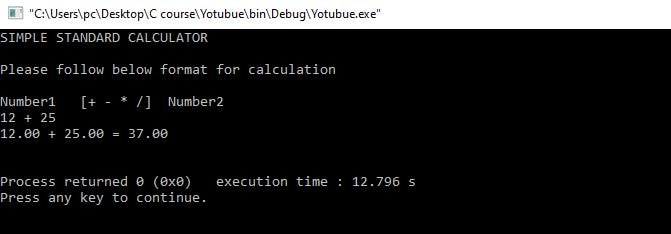
Output 1:
When the user enters 12, + (arithmetic operator), and 25.
Output 2:
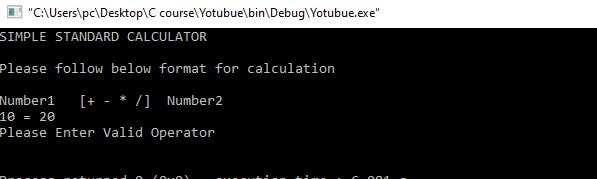
When the user enters 10, = (Assignment operator) and 20.
Recommended Articles for you:
- switch case in C, A Brief Explanation.
- Break Statements in C.
- Continue statement in C.
- File Handling in C, In Just A Few Hours!
- Format specifiers in C.
- A brief description of the pointer in C.
- Dangling, Void, Null and Wild Pointers.
- How to use fopen() in C?
- Function pointer in c, a detailed guide
- How to use the structure of function pointer in c language?
- Function pointer in structure.
- Pointer Arithmetic in C.
- void pointer in C.
- How to use fgetc() in C?
- How to use fputc() in C?
- 10 questions about dynamic memory allocation.
- Memory Layout in C.
- 100 C interview Questions.
- How to use fgets() in C?
- How to use fputs() in C?
- 100 Embedded C Interview Questions.
- How to use fread() in C?
- How to use fwrite() in C?