In this example, you will learn to convert binary to decimal numbers. Here we write a C program that takes a binary number as input and converts it into an equivalent decimal number. Converting a binary number to decimal means converting the number with base value 2 to base value 10.
The base value of a number system determines the number of digits used to represent a numeric value. For example, a binary number system uses 2 digits 0-1 to represent any numeric value.
Given a binary number n, you need to convert to a decimal number.
Example,
Input: 101
Output: 5


Input: 1001
Output: 9
To understand this code, you must have knowledge of the following C programming topics:
Binary to Decimal Conversion Formula:
The following formula is used to convert binary numbers to decimal numbers.
(Decimal Num)10 = ( d 0 × 20 )+ ( d 1 × 21 )+ ( d 2 × 22 )+ ….. + ( d n − 1 × 2n-1)
where “d” is a binary number containing “n” digits and d 0 , d 1 , d 2 , …, dn-1 are the individual digits of the binary number starting from the right-most position.
Example,
Let us convert (1001)2, from binary to decimal using the formula. We start doing the conversion from the rightmost digit, which is ‘1’ here.
(Decimal Number)10 = (d0 × 20 )+ (d1 × 21 )+ (d2 × 22 )+ ….. (dn−1 × 2n-1)
= (1 × 20) + (0 × 21) + (0 × 22) + (1 × 23)
= (1 × 1) + (0 × 2) + (0 × 4) + (1 × 8)
= 1 + 0 + 0 + 8
= 9
Chart For Binary to Decimal Conversion
The binary to the decimal conversion of the first 20 decimal numbers is displayed in the chart given below.
| Binary | Decimal |
|---|---|
| 0 | 0 |
| 1 | 1 |
| 10 | 2 |
| 11 | 3 |
| 100 | 4 |
| 101 | 5 |
| 110 | 6 |
| 111 | 7 |
| 1000 | 8 |
| 1001 | 9 |
| 1010 | 10 |
| 1011 | 11 |
| 1100 | 12 |
| 1101 | 13 |
| 1110 | 14 |
| 1111 | 15 |
| 10000 | 16 |
| 10001 | 17 |
| 10010 | 18 |
| 10011 | 19 |
| 10100 | 20 |
C Program to Convert Binary Number to Decimal:
Method 1: Using math.h library function
#include <stdio.h>
#include <math.h>


// function definition
int convertBinaryToDecimal(long long n)
{
    int dec = 0, i = 0, rem;

    while (n!=0)
    {
        rem = n % 10;
        n /= 10;
        dec += rem * pow(2, i);
        ++i;
    }

    return dec;
}


int main()
{
    long long n = 1001;

    const int dec = convertBinaryToDecimal(n);

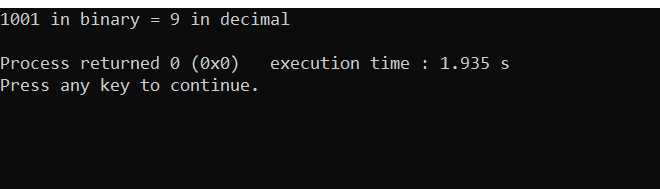
    printf("%lld in binary = %d in decimal\n", n, dec);

    return 0;
}
Output:
Method 2:
#include <stdio.h>


// function definition
int convertBinaryToDecimal(long long n)
{
    int num = n;
    int dec_value = 0;

    // Initializing baseValue value to 1, i.e 2^0
    int baseValue = 1;

    int temp = num;
    while (temp)
    {
        int last_digit = temp % 10;
        temp = temp / 10;

        dec_value += last_digit * baseValue;

        baseValue = baseValue * 2;
    }

    return dec_value;
}


int main()
{
    long long n = 10011;

    const int dec = convertBinaryToDecimal(n);

    printf("%lld in binary = %d in decimal\n", n, dec);

    return 0;
}
Output:
10011 in binary = 19 in decimal
Note: Above mentioned C program works only with binary numbers in the range of integers.
Recommended Post:
- C Programming Courses And Tutorials.
- CPP Programming Courses And Tutorials.
- Python Courses and Tutorials.
- C program to decimal to octal number
- Convert decimal to binary number
- C program to decimal to binary using recursion and without using power operator
- Program to decimal to binary number using recursion
- C program to convert decimal to binary without using arithmetic operators.