
The C Compilation Process is the sequence of steps that transforms C source code into an executable program. In this process, the source code goes through preprocessing, compilation, assembly, and linking before it can be executed by the computer.
This process is necessary because computers cannot directly understand C code. They understand only machine code, which consists of binary instructions (0s and 1s). Machine code is architecture-specific and can be executed directly by the processor.
Writing programs in machine language is extremely difficult and error-prone for humans. To simplify software development, programmers use high-level programming languages such as C, C++, Java, and Python. These languages are easier to read, write, debug, and maintain.
However, there is a challenge: computers cannot directly understand high-level languages. A computer only understands machine code.
Think of it this way: imagine two people trying to communicate, but one speaks only Chinese and the other speaks only Hindi. Communication would be impossible unless they had a translator who could convert one language into the other.
Similarly, in the world of C programming, a compiler acts as a translator. It converts a C program written by a programmer into machine code that the computer can understand and execute.
Let’s explore what a compiler is and how the C compilation process works.
What is a Compiler?
A compiler is a software program that translates source code written in one programming language (the source language) into another language (the target language).
In most cases, a compiler converts code written in a high-level programming language into a lower-level language such as assembly language, object code, or machine code, ultimately producing an executable program.
In the case of the C programming language, the compiler translates C source code into machine code that can run on a specific processor architecture.
The entire process of converting C source code into an executable program is known as the compilation process. In this article, you will learn what a compiler is, how the C compilation process works, and what happens at each stage of the build pipeline.
Stages of the C Compilation Process:
Although the exact implementation may vary between compilers, the C compilation process generally consists of four major stages:
- Preprocessing.
- Compilation
- Assembly
- Linking
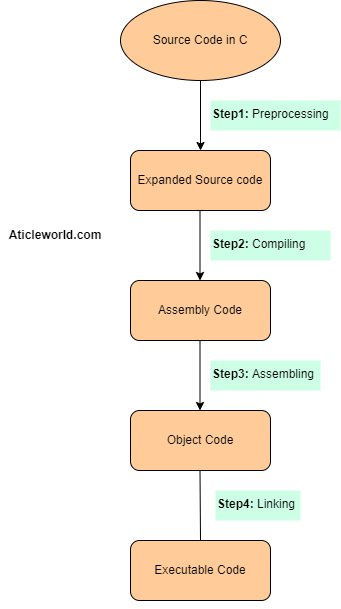
Now, let us see all the steps involved in a compilation process in C in detail.
Preprocessing:
Preprocessing is the first stage of the compilation process. Before the actual compilation begins, the C preprocessor processes special directives that start with the ‘#’ symbol such as #include, #define, and #ifdef. The preprocessor modifies the source code according to these directives and produces an expanded version of the program.
For example, if your program contains:
#include <stdio.h>
the preprocessor replaces this directive with the contents of the header file. Similarly, macros defined using #define are expanded before compilation begins.
Tasks Performed During Preprocessing:
- Removal of comments.
- Expansion of macros.
- Inclusion of header files.
- Conditional compilation
Example,
//Source Code
#define PI 3.14159

float area = PI * r * r;


//After preprocessing:

float area = 3.14159 * r * r;
The output of this stage is called the preprocessed source code.
Compilation:
The compiler takes the preprocessed source code and translates it into assembly language or an intermediate representation that is later converted into assembly code. During this stage, the compiler checks the program for errors and performs various optimizations.
Internal Compiler Phases:
Although the exact implementation varies between compilers, the following activities typically occur:
- Lexical analysis (tokenization).
- Syntax analysis (parsing).
- Semantic analysis.
- Intermediate code generation.
- Code optimization.
- Assembly code generation
If the compiler detects syntax or semantic errors, the compilation process stops and error messages are generated. The output of this stage is usually an assembly language file.
Assembly:
In the assembly stage, an assembler converts assembly language instructions into machine-readable object code. Each source file generally produces a separate object file.
Common object file extensions include:
- .o on Unix and Linux systems
- .obj on Windows systems
What Is an Object File?
An object file contains machine code that is not yet ready for execution because references to functions, variables, and memory locations may still need to be resolved.
In addition to machine instructions, an object file may contain:
- Symbol information.
- Relocation information.
- Debugging information
Object files are binary files and cannot be read directly by humans. Tools such as objdump can be used to inspect their contents.
Example:
//command

objdump -d main.o
This command displays a disassembled view of the object file.
Linking:
Linking is the final stage of the compilation process.
A program often consists of multiple source files and may use functions provided by external libraries. The linker combines all object files and requires libraries into a single executable file.

During this stage, the linker performs two important tasks.
Symbol Resolution:
The linker resolves references between different files.
For example, if a function is defined in one source file and called from another source file, the linker connects those references correctly.
Relocation:
The linker adjusts address-related information so that the program can execute correctly once loaded into memory.
After symbol resolution and relocation are completed, the linker generates the final executable file.
What Happens After Linking?
The output of the linker is an executable file. However, the executable does not start running immediately.
When you execute the program, the operating system’s loader loads the executable into memory, prepares the runtime environment, loads any required shared libraries, and transfers control to the program.
Summary of Stages of the C Compilation Process:
The following table summarizes the key inputs, outputs, and tools involved in each stage of the C compilation process:
| Stage | Input File | Tool Used | Output File | Description |
|---|---|---|---|---|
| Preprocessing | main.c | Preprocessor (cpp) | main.i | Processes preprocessor directives (#include, #define, etc.), expands macros, and produces pure C source code. |
| Compilation | main.i | Compiler (cc1) | main.s | Translates the preprocessed C code into assembly language instructions. |
| Assembly | main.s | Assembler (as) | main.o | Converts assembly code into machine code and generates an object file. |
| Linking | main.o (+ libraries) | Linker (ld) | main.exe / a.out | Combines object files and libraries, resolves external references, and creates the final executable program. |
Conclusion:
The C compilation process transforms human-readable source code into machine-executable instructions through four major stages:
- Preprocessing.
- Compilation.
- Assembly.
- Linking
Each stage has a specific responsibility, and together they convert a C program into an executable file that can run on a computer.
Understanding how these stages work helps developers debug build errors, understand compiler messages, optimize programs, and gain a deeper understanding of how software is translated and executed by a computer.