
C Macros are defined using the #define preprocessor directive and do not need to be terminated by a semicolon (;). In C programming, macro is a piece of code which has been given a name using the #define, we will see it in the below example code. Whenever we use this name in the code, it is replaced by the contents of the macro.
Consider the below example,
#define ATICLEWORLD 24
In my code where I will use “ATICLEWORLD”, it is replaced with 24.
These replacements occur before the compilation of the code which is the reason there is no type checking occurring with C macros.
There are mainly two kinds of macros:
- Object-like macros
- Function-like macros.
Both macros mainly differ in their appearance when used: object-like macros look like data objects, whereas function-like macros look like function calls.
In this tutorial, you will learn the C Macros with programming examples. I will discuss here the types of C macro (object macros and function macros). Also, here you will also learn to use #define with some predefined C Macros with the help of programming examples.
So let’s get started.
Object-like Macros in C
An object-like macro is a simple identifier that will be replaced by a code segment (a piece of code) in the program. It is mainly used to give a symbolic name to a numeric constant and it is a good habit to give a meaningful name to a numeric constant.
Like if you are creating a macro to represent the second, you should write the macro name SECOND. It increases the code readability.
To define a new macro in C, We can use the #define. A #define is a pre-processor directive.
Syntax of the object-like macro,
#define MACRO_NAME MACRO_VALUE
For Example,
#define ARRAY_SIZE 1024
Now ARRAY_SIZE is an alias of 1024, whenever in the program we will use ARRAY_SIZE it replaces with 1024.
//Declaration of array

int arr[ARRAY_SIZE];
Before the compilation of the code, the C preprocessor will replace the ARRAY_SIZE with 1024 and the array will look like the below expression,
int arr[1024];
Note: Macro definitions need not be terminated by a semi-colon(;)
The following program illustrates the use of macros in C/C++:
#include <stdio.h>

/*
  You can see semicolon (;)
  is not require.
*/
#define PI_VALUE 3.1415

int main()
{
    float radius, circleArea;
    printf("Enter the radius: ");
    scanf("%f", &radius);

    //We are using PI_VALUE
    circleArea = PI_VALUE*radius*radius;

    printf("Area=%.2f",circleArea);

    return 0;
}
Output:
Enter the radius: 3
Area=28.27
An object-like macro could have a multi-line. So to create a multi-line macro you have to use backslash-newline. See the below example,
#include <stdio.h>


#define LIST    10, \
                20, \
                30

int main()
{
    //Initialized array
    int arr[] = { LIST };

    printf("arr[0] = %d\n",arr[0]);
    printf("arr[1] = %d\n",arr[1]);
    printf("arr[2] = %d\n",arr[2]);

    return 0;
}
OutPut:
arr[0] = 10
arr[1] = 20
arr[2] = 30
Function like Macro in C:
A function-like macro looks like the function is because it has a pair of parentheses like the function. Similar to the object like macro #define use to create a function-like macro. You need to put a pair of parentheses immediately after the macro name.
For example,
#define MAX(A, B) (((A) > (B)) ? (A) : (B))
Let’s see an example code,
#include <stdio.h>

#define MAX(A, B)  (((A) > (B)) ? (A) : (B))


int main()
{
    int a = 10;
    int b = 20;

    //check max value
    int ret = MAX(a,b);

    printf("Max value %d\n", ret);

    return 0;
}
Output:
Max value 20
Note: You can See, Token Pasting Operator
You should remember the following points before using the function-like a macro in c.
- Always use proper parentheses in macro.
- Use each macro parameter once to avoid the undesired side effect.
- You should never use a function like macro if you can use the function.
- Always remember there is no type checking occur in macro.
- You should remember the following points before using the function-like a macro in c
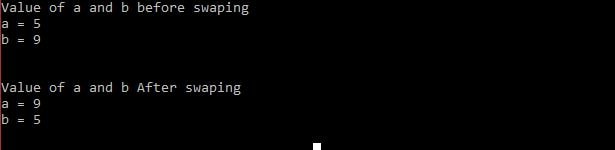
We can also create a function as a macro in multi-line, See the below example in which I am swapping the value of two variables.
#include <stdio.h>

#define swap(x,y,T) do { \
    T temp = (*x);\
    (*x) = (*y); \
    (*y) = temp; \
} while (0)


int main(void)
{
    int a = 5;
    int b = 9;

    printf("Value of a and b before swaping\n");
    printf("a = %d\n",a);
    printf("b = %d\n",b);

    //Swap the number
    swap(&a,&b,int);


    printf("\n\nValue of a and b After swaping\n");
    printf("a = %d\n",a);
    printf("b = %d\n",b);

    return 0;
}
Output:
Some C Predefined Macros:
The following is the list of some predefined Macros which you should know.
Macro    Description

_DATE_	 current date in "MM DD YYYY" format.

_TIME_	 current time in "HH:MM:SS" format.

_FILE_	 current file name.

_LINE_	 current line number.
See the example code,
#include<stdio.h>

int main()
{
    printf("File Name :%s\n", __FILE__ );

    printf("Current Date(MMM DD YYYY)  :%s\n", __DATE__ );

    printf("Current Time(HH:MM:SS)  :%s\n", __TIME__ );

    printf("Line Number  :%d\n", __LINE__ );

    return 0;
}
Output:
File Name :pointermain.c
Current Date(MM DD YYYY) :Jan 1 2019
Current Time(HH:MM:SS) :14:34:08
Line Number :11
Recommended Post
- C Programming Courses And Tutorials
- CPP Programming Courses And Tutorials.
- Learn how to use the typedef in C.
- Difference between typedef and #define ( typedef vs #define).
- Macro in C, you should know.
- enum in C,7 application.
- Best programming mouse
- Best electronic Kits.
- Best C books.
- You should know the volatile Qualifier.
- 100 embedded C Interview Questions.
- 100 C interview Questions.
- Interview questions on bitwise operators in C
- 10 questions about dynamic memory allocation.
- File handling in C.
- Pointer in C.
- C format specifiers.