When working with C or C++ in embedded systems and firmware development, the ability to Detect Rising and Falling Edge of a Bit in C/C++ is essential. This technique is widely used when developing firmware for microcontrollers such as STM32, NXP, and TI to monitor digital signals, status registers, and hardware events reliably.
In embedded systems programming, it is common to store multiple related status flags inside a single variable. This variable is typically referred to as a register, where each individual bit represents a specific hardware state or condition.
For example:
uint32_t flagRegister;
But in real-world firmware development, we are usually not concerned with the exact numerical value stored in a register. Instead, we care about detecting changes in its individual bits. Specifically:
- Whether the register value has changed
- Which particular bit has changed
- Whether the change represents a rising edge (0 → 1)
- Whether the change represents a falling edge (1 → 0)
Efficient bit change detection is essential in embedded firmware programming, especially when monitoring Alarm Register, GPIO inputs, communication flags (UART, SPI, I2C), hardware fault indicators, or peripheral status registers.
In this blog post, we will explore the fastest and most reliable way to Detect Rising and Falling Edge of a Bit in C/C++ using efficient bitwise operations designed for real-world embedded and systems programming.
In this article, you will learn:
- How to detect whether any bit has changed.
- How to determine exactly which bit changed.
- How to detect rising edge (0 → 1) transitions.
- How to detect falling edge (1 → 0) transitions.
- How to check a bit change in an integer in C/C++.
- How to write clean, efficient, and embedded-friendly code.
Understanding Rising and Falling Edges in Firmware
In embedded systems, particularly when working with status registers, GPIO inputs, or alarm flags—understanding the distinction between a level and a state transition is fundamental.
Many firmware problems such as like repeated logging, alarm flooding, or high CPU usage happen because we react to a level instead of detecting when something actually changes.
In embedded systems, where determinism and efficiency are non-negotiable, failing to distinguish between a persistent condition and a transition event leads to unstable behavior, noisy logs, and wasted processing cycles.
In embedded systems, we care about two things:
- What is happening right now (the current state)
- What just changed (the event)
If we do not clearly separate these two ideas, the system may:
- Print the same error again and again
- Send repeated alarm messages
- Waste CPU time
- Behave unpredictably
Good, reliable firmware works only when we clearly understand the difference between a condition that is active and a condition that just started or ended.
Edge vs Level in Embedded Systems:
In embedded systems especially when working with status registers, GPIO inputs, or alarm flags understanding the difference between a level and an edge is very important.
Many common firmware problems like repeated log messages, alarm flooding, unstable behavior, or high CPU usage happen because the code reacts to a level when it should react to an edge.
This mistake is small, but the impact can be big.
To design clean and reliable firmware, you must think clearly about what you are reacting to.
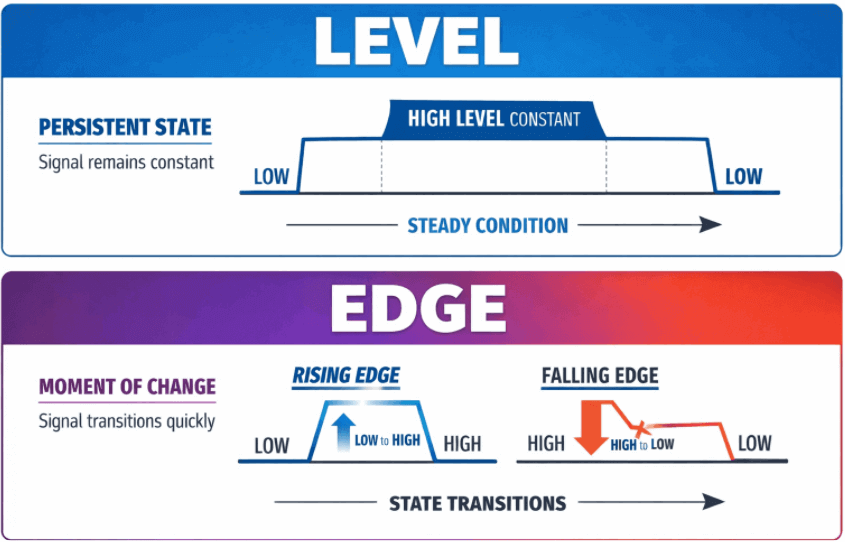
What Is a Level?
In embedded systems, a level refers to the continuous state of a signal, flag, or variable. It answers a very simple question: What is the state right now?
Level does not tell you when something started. It does not tell you whether it just changed. It only tells you what the condition is at this exact moment. In other words, a level has no concept of history, it represents only the current state.
Examples of level:
- A GPIO pin reads HIGH
- A status register bit is 1
- An alarm flag is set
- A temperature value is above its threshold
- A communication line remains active
Each of these represents a condition that currently exists.
As long as that condition remains true, the level remains true. The system does not care whether it has been true for 1 millisecond or 10 seconds. It simply reports the present state.
What is an Edge?
In embedded systems, an edge represents the exact moment when a signal, flag, or variable changes its state.
Unlike a level, which describes a condition that continues over time, an edge represents a transition. It answers a completely different question: Did the state just change?
An edge occurs only at the instant when the value moves from one state to another.
Types of Edges:
In digital systems, there are two common types of edges.
Rising Edge:
A rising edge occurs when a signal transitions from LOW to HIGH.
0 → 1
For example:
- A GPIO pin changes from LOW to HIGH
- A status bit changes from 0 to 1
- A flag becomes set
Falling Edge:
A falling edge occurs when a signal transitions from HIGH to LOW.
1 → 0
For example:
- A GPIO pin changes from HIGH to LOW
- A status bit clears from 1 to 0
- A fault condition disappears
Important Difference between level vs edge:
In firmware systems, understanding the difference between levels and edges is critical. A level indicates a persistent condition, while an edge represents the instant when a signal changes state.
The following table highlights the key differences between level signals and edge signals in embedded systems and firmware development.
How to Detect Rising and Falling Edge of Bits in C/C++:
Detecting whether a bit has changed is useful, but in many embedded systems we must also determine the direction of the change.
For example:
- An alarm becoming active (0 → 1)
- A fault getting cleared (1 → 0)
- A button press (0 → 1)
- A button release (1 → 0)
These transitions are known as edges.
A change from 0 to 1 is called a Rising Edge, while a change from 1 to 0 is called a Falling Edge.
Understanding these transitions allows firmware to react only when the state changes, instead of repeatedly reacting to a persistent level.
Detecting Rising Edge (0 → 1)
To detect a rising edge, the bit must satisfy two conditions:
- It was 0 previously
- It is 1 now
This condition can be expressed using bitwise operations as:
(~previous) & current
Explanation:
- ~previous flips all bits of the previous value
- & current ensures we only keep bits that are currently set
The result is a mask containing only the bits that transitioned from 0 to 1.
Rising Edge Detection Code:
This function returns a bit mask of all bits that changed from 0 to 1.
#include <stdint.h>
#include <stdbool.h>

static inline uint32_t getRisingEdgeBits(uint32_t previous,
                                          uint32_t current)
{
    return (~previous) & current;
}
How It Works:
Step 1: – Invert the Previous Value
~previous
All previously 0 bits become 1, and 1 bit become 0. This helps identify bits that were previously inactive.
Step 2: – Apply Bitwise AND
(~previous) & current
Only bits that are currently 1 and previously 0 remain set. This produces a mask of rising edge bits.
Detecting Falling Edge (1 → 0)
A falling edge occurs when:
- The bit was 1 previously
- The bit is 0 now
This can be expressed as:
previous & (~current)
Falling Edge Detection Code:
This function returns a bit mask of all bits that changed from 1 to 0.
#include <stdint.h>
#include <stdbool.h>

static inline uint32_t getFallingEdgeBits(uint32_t previous,
                                           uint32_t current)
{
    return previous & (~current);
}
How It Works
Step 1: – Invert the Current Value
~current
All currently 0 bits become 1, allowing detection of cleared bits.
Step 2: – Apply Bitwise AND
previous & (~current)
This ensures only bits that were previously set but now cleared remain set.
Complete Example: Edge Detection Using Enum in C:
#include <stdio.h>
#include <stdint.h>

/*----------------------------------------------------------
 Enum representing possible edge states
-----------------------------------------------------------*/
typedef enum
{
    EDGE_NONE    = 0U,
    EDGE_RISING  = 1U,
    EDGE_FALLING = 2U,
    EDGE_BOTH    = 3U
} EdgeState;


/*----------------------------------------------------------
 Detect edge condition between two values
-----------------------------------------------------------*/
static inline EdgeState detectEdge(uint32_t previous,
                                   uint32_t current)
{
    uint32_t rising  = (~previous) & current;
    uint32_t falling = previous & (~current);

    return (EdgeState)((rising ? EDGE_RISING : EDGE_NONE) |
                       (falling ? EDGE_FALLING : EDGE_NONE));
}


/*-----------------------------------------------------------*/
int main()
{
    uint32_t previous = 0x05; /* 0101 */
    uint32_t current  = 0x0A; /* 1010 */

    EdgeState edge = detectEdge(previous, current);

    printf("Previous: 0x%X\n", previous);
    printf("Current : 0x%X\n\n", current);

    switch(edge)
    {
        case EDGE_NONE:
            printf("No edge detected\n");
            break;

        case EDGE_RISING:
            printf("Rising edge detected\n");
            break;

        case EDGE_FALLING:
            printf("Falling edge detected\n");
            break;

        case EDGE_BOTH:
            printf("Both rising and falling edges detected\n");
            break;
    }

    return 0;
}
Output:
Previous: 0x5
Current : 0xA

Both rising and falling edges detected
Bitwise Analysis:
Edge detection is implemented using the following formulas.
Rising Edge Detection:
A rising edge occurs when a bit changes from 0 → 1.
(~previous) & current
Explanation:
- ~previous turns all 0 bits into 1
- ANDing with current keeps only the bits that became 1
Falling Edge Detection:
A falling edge occurs when a bit changes from 1 → 0.
previous & (~current)
Explanation:
- ~current turns all 0 bits into 1
- ANDing with previous keeps only the bits that were previously 1 but are now 0
Example: Understanding Edge Detection with Values
Let’s understand how the edge detection logic works with an example.
previous = 0101
current  = 1010
Step 1: Invert previous
To detect rising edges, we first invert the previous value.
~previous = 1010
Step 2: Detect Rising Edges
Formula:
rising = (~previous) & current
Calculation:
rising = 1010 & 1010
       = 1010
Interpretation:
Bits 1 and 3 changed from 0 → 1, so they represent rising edges.
Rising mask = 1010
Step 3: Detect Falling Edges
First invert the current value.
~current = 0101
Now apply the falling edge formula.
falling = previous & (~current)
        = 0101 & 0101
        = 0101
Interpretation:
Bits 0 and 2 changed from 1 => 0, so they represent falling edges.
Falling mask = 0101
Final Result:
Rising mask = 1010
Falling mask = 0101
Since both masks are non-zero, the function detects both rising and falling transitions.
return EDGE_BOTH;
Related Bit Manipulation Articles in C/C++
If you are learning how to detect bit changes in C/C++, you may also find these bit manipulation techniques useful:
- How to Detect Bit Changes in C/C++ Using the XOR Operator and Bit Masking.
- How to Toggle Particular Bits in a Given Number in C
- How to Set a Particular Bit in a Number in C
- How to Turn Off a Particular Bit in C
- Count Set Bits in an Integer in C
- Turn Off the Rightmost Set Bit in C
- Rotate Bits of a Number in C
- Useful Macros for Bit Manipulation in C/C++
- 5 Ways to Check if Two Integers Have Opposite Signs in C
- Operator Precedence and Associativity in C