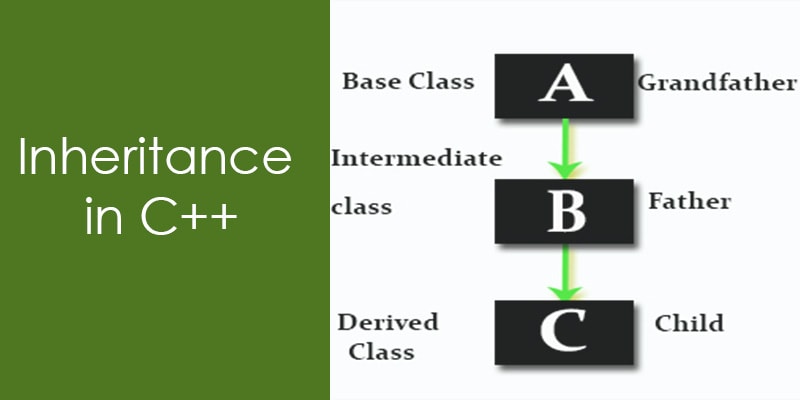
Inheritance is one of the foundational pillars of Object-Oriented Programming (OOP). In this comprehensive blog post, we will explore Inheritance in C++ with clear explanations and practical examples. Whether you’ are a beginner or a seasoned developer, this article will help you understand not only how inheritance works but also when and why to use it.
Let’s begin with the fundamental question:
🔍 What Is Inheritance in C++?
Inheritance allows you to define a new class (called the derived class or child class) based on an existing class (called the base class or parent class). The derived class inherits the properties and behaviors (data members and member functions) of the base class and can also introduce its own additional features.
Key Definitions:
- Base Class (Parent/Superclass): The class whose features are inherited.
- Derived Class (Child/Subclass): The class that inherits features.
Think of it like this:
If a “Cow” is a specialized form of a more generic “Animal”, then “Cow” should inherit from “Animal”.
In simple terms, Inheritance promotes code reuse, extensibility, and organized structure in large applications.
✨ Example Scenario:
Imagine building a survey system for animals like Cows, Dogs, and Cats. Each animal shares common attributes such as speed, diet, and cost. Instead of duplicating this logic in each class, we define a common Animal class and derive specific animals from it.
class Animal
{
public:
  int speedCalculator(unsigned int speedOffset);
  int priceCalculator(unsigned int priceOffset);
  int dietCalculator(unsigned int dietOffset);
};

class Cow : public Animal
{
public:
  void milkQuality();
};
With this structure, Cow inherits everything from Animal and can also define its own functionality, like milkQuality().
You may have noticed the use of the keyword public in the above inheritance declaration:
class Cow : public Animal
In C++, inheritance can be specified as public, protected, or private. The keyword you choose directly affects the accessibility of the base class members in the derived class. We will explore the differences between these inheritance types in the upcoming section of this tutorial.
In a similar fashion, we can define Dog and Cat classes that also inherit from Animal, reusing and extending its functionality. This results in a classic inheritance hierarchy, as shown below:
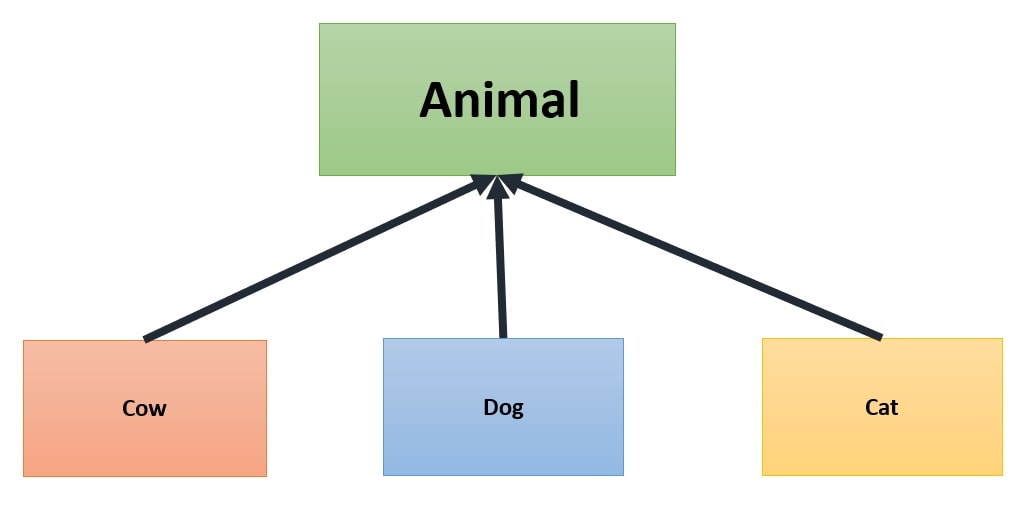
Note: Class hierarchies are generally drawn with arrows pointing from derived classes to base classes.
🧬 The “Is-A” Relationship:
Inheritance defines an “is-a” relationship between classes and should only be used when the derived class is truly a subtype of the base class. It is not suitable for modeling “has-a” relationships, which are better represented through composition.
✅ Valid “is-a” examples:
- A Cow is an Animal.
- A Mango is a Fruit.
- A Car is a Vehicle.
❌ Invalid “is-a” usage:
Do not use inheritance to model “has-a” relationships. For example, a Car has an Engine — this is composition, not inheritance.
❗Why This Matters:
- Using inheritance incorrectly (e.g. when only a “has-a” relationship exists) can lead to:
- Tight coupling.
- Fragile code.
- Inflexibility in design
- Composition promotes better encapsulation and reuse without forcing an unnatural hierarchy.
🧠 Rule of Thumb:
Ask yourself: “Is class B a kind of class A?”
- If yes, use inheritance
- If no, and B just uses or contains A, use composition
Example: C++ Inheritance:
Here, the cow object (an instance of the derived class Cow) can access the public methods of the base class Animal. This is because Cow inherits from Animal. The same applies to the dog and cat objects, which are instances of the Dog and Cat classes respectively — both also inherit from Animal, and thus share its functionality.
This demonstrates the purpose of inheritance: to allow multiple related classes to share common behavior without duplicating code.
#include <iostream>
using namespace std;

// Base class representing a generic Animal
class Animal
{
public:
  // Calculates speed based on an offset value
  // Returns -1 if offset is invalid (offset >= 15)
  int speedCalculator(unsigned int offset)
  {
    return (offset < 15) ? (offset * 10) : -1;
  }

  // Calculates price based on an offset value
  // Returns -1 if offset is invalid (offset >= 100)
  int priceCalculator(unsigned int offset)
  {
    return (offset < 100) ? (offset * 1000) : -1;
  }

  // Calculates diet cost based on an offset value
  // Returns -1 if offset is invalid (offset >= 20)
  int dietCalculator(unsigned int offset)
  {
    return (offset < 20) ? (offset * 1000) : -1;
  }
};

// Derived class Cow, inherits common behaviors from Animal
class Cow : public Animal
{
public:
  // Unique behavior for Cow
  void milkQuality() { cout << "Cow milk quality is good" << endl; }
};

// Derived class Dog, inherits from Animal
class Dog : public Animal
{
public:
  // Unique behavior for Dog
  void bark() { cout << "I can bark! Bho Bho!!" << endl; }
};

// Derived class Cat, inherits from Animal
class Cat : public Animal
{
public:
  // Unique behavior for Cat
  void climbing() { cout << "Wow! Cat can climb trees!" << endl; }
};

int main()
{
  // Create a Cow object and call its methods
  Cow cow;
  cout << "Cow speed: " << cow.speedCalculator(1) << endl;
  cow.milkQuality(); // Unique to Cow

  // Create a Dog object and call its methods
  Dog dog;
  cout << "\nDog speed: " << dog.speedCalculator(5) << endl;
  dog.bark(); // Unique to Dog

  // Create a Cat object and call its methods
  Cat cat;
  cout << "\nCat speed: " << cat.speedCalculator(3) << endl;
  cat.climbing(); // Unique to Cat

  return 0;
}
Output:
Cow speed is = 10
Cow Milk quality is good

Dog speed is = 50
I can bark! Bho Bho!!

Cat speed is = 30
Wow! Cat can climbing on tree
🔁 What Gets Inherited?
- ✅ All non-private members (data and methods) of the parent class are inherited by the child class as-is.
- ⛔ Private members are not directly accessible in the child class, although they still exist in memory.
- 💡 Reverse is NOT true — child class members are not accessible from the parent class.
🎯 Why Use Inheritance?
Based on my architectural experience, I suggest:
Use inheritance when your design has a clear “is-a” relationship, and code reuse brings consistency and extensibility.
✅ When to Use
- Modeling real-world hierarchies, where arrows point from child to parent, showing “is-a” relationships:
Director→Manager→Employee
(A Director is a Manager, and a Manager is an Employee.) - Extending or customizing existing classes:
BaseController → APIController - Reusing shared logic among related classes:
CommunicationDevice → UARTDevice, SPIDevice
❌ When Not to Use
- When there’s no true “is-a” relationship:
(e.g., A Car is not a type of Engine). - When a composition (“has-a”) relationship is a better fit.
- When you only need code reuse without a tight relationship — prefer aggregation instead
🧠 Key Concepts Behind Inheritance
Let’s break it down with clarity:
| Concept | Explanation |
|---|---|
| Superclass / Parent Class | The general class from which others inherit (e.g., Person). |
| Subclass / Child Class | A more specific class that inherits from the parent (e.g., Student). |
| “Is-a” Relationship | A subclass is-a kind of the parent class. |
| Generalization | Moving from specific to general (e.g., Student → Person). |
| Specialization | Adding unique features to a subclass (Student adds study() method). |
⚠️ Modern Perspective on Inheritance:
While inheritance is a core concept in object-oriented programming, it’s increasingly seen as less favorable in modern software design. Many experts recommend using composition over inheritance because it promotes greater flexibility, modularity, and maintainability.
In fact, some modern programming languages — such as Go — do not support classical inheritance at all. Instead, they encourage developers to use composition, which allows objects to be built by combining simpler, reusable parts.
We’ll explore the differences between inheritance and composition in more detail in a future article
🏗️ Constructing Derived and Base Class Objects:
When a derived class object is created, the base class object is constructed first. This ensures that all inherited members are properly initialized before the derived class’s own initialization begins.
- The derived class constructor calls the base class constructor.
- If you do not explicitly specify which base class constructor to call, the compiler invokes the default constructor of the base class.
- You can pass arguments to base class constructors using the member initializer list in the derived class constructor.
“You cannot build a second floor without a solid ground floor.”
Example 1: Single Inheritance Constructor Calls:
#include <iostream>
using namespace std;

// Base class A with a parameterized constructor
class A
{
protected:
  int data1; // Data member of class A
public:
  // Constructor initializes data1 and prints a message
  A(int n)
    : data1(n)
  {
    cout << "A() -> data1 = " << data1 << endl;
  }
};

// Derived class B inherits from class A
class B : public A
{
private:
  int data2; // Data member of class B
public:
  // Constructor initializes base class A with n,
  // initializes data2, and prints a message
  B(int n)
    : A(n)
    , data2(n)
  {
    cout << "B() -> data2 = " << data2 << endl;
  }
};

int main()
{
  // Create an object of class B,
  // triggers constructor calls of A and then B
  B obj(2);
  return 0;
}
Output:
A() -> data1 = 2
B() -> data2 = 2
Explanation:
The base class constructor (A(int)) is called first to initialize inherited members before the derived class constructor (B(int)) runs.
Constructor Order in Multiple Inheritance:
When a derived class inherits from multiple base classes, the constructors of these base classes are called in the order in which they are listed in the derived class declaration, not in the order they appear in the derived class’s constructor initializer list.
This means:
- The compiler calls base class constructors based on their order in the class inheritance list.
- The order of initialization in the constructor’s member initializer list does not affect the order of base class constructor calls.
#include <iostream>
using namespace std;

class A
{
public:
  A() { cout << "Constructor A called\n"; }
};

class B
{
public:
  B() { cout << "Constructor B called\n"; }
};

class C
{
public:
  C() { cout << "Constructor C called\n"; }
};

// Derived inherits from A, B, then C — this order matters!
class Derived
  : public A
  , public B
  , public C
{
public:
  Derived()
    : C()
    , B()
    , A()
  { // Initializer list order is C, B, A (reverse)
    cout << "Derived constructor called\n";
  }
};

int main()
{
  Derived obj;
  return 0;
}
Output:
Constructor A called
Constructor B called
Constructor C called
Derived constructor called
Explanation:
- Although the initializer list specifies constructors in the order C(), B(), A(), the base class constructors are called in the order they are declared in the class inheritance list: A, then B, then C.
- This means A’s constructor runs first, then B’s, then C’s.
- Finally, the Derived constructor body executes.
Why is this important?
- It ensures consistent and predictable construction order, which is critical if base classes depend on one another.
- It prevents surprises and bugs caused by changing the initializer list order.
- It helps maintain safe and reliable multiple inheritance designs.
C++ access specifiers:
C++ supports three access specifiers public, protected, and private. An access specifier specifies the access rules for members following it until the end of the class or until another access specifier is encountered. For example,
class X
{
    int a; // X::a is private by default: class used
public:
    int b; // X::b is public
    int c; // X::c is public
};
Note: Any number of access specifiers is allowed and no particular order is required. For example,
struct S
{
    int a; // S::a is public by default: struct used

protected:
    int b; // S::b is protected

private:
    int c; // S::c is private

public:
    int d; // S::d is public

};
So let’s understand all three access specifiers (public, protected, and private) one by one with examples.
private: A member (either data member or member function) declared in a private section of a class can only be accessed by member functions and friends of that class.
class Test
{
private:
    // Access only by member functions
    //and friends of that class
    int data;
};
protected: A member (either data member or member function) declared in a protected section of a class can only be accessed by member functions and friends of that class, and by member functions and friends of derived classes.
class Test
{
protected:
    //Access by member functions and friends of that class,
    //and by member functions and friends of derived classes.
    int data;
};
public: A member (either data member or member function) declared in a public section of a class can be accessed by anyone.
class Test
{
public:
    //Access by anyone
    int data;
};
Understanding Protected and Private Members in C++ Inheritance:
By now, you have a basic grasp of access specifiers and modifiers in C++. But an important question often arises:
Can derived classes access the private or protected members of their base classes?
Until now, we have mostly discussed public members. Let’s dive deeper and explore how protected and private members behave in inheritance.
Protected Members:
- Protected members of a base class are accessible within derived class member functions and friends.
- They provide a way to hide data from the outside world while still allowing derived classes to use and extend it.
- Use protected members when you want to restrict access from general code but enable inheritance-based access.
Example:
#include <iostream>
using namespace std;

class A
{
protected:
  void displayMsg() { cout << "I am a protected function\n"; }
};

class B : public A
{
public:
  void msg()
  {
    // Derived class accessing protected base class member
    displayMsg();
  }
};

int
main()
{
  B obj;

  // Works fine: prints "I am a protected function"
  obj.msg();

  return 0;
}
Output:
I am protected function
Private Members
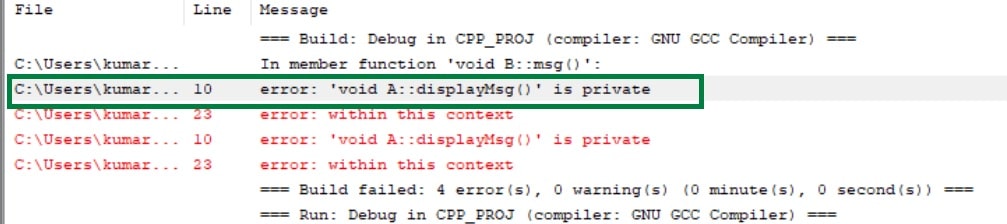
- Private members of a base class cannot be accessed directly by derived classes.
- Private members are strictly confined to the class where they are declared.
- If a derived class needs access to base class private members, it can only do so via public or protected member functions provided by the base class.
Example:
#include <iostream>
using namespace std;

class A
{
private:
  void displayMsg() { cout << "I am a private function\n"; }
};

class B : public A
{
public:
  void msg()
  {
    // ERROR: Cannot access private member from base class
    displayMsg();
  }
};

int
main()
{
  B obj;
  // Compilation error if uncommented above line
  obj.msg();
  return 0;
}
Output:
Access Modes in C++ Inheritance
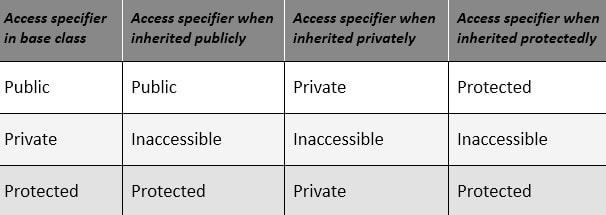
Up to this point, we have inherited classes using the public keyword, but C++ offers three access modes for inheritance: public, protected, and private. These modes control how the base class members’ access specifiers are treated in the derived class.
1. Public Inheritance (class B : public A):
- Public members of the base class remain public in the derived class.
- Protected members of the base class remain protected in the derived class.
- Private members remain inaccessible directly.
class A
{
  // public and protected members
};

class B : public A
{
  /*
  Base class public members  -> public in B
  Base class protected members -> protected in B
  */
};
2. Protected Inheritance (class B : protected A)
- Both public and protected members of the base class become protected in the derived class.
- Private members remain inaccessible directly.
class A
{
  // public and protected members
};

class B : protected A
{
  /*
  Base class public members  -> protected in B
  Base class protected members -> protected in B
  */
};
3. Private Inheritance (class B : private A)
- Both public and protected members of the base class become private in the derived class.
- Private members remain inaccessible directly.
class A
{
  // public and protected members
};

class B : private A
{
  /*
  Base class public members  -> private in B
  Base class protected members -> private in B
  */
};
The below table summarizes the above three access modes and shows the access specifier of the members of the base class in the subclass when derived in public, protected, and private modes:
Important Points About Inheritance:
Understanding C++ inheritance in depth helps avoid many subtle bugs and design pitfalls. Below are 8 important concepts every C++ developer should know when working with inheritance.
1. Default Inheritance Access Mode:
The default access mode depends on whether you’re using struct or class.
- struct defaults to public inheritance.
- class defaults to private inheritance.
struct D1 : B
{
    /* ... */
}; //Inherits publicly from B


class D2 : B
{
    /* ... */
}; //Inherits privately from B
2. Accessing Private Base Members:
Private members of a base class are not accessible in the derived class, even indirectly. However, they can still be accessed using a pointer to the base class with an explicit cast.
class A
{
public:
  int data;
};

class B : private A
{};

class C : public B
{
public:
  void funMethod()
  {
    data = 3; // ❌ Error: data is private in B


    A obj;
    obj.data = 3;     // ✅ OK: direct access through A
    A* bp = (A*)this; // ✅ OK: cast pointer to A
    bp->data = 3;     // ✅ OK
  }
};
3. Inheriting Constructors (using Declarations):
In C++, constructors of a base class can be explicitly inherited by a derived class using using declarations. This allows the derived class to reuse the base class constructors without redefining them.
If the using declaration refers to a constructor, it means that the derived class inherits that set of constructors from the base class. This feature simplifies code and helps avoid duplication. For example,
#include <iostream>
using namespace std;

struct A
{
  A(int data) { cout << "A constructor called with data = " << data << endl; }
};

struct D : A
{
  using A::A; // Inherit A(int)

  int x = 0; // Initialize x to avoid uninitialized value

  void test();
};

void D::test()
{
  D d(2); // Calls inherited constructor A(int)

  cout << "D::test executed. x = " << d.x << endl;
}

int main()
{
  D obj(5); // Calls A(int)

  obj.test();

  return 0;
}
Output:
A constructor called with data = 5
A constructor called with data = 2
D::test executed. x = 0
🧠 Useful when you want to avoid rewriting constructors in the derived class.
4. Friendship is Not Inherited:
Friendship is not inherited. You can understand this like your friend’s children are not your friends. For example,
#include <iostream>
using namespace std;

class A
{
private:
    int a;
    friend void f();
};

class B : public A
{
    int data;
};

void f()
{
    A obj1;

    obj1.a = 10; // Ok

    B obj2;

    obj2.data = 10; //Error
}

int main()
{
    f();
    return 0;
}
Friend of A is not also a friend of B. Having Binherited from Avia public access means that all public and protected members of A are accessible as members of B. Attribute “data” is a private member of B. Since f() is not a friend of B, it cannot access private members of B.
5. Accessing Base Class Members in Derived Classes:
Base class members can be accessed just like those of the derived class, unless name hiding or ambiguity occurs. For example,
#include <iostream>
using namespace std;

class A
{
public:
    int a;
};

class B : public A
{
public:
    int b;
};


int main()
{
    B obj; //derived class object

    /*
    Base class member referred to
    the same manner as derived class.
    */
    obj.a = 10; //Base class member

    obj.b = 20; //Derived class member

    return 0;
}
If a base member is hidden by a derived class member with the same name, use the scope resolution operator :: to disambiguate. Consider the below example.
#include <iostream>
using namespace std;

class A
{
public:
    int a;
};

class B : public A
{
public:
    int a;
    void fun()
    {
        A::a = 10; // Base class 'a'
        B::a = 10; // Derived class 'a'
        cout << "A's a is " << A::a<<endl;
        cout << "B's a is " << B::a;
    }
};


int main()
{
    B obj; //derived class object

    obj.fun(); //Calling fun()

    return 0;
}
6. Upcasting: Converting Derived Class Pointers to Base Class Pointers:
In C++, you can automatically convert a pointer to a derived class into a pointer to its base class — no casting is needed. This is useful when you want to work with a derived object using base class features.
Also, a derived class can act as a base class for another class. In that case, you can convert a pointer to the most derived class into a pointer to any base class — as long as the base class is accessible and not ambiguous.
#include <iostream>
using namespace std;


//Base class
class BaseClass
{
public:
    int data;
};


//child class
class DerivedClass  : public BaseClass
{

};

int main()
{
    //derived class ptr
    DerivedClass * derivePtr = new DerivedClass ;

    // upcast - implicit type cast allowed
    BaseClass* basePtr = derivePtr;

    basePtr->data = 27;

    cout<<"basePtr->data = "<<basePtr->data <<endl;

    delete basePtr;

    return 0;
}
Output:
basePtr->data = 27
7. Preventing Inheritance Using final (C++11)
Use the final keyword (C++11) to prevent a class from being inherited. If a class or struct is marked as final then it becomes non-inheritable and cannot be used as a base class/struct.
#include <iostream>

//class with final keyword
class A final
{
};

class B : public A
{
};

int main()
{
    B obj;

    return 0;
}
Output:
error: cannot derive from ‘final’ base ‘A’ in derived type ‘B’
8. Preventing Overriding with final on Virtual Functions:
Use final to prevent overriding of a virtual function in a derived class.
Sometimes you don’t want to allow the derived class to override the base class’ virtual function. Using the final the keyword you can prevent the overriding of the virtual function of the base class.
#include <iostream>
using namespace std;


//Base class
class Base
{
public:
    //virtual fun with final keyword
    virtual void fun() final
    {
        cout << "fun() in Base";
    }
};


//Derived class
class Derived : public Base
{
    //Try to override the virtual function
    // of the base class
    void fun()
    {
        cout << "fun() in Derived\n";
    }
};


int main()
{
    //object of derived class
    Derived obj1;

    /* Assigning derived class object
       to base class reference.
    */
    Base &obj2 = obj1;

    //calling fun of derive class
    obj2.fun();

    return 0;
}
Output:
error: overriding final function ‘virtual void Base::fun()
Types of inheritance in C++
I will cover this topic in a separate blog post. Here I am only describing the few basic types of inheritance supported by C++ with images and example code.
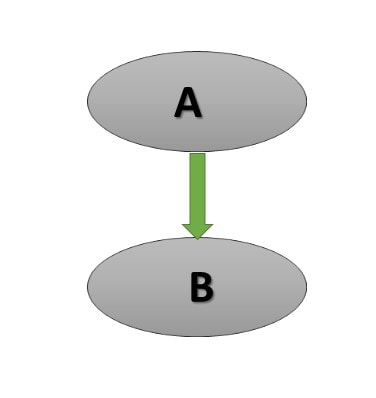
Single Inheritance in C++
This is a basic type of inheritance in which only one derived class is inherited from one base class. In the below example, class B is derived from class A.
//base class
class A
{

}

//child class
class B : public A
{

}
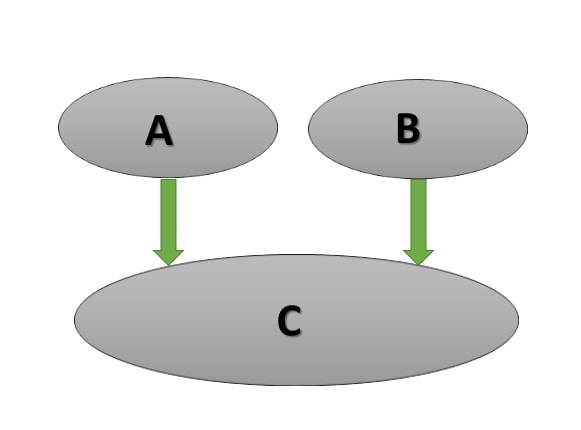
Multiple Inheritance in C++
In which one class is derived from more than two classes. In the below example class C is derived from class A and class B.
// first base class
class A
{

}

//Second base class
class B
{

}

//class derived from A and B
class C : public A public B
{

}
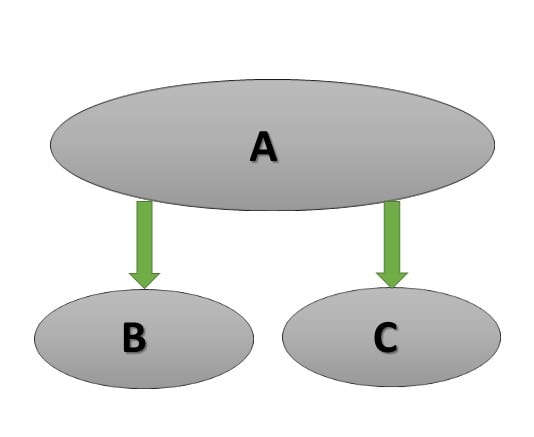
Hierarchal Inheritance in C++
In which more than one class is derived from the same base class. In the below example, class B and class C are derived from the same base class A.
//Base class
class A
{

}

//derived class B from A
class B : public A
{

}

//derived class C from A
class C : public A
{

}
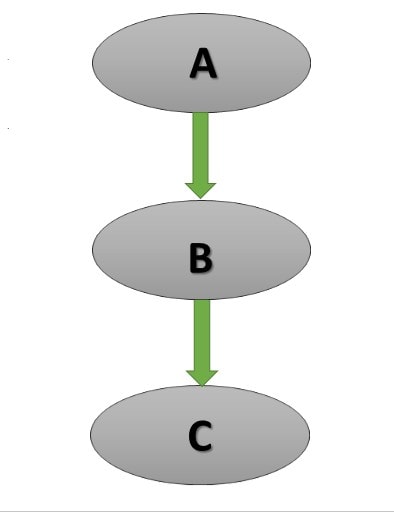
Multilevel Inheritance in C++
In which derived class is derived from another derived class. In the below example class C is derived from another derived class B.
//Base class
class A
{

}

//child class of A
class B :  public A
{

}

//Child class of B
class C : public B
{

}
Hybrid Inheritance in C++
Hybrid inheritance is the composition of more than one inheritance. The below example is the composition of multilevel and hierarchal inheritance.
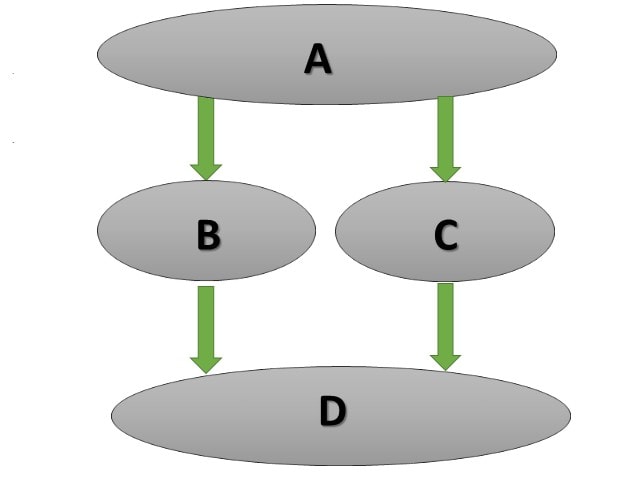
//Parent class
class A
{

}

//B is child class of A
class B :  public A
{

}

//C is child class of A
class C : public A
{

}

//D is child class of B nd C
class D : public B, public C
{

}
Advantage of Inheritance in C++
I have already discussed at the beginning of the article, inheritance minimizes the development cycle of the product to avoid duplicate code in the project. It also arranges the code in a better way which increases the readability of the code and provides the flexibility to the user to make any changes easily.
In below, I am describing some beneficial features of inheritance in c++.
- Reusability: It provides the facility to the derived class to use the public method of the base class without rewriting the methods.
- Overriding: It is a very useful feature of objective-oriented programming. Without the help of inheritance, we cannot use this property.
- Extensibility: It is another advantage of inheritance. It extends the base class logic as per the business logic of the derived class.
- Data hiding: It is also a good feature of the inheritance which provides the facility to the base class to decide which data to keep private that child class would not be able to change.
Disadvantages of Inheritance in C++
- In Inheritance, both base class and child classes are tightly coupled to each other. Hence If you change anything in the code of the base class, it will get effects all the child classes.
- In a class hierarchy, many data members remain unused and the memory allocated to them is not utilized. Hence affect the performance of your program if you have not implemented inheritance correctly.
Recommended Articles for you:
- C++ Programming Courses And Tutorials.
- Encapsulation in C++.
- Polymorphism in C++ for example.
- Compile Time Polymorphism with Templates in C++.
- Operator Overloading in C++ with some FAQ.
- Introduction of reference in C++.
- Use of mutable keywords in C++.
- Best electronic kits for programmers.
- References and const in C++ with example programs.
- C++ Interview Questions with Answers.
- List of some Best C++ Books, you must see.